Home Appliances / Vacuum Cleaners
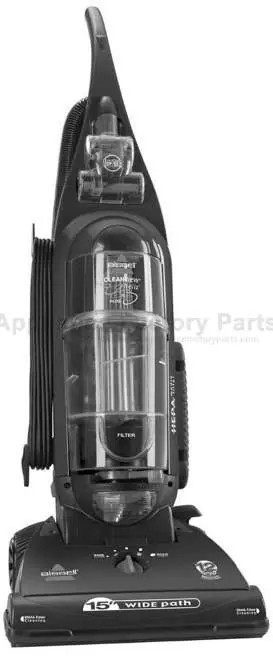
User Manual for Bissell 22C1 Cleanview Helix Vacuum Cleaner
Quick guide for the Bissell 22C1 Cleanview Helix vacuum cleaner. Includes assembly, operation, maintenance, filter cleaning, and troubleshooting steps.
Quick answers from the manual
Quick answer
- The Bissell 22C1 Cleanview Helix is an upright vacuum cleaner. This manual covers assembly, operation, maintenance (including filter and belt replacement), and troubleshooting. p. 2
Key actions
- Empty dirt container p. 10
- Clean filters p. 10, 11
- Replace drive belt p. 12
First start
- Assemble the handle to the vacuum body using the provided screw. p. 6
- Attach the hose and tools. p. 6
Show 3 more answers Show less
Problems and fixes
Vacuum cleaner won't turn on
Check electrical plug, fuse, or breaker.
p. 14
Vacuum cleaner won't pick up dirt
Adjust height, check hose, check belt, empty container, clean filters.
p. 14Technical specifications
| Parameter | Value | Meaning | Pages |
|---|---|---|---|
| Replacement Belt | Style 9 (#32074) | Required replacement belt for this model. | p. 12, 16 |
| HEPA Filter | Style 7/9/16 (#32076) | Required replacement HEPA media filter. | p. 11, 16 |
Where to find it in the PDF
- Safety Instructions p. 4
- Assembly p. 6
- Maintenance p. 9, 10, 11, 12
Table of contents
Manual images
Click an image to enlargeQuick Guide
The Bissell 22C1 Cleanview Helix is an upright vacuum cleaner designed for home use. This guide provides essential information for assembly, operation, and maintenance to ensure optimal performance.
Assembly
The only tool required for assembly is a Phillips head screwdriver.
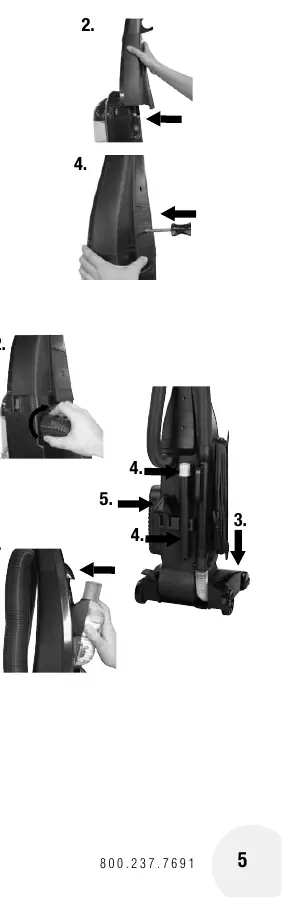
- Attach handle: Remove the screw packet from the handle base. Slide the handle into the grooves at the top of the vacuum body. Ensure it is flush, then secure with the provided screw.
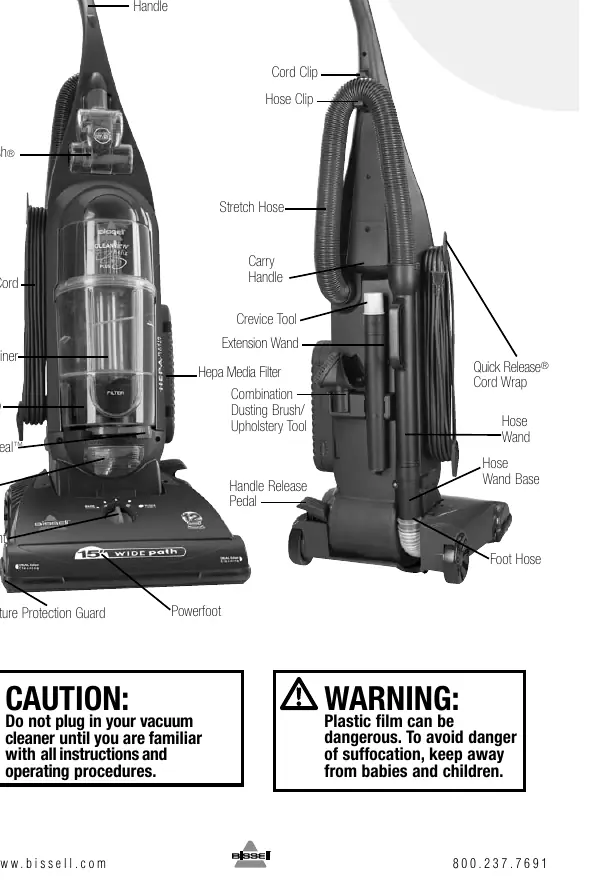
- Attach hose and tools: Line up the Twist 'n Snap hose tabs with the notches on the back of the vacuum and turn to lock. Attach the hose wand to the base. Snap the extension wand, crevice tool, and combination tool into their storage clips. Attach the TurboBrush by aligning the holes with the tabs on the brush housing.
Operation
The vacuum features three handle positions: Upright (storage/tools), Normal cleaning, and Low cleaning (under furniture). Use the handle release pedal to switch positions.
Height Adjustment
The Powerfoot can be adjusted for different floor surfaces. For optimal performance, use the lowest practical setting. Turn the height adjustment knob to the desired setting: Lowest for bare floors, Medium for short/medium pile carpets, and Highest for plush pile carpets.
Special Tools
The vacuum includes a crevice tool for tight spaces, a combination dusting brush/upholstery tool, and an extension wand. To use, lift the hose wand from the suction intake and attach the desired tool.
Maintenance and Care
To maintain performance, perform the following maintenance:
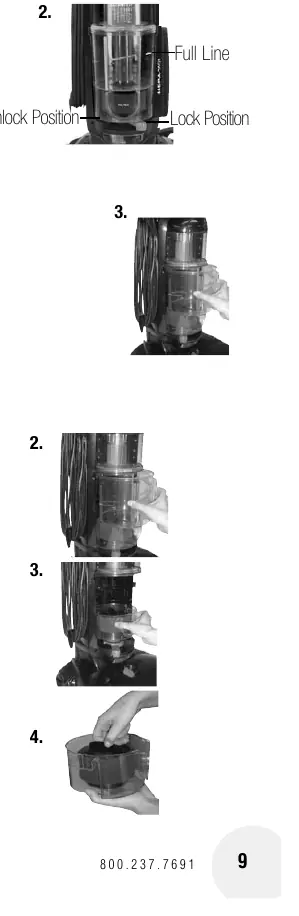
- Empty Dirt Container: Empty when dirt reaches the "Full" line.
- Filters: Check inner/outer circular filters and pre-motor filter monthly. Wash in warm water with mild detergent and air dry completely before replacing. Replace the post-motor filter every six months.
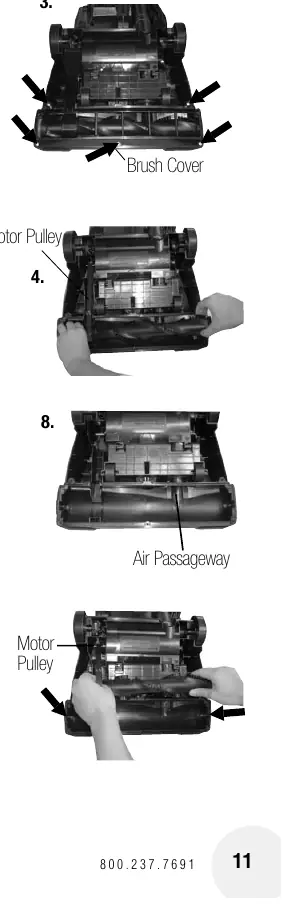
- Brush and Belt: Regularly check the rotating floor brush and drive belt for wear or debris. Remove the brush cover to clean hair and strings from the brush and motor pulley.
- Clogs: If suction is low, check the dirt container, upper tank, suction inlet, and hose for blockages.
Troubleshooting
If the vacuum does not turn on, check the power cord, fuse, or breaker. If it does not pick up dirt, check the height adjustment, hose connection, dirt container, filters, and drive belt. If the vacuum is difficult to push, adjust the height setting.
Manufacturer information
Bissell Inc.
Practical help
Common problems
Vacuum cleaner won't turn on
Check that the power cord is plugged in and verify the fuse or circuit breaker.
Vacuum cleaner won't pick up dirt
Adjust height setting, ensure hose is attached, check for clogs, empty dirt container, or clean/replace filters and drive belt.
Vacuum cleaner is difficult to push
Adjust the powerfoot height setting to a higher position.
Before use
- Ensure the dirt container is locked in position.
- Verify all filters (inner circular, outer circular, pre-motor, and post-motor) are in place.
- Ensure the handle is securely attached.
- Check that the hose is properly connected to the suction opening.
Show more Show less
Specs in practice
- Height Adjustment
- Allows the vacuum to be used on different floor types, from bare floors to plush carpets.
- Air Flow Indicator
- Green indicates normal airflow; red indicates a clog or significantly reduced airflow.
Images and diagrams
- Assembly steps for the handle and hose.
- Process for emptying the dirt container.
- Steps for cleaning filters and accessing the brush roll.
Model compatibility
- Use only genuine Bissell style 9 replacement belts (#32074).
- Use only genuine Bissell style 9 (#32076) or style 16 filters.

Manual page author
David Miller
Documentation analyst