Power / Batteries & Chargers
User Manual for BlueBuilt 10000mAh Power Bank
Quick start guide and safety instructions for the BlueBuilt 10000mAh Power Bank. Learn how to charge your devices, recharge the power bank, and check battery levels.
Quick answers from the manual
Quick answer
- This guide explains how to charge your devices using the power bank, how to recharge the power bank itself, and how to check the remaining battery level. p. 1
Key actions
- Charge a device by connecting it to the USB A port. p. 1
- Charge the power bank by connecting it via the USB C port. p. 1
- Check the battery level by touching the button on the side once. p. 1
First start
- The power bank turns on automatically when you connect a device and turns off automatically when you disconnect it. p. 1
Technical specifications
| Parameter | Value | Meaning | Pages |
|---|---|---|---|
| Capacity | 10000mAh | Battery capacity | p. 1 |
| Charging time (1A) | 10H | Time to charge power bank at 1A | p. 1 |
| Charging time (2A) | 5H | Time to charge power bank at 2A | p. 1 |
Where to find it in the PDF
- Operating instructions and diagrams p. 1
- Safety instructions and disposal p. 2
Table of contents
Manual images
Click an image to enlargeQuick Start Guide
The BlueBuilt 10000mAh Power Bank is designed for simplicity. Please note that the button on the side is not an on/off switch. The power bank turns on automatically when you connect a device and turns off automatically when you disconnect it.
Charging Your Devices
To charge your phone, tablet, or other mobile devices:
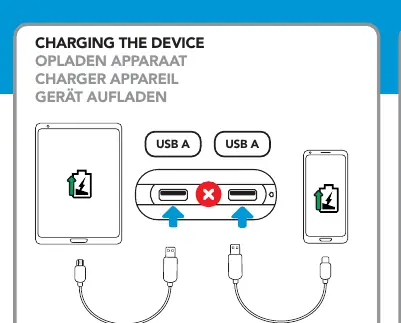
- Connect your device's charging cable to one of the USB-A output ports on the power bank.
- The power bank will automatically detect the connection and begin charging.
- Disconnect the cable when charging is complete to turn off the power bank.
Charging the Power Bank
To recharge the power bank itself:
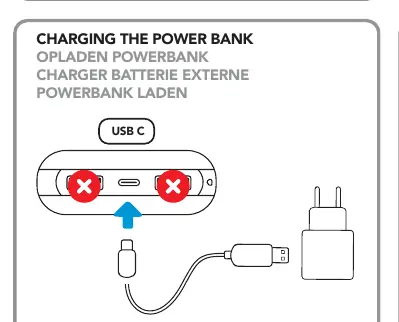
- Use the USB-C input port located on the power bank.
- Connect the power bank to a power source using a compatible USB-C cable.
Battery Level Indication
To check the remaining battery level:
- Touch the button on the side of the power bank once.
- The LED lights will illuminate to indicate the current charge level.
- The lights will automatically switch off after 30 seconds.
Charging Performance
The charging time for the power bank depends on the power adapter used:
- 1A (Ampere) charger: Approximately 10 hours for a full charge.
- 2A (Ampere) charger: Approximately 5 hours for a full charge.
The power bank capacity allows for approximately 2-3 full charges for a standard smartphone or 1 full charge for a tablet.
Safety Instructions
For your safety and to ensure the longevity of the device, please adhere to the following guidelines:
- Do not expose the power bank to excessive heat, such as direct sunlight or fire. Avoid abrupt temperature changes.
- Do not use or store the device in damp or wet environments.
- Do not use near explosive gases or flammable materials.
- Do not burn or incinerate the unit.
- Avoid contact with battery chemicals.
- Do not throw, shake, vibrate, drop, crush, or mechanically abuse the device.
- Do not cover the power bank with objects that may affect heat dissipation.
- Only use the included cables or cables provided with your device.
- Disconnect the device when not in use. Do not charge or discharge unattended.
- Keep out of reach of children.
Manufacturer information
BlueBuilt
Practical help
Common problems
Power bank does not turn on
The power bank does not have a manual power switch. It turns on automatically when a device is connected. Ensure your cable is securely plugged into the USB-A port.
Battery lights turn off quickly
This is normal behavior. The battery level indicator lights automatically turn off after 30 seconds to save power.
Before use
- Check the battery level by pressing the side button once.
- Ensure you have a compatible USB-A cable for charging your devices.
- Ensure you have a compatible USB-C cable for recharging the power bank.
- Verify the power adapter output (1A or 2A) to estimate charging time.
Images and diagrams
- The side button is strictly for checking battery status, not for power control.
- USB-A ports are for output (charging your devices).
- USB-C port is for input (charging the power bank).
Model compatibility
- Charging capacity is approximately 2-3 times for a smartphone and 1 time for a tablet.

Manual page author
David Miller
Documentation analyst
Organizes user manual content into clear summaries, with attention to model details, product context, and everyday usability.