Power / Car Chargers
User Guide for BlueBuilt USB-A Charger QC 18W
Quick guide for the BlueBuilt USB-A Charger QC 18W (model BBTL18Z). Learn about charging speeds, safety precautions, and technical specifications.
Quick answers from the manual
Quick answer
- The BlueBuilt USB-A Charger QC 18W is a universal power adapter supporting Quick Charge technology with a maximum output of 18W. p. 1
Key actions
- Plug the charger into a wall socket and connect your device via a USB cable. p. 1
Problems and fixes
Charger damaged
Do not use the product if the AC adapter, cable, or mains cable are damaged.
p. 2, 3Maintenance and reset
- Disconnect from power supply before cleaning or long-term storage. p. 2, 3
Technical specifications
| Parameter | Value | Meaning | Pages |
|---|---|---|---|
| Input Voltage | 100-240V | Universal input voltage | p. 2, 3 |
| Max Output Power | 18W | Maximum power delivery | p. 2, 3 |
Where to find it in the PDF
- Product Overview and Charging p. 1
- Safety and Technical Specs (EN/NL) p. 2
- Safety and Technical Specs (FR/DE) p. 3
Table of contents
Quick guide from the manual
The BlueBuilt USB-A Charger QC 18W is a compact power adapter designed for fast charging of mobile devices. It supports Quick Charge technology, providing up to 18W of power. The charger is compatible with worldwide mains voltages (100-240V).
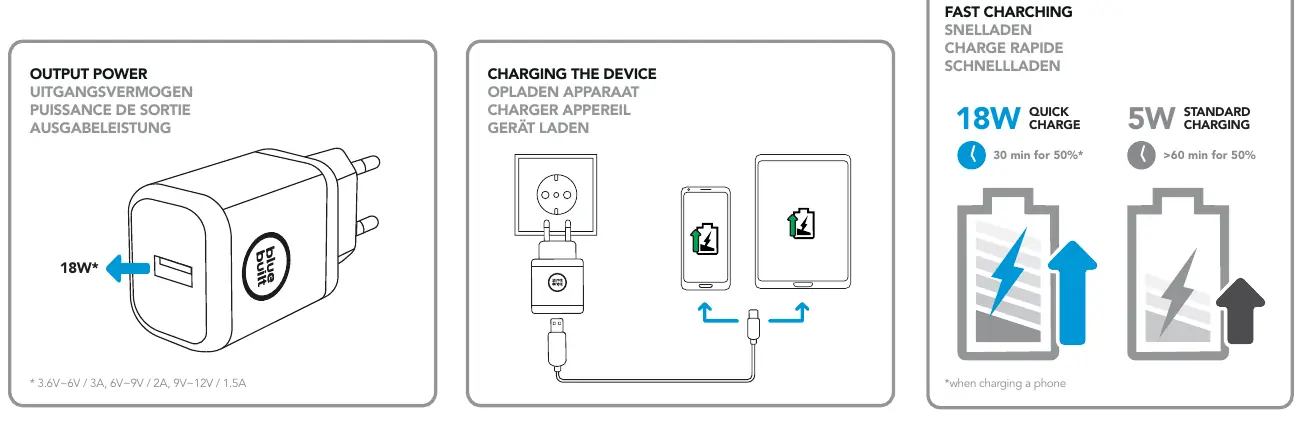
Charging the device
To charge your device:
- Plug the charger into a standard wall socket.
- Connect your device to the charger using a compatible USB-A cable.
- The charger will automatically adjust the output power based on the connected device's requirements.
Note: Quick Charge provides faster charging (e.g., 50% in 30 minutes) compared to standard 5W charging, depending on the device's capabilities.
Safety instructions
- Indoor use only: Use the product only in dry, indoor environments.
- Do not modify: Do not open the device or attempt to repair it yourself. Any modification voids the warranty.
- Power limits: Ensure the connected device does not exceed 18W power consumption.
- Maintenance: Disconnect the charger from the power supply before cleaning or if it will not be used for a long period.
- Environment: Keep out of reach of children and avoid using near heat sources or in direct sunlight.
Technical specifications
The charger operates on a mains voltage of 100-240V (50/60Hz). The output power varies based on the voltage: DC 3.6V-6V/3A, 6V-9V/2A, or 9V-12V/1.5A, with a maximum of 18W.
Manufacturer information
BlueBuilt
Practical help
Common problems
Device charges slowly
Ensure you are using a high-quality cable and that your device supports Quick Charge technology.
Charger not working
Check if the wall socket is live and the cable is securely connected to both the charger and the device.
Before use
- Check that the wall socket is compatible with the plug type.
- Verify that your device's power requirement does not exceed 18W.
- Ensure the environment is dry and moderate.
- Inspect the charger and cable for any visible damage before use.
Images and diagrams
- The charger features a single USB-A port.
- The charging process involves connecting the charger to a wall outlet and then connecting the device via a USB cable.
Model compatibility
- The charger is suitable for devices requiring up to 18W.
- Quick Charge performance depends on the connected device's specifications.

Manual page author
Michael Turner
Technical manual editor
Reviews PDF manuals for structure, safety notes, and practical product details so readers can find the right information quickly.