Power / USB Chargers
User Manual for BlueBuilt Dual USB-A Car Charger QC 18W
Quick guide for the BlueBuilt Dual USB-A Car Charger QC 18W. Learn how to connect your devices, understand charging speeds, and follow safety guidelines for optimal use in your vehicle.
Quick answers from the manual
Quick answer
- The BlueBuilt Dual USB-A Car Charger provides a total output of 36W, with 18W available per port for fast charging. It is compatible with 12V and 24V vehicle electrical systems. p. 1
Key actions
- Disconnect the charger from the power supply when not in use to prevent car battery discharge. p. 2
Technical specifications
| Parameter | Value | Meaning | Pages |
|---|---|---|---|
| Input voltage | 12V, 24V | Vehicle electrical system compatibility | p. 2 |
| Output power total | 36W | Maximum combined power | p. 2 |
Where to find it in the PDF
- Product Overview and Charging p. 1
- Safety Instructions and Specifications p. 2
Table of contents
Manual images
Click an image to enlargeQuick guide from the manual
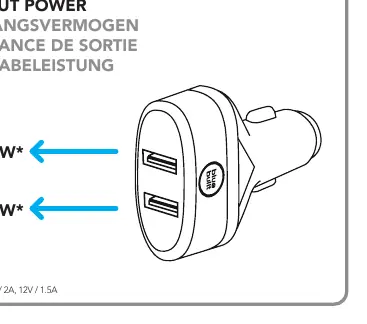
The BlueBuilt Dual USB-A Car Charger QC 18W is designed for use in vehicles with 12V or 24V electrical systems. It features two USB-A ports, each capable of delivering up to 18W of power, with a total combined output of 36W. Always ensure the total power consumption of your connected devices does not exceed this limit.
Charging your device
To charge your device, follow these steps:
- Connect your device to the charger using a suitable USB cable.
- Plug the charger into the vehicle's power socket.
- Monitor the charging progress directly on your device's screen.
- Once charging is complete or if you wish to interrupt it, disconnect the device from the charger first, then remove the charger from the vehicle's power socket.
Safety instructions
To ensure safe operation and prevent damage to your vehicle or device, observe the following precautions:
- Do not open or repair: Do not attempt to service the device yourself. If damaged, stop using it immediately.
- Vehicle battery protection: In some vehicles, power is supplied even when the ignition is off. Disconnect the charger when not in use to prevent draining your car battery.
- Environmental conditions: Use the charger only in dry environments. Keep it away from moisture, dirt, and extreme heat.
- Usage restrictions: Keep out of reach of children. Do not use the charger if it obstructs vehicle controls, airbags, or visibility.
Technical specifications
The charger operates within the following parameters:
- Input voltage: 12V, 24V
- Output per port: 5.0V/3.0A (15W), 9.0V/2.0A (18W), 12.0V/1.5A (18W)
- Total output power: 36W
- Ambient temperature: 0°C – 40°C
Manufacturer information
BlueBuilt
Practical help
Common problems
Device not charging
Check the USB cable connection and ensure the charger is firmly inserted into the vehicle's power socket. Verify if your vehicle requires the ignition to be on for the socket to provide power.
Slow charging
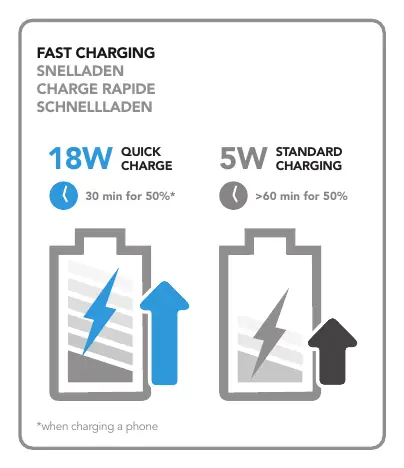
Ensure your device supports Quick Charge technology and that you are using a high-quality, compatible USB cable.
Before use
- Check if your vehicle socket is 12V or 24V.
- Ensure the total power of connected devices does not exceed 36W.
- Inspect the charger and cables for visible damage before use.
- Ensure the charger does not obstruct vehicle controls or visibility.
Specs in practice
- 12V/24V Input
- Compatible with standard car and truck electrical systems.
Images and diagrams
- The diagram illustrates the dual USB-A ports and the connection to the vehicle's power socket.
- The charging speed chart compares Quick Charge (18W) vs Standard Charging (5W), showing 50% charge time differences.
Model compatibility
- Suitable for 12V and 24V vehicle electrical systems.
- Compatible with devices requiring USB-A charging.

Manual page author
David Miller
Documentation analyst
Organizes user manual content into clear summaries, with attention to model details, product context, and everyday usability.