Tools / Power Tools
User Manual for Bosch GWB 12V-10 Professional Angle Drill/Driver
Quick guide for the Bosch GWB 12V-10 Professional angle drill/driver. Includes setup, operation, maintenance, and safety instructions.
Table of contents
Manual images
Click an image to enlargeQuick guide from the manual
The Bosch GWB 12V-10 Professional is a cordless angle drill/driver designed for drilling and screwdriving in tight spaces. Before first use, ensure the battery is fully charged. The tool features a 5-position adjustable drill head for hard-to-reach areas, an integrated LED light, and an auto-lock spindle for easy tool changes.
Product Description
The tool consists of a motor unit with an adjustable head, a keyless chuck for tool mounting, and a handle with an integrated battery compartment. Key features include:
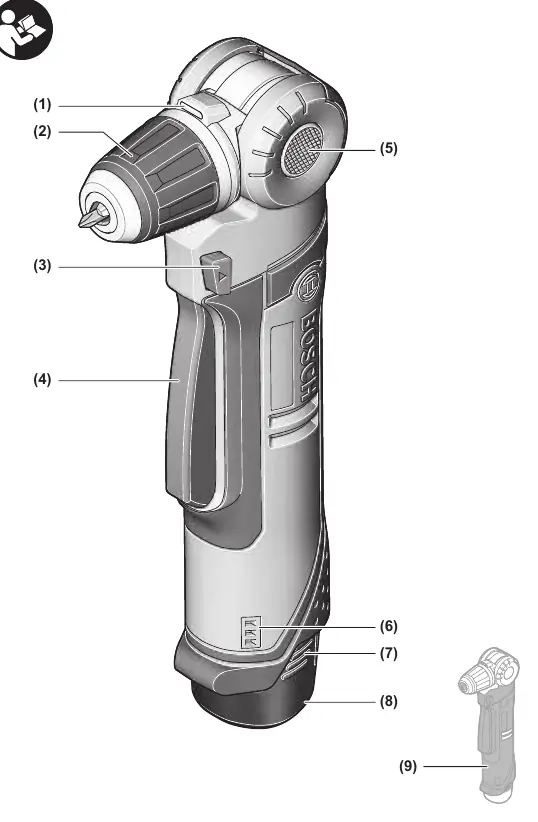
- Power Light: Integrated LED for illuminating the work area.
- Keyless Chuck: For quick and easy tool changes.
- Adjustable Drill Head: Can be locked in 5 different angle positions.
- Auto-Lock: Automatic spindle lock when the on/off switch is not pressed.
Assembly and Operation
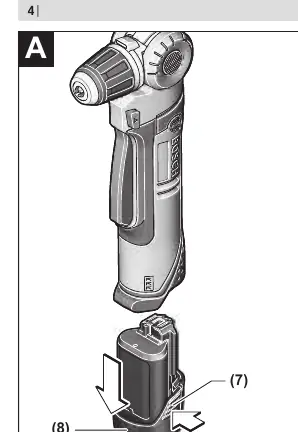
Battery Charging
Use only the chargers listed in the technical data. The battery is supplied partially charged. To ensure full performance, charge the battery completely before first use.
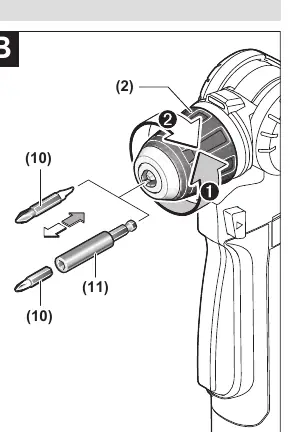
Changing the Tool
The drill spindle is locked when the on/off switch is not pressed. Open the keyless chuck by turning it in the direction of rotation until the tool can be inserted. Insert the tool and firmly tighten the chuck by hand.
Adjusting the Drill Head
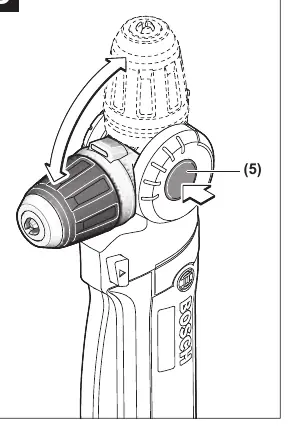
The drill head can be locked in 5 different angle positions. Press the release button and swivel the tool head to the required position. Release the button to lock it in place. Always check that the head is locked before starting operation.
Operation
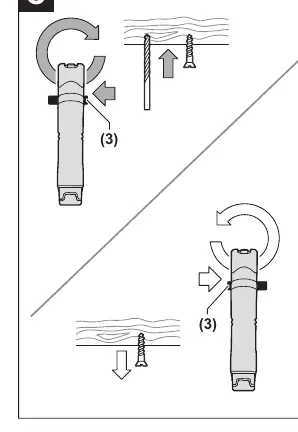
Use the rotational direction switch to change the direction of rotation. Press the on/off switch to start the tool. The speed can be regulated steplessly by varying the pressure on the on/off switch. The tool features a run-out brake to prevent the tool from continuing to rotate after the switch is released.
Maintenance and Cleaning
Remove the battery before any work on the tool (e.g., maintenance, tool change, transport, or storage). Keep the tool and ventilation slots clean for safe and efficient operation.
Safety
Always wear personal protective equipment, including eye protection. Do not operate the tool in explosive atmospheres. Keep children and bystanders away while operating. If the tool blocks, switch it off immediately to avoid high reaction torques.
Manufacturer information
Bosch
Practical help
Common problems
Tool does not start
Check if the battery is charged and correctly inserted. Ensure the rotational direction switch is not in the middle position.
Tool stops during operation
Overload protection or battery temperature is too high. Wait for the tool to cool down.
Drill bit slips in chuck
Ensure the keyless chuck is tightened firmly by hand.
Before use
- Charge the battery fully
- Check that the drill bit is sharp and undamaged
- Ensure the drill head is locked in the desired angle position
- Check the rotational direction switch setting
Specs in practice
- 0-1300 min-1
- No-load speed range.
Images and diagrams
- Figure A: Battery insertion and removal
- Figure B: Changing the tool in the keyless chuck
- Figure C: Setting the rotational direction
- Figure D: Adjusting the angle of the drill head
Model compatibility
- Use only original Bosch Li-ion batteries
- Use only recommended chargers (GAL 12..., GAX 18...)

Manual page author
Emily Carter
User documentation editor
Prepares concise manual descriptions and highlights the most useful setup, operation, and maintenance information for readers.