Tools / Power Tools
Bosch PSM 80 A / PSM 100 A Multi Sander User Manual
Quick guide for the Bosch PSM 80 A and PSM 100 A multi sander. Includes assembly, dust extraction, sanding sheet replacement, and operation instructions.
Table of contents
Manual images
Click an image to enlargeQuick guide from the manual
The Bosch PSM 80 A and PSM 100 A are multi sanders designed for dry sanding and polishing of wood, filler, and varnished surfaces. They are particularly suitable for profiles, corners, and hard-to-reach areas.
- Safety: Always wear eye protection and a dust mask (P2 class recommended). Disconnect the power plug before any work on the tool.
- Dust Extraction: Use the provided dust box for self-extraction or connect a vacuum cleaner using the appropriate adapter.
- Sanding Sheets: Ensure both sanding sheets are mounted and have the same grit.
Product description
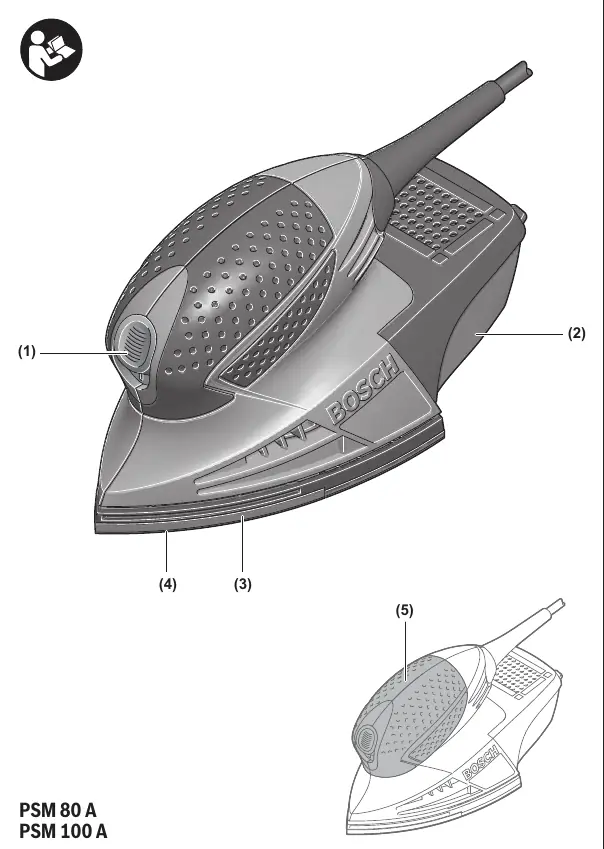
The tool features an on/off switch, a dust box with a microfilter system, a sanding plate, and an extraction outlet. The handle is insulated for a secure grip.
Assembly and dust extraction
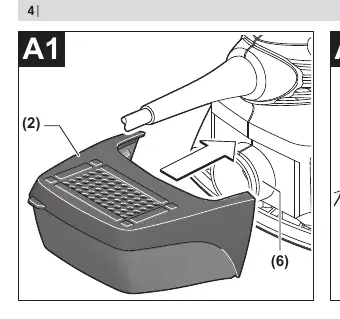
Self-generated dust extraction: Place the dust box onto the extraction outlet until it clicks into place. To empty, pull the dust box downwards. Before opening, tap the box against a firm surface to loosen dust from the filter element.
External dust extraction: Connect the dust extraction adapter to an extraction hose and then to the tool's extraction outlet. Connect the other end of the hose to a vacuum cleaner.
Changing the sanding sheet
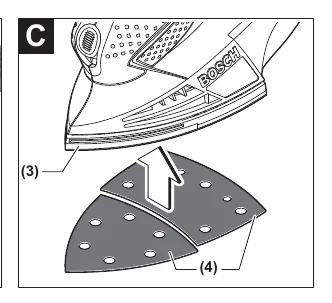
The sanding plate is equipped with a hook-and-loop fastening system. Before attaching a new sheet, remove dust from the sanding plate with a brush. Ensure the holes in the sanding sheet align with the holes in the sanding plate for optimal dust extraction. To remove, pull the sheet off by one of its corners.
Operation
Switching on/off: Slide the on/off switch forward to position '1' to turn the tool on, and backward to position '0' to turn it off.
Working advice: Apply consistent pressure to extend the life of the sanding sheets. Excessive pressure does not increase performance but causes faster wear. For corners and edges, you can use the tip or an edge of the sanding plate.
Maintenance and cleaning
Always keep the tool and ventilation slots clean for safe operation. If the power cord needs replacement, it must be done by Bosch or an authorized service center.
Technical data
- Rated power input: 80 W (PSM 80 A) / 100 W (PSM 100 A)
- No-load speed: 13,000 min-1
- No-load orbital stroke rate: 26,000 min-1
- Weight: 0.90 kg
Manufacturer information
Bosch
Practical help
Common problems
Poor dust collection
Check if the dust box is full, empty it. Ensure the holes in the sanding sheet align with the holes in the sanding plate.
Reduced sanding performance
Check if the sanding sheet is worn out. Replace with a new sheet of the same grit.
Tool overheating
Ensure ventilation slots are not blocked. Do not apply excessive pressure during sanding.
Before use
- Check that the mains voltage matches the rating plate.
- Ensure both sanding sheets are correctly mounted.
- Verify the dust box is securely clicked into place if using self-extraction.
- Ensure the switch is in the off position before plugging in.
Specs in practice
- Rated power input
- The power consumption of the tool (80W or 100W depending on model).
- No-load speed
- The rotational speed of the motor when not under load (13,000 min-1).
- Orbit diameter
- The size of the sanding orbit (1.4 mm), determining the sanding pattern.
Images and diagrams
- Page 3: Overview of components including switch, dust box, and sanding plate.
- Page 4: A1-A4: Instructions for attaching and emptying the dust box.
- Page 4: B: Instructions for connecting an external vacuum cleaner.
- Page 4: C: Instructions for replacing the sanding sheet.
Model compatibility
- Use only original Bosch sanding accessories.
- Do not use a sanding sheet previously used on metal for other materials.

Manual page author
David Miller
Documentation analyst
Organizes user manual content into clear summaries, with attention to model details, product context, and everyday usability.