Tools / Power Tools
Bosch IXO Cordless Screwdriver User Manual
Quick guide for the Bosch IXO cordless screwdriver. Learn about charging, bit replacement, using adapters, and safety instructions.
Table of contents
Manual images
Click an image to enlargeQuick guide from the manual
The Bosch IXO is a compact cordless screwdriver designed for driving and removing screws. Before using the tool for the first time, ensure the battery is fully charged. The tool features an automatic spindle lock (Auto-Lock) for manual use when the battery is low. Always ensure the tool is switched off before placing it on a screw or nut.
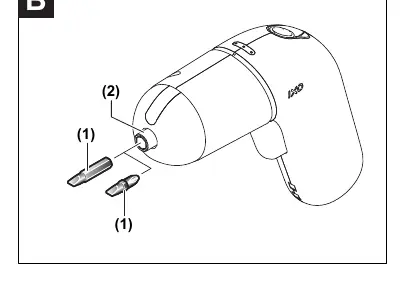
Device description
The device consists of the following main components:
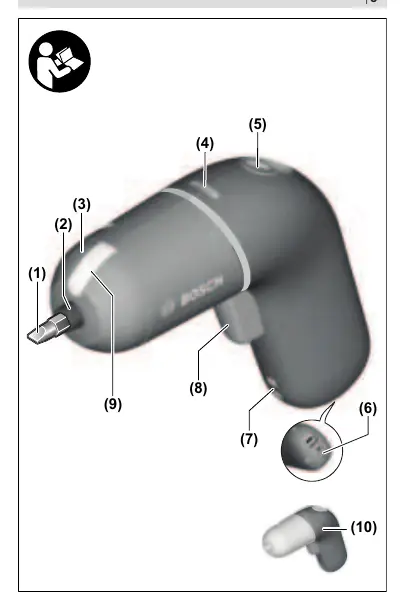
- (1) Screwdriver bit
- (2) Tool holder
- (3) Rubber cap
- (4) Battery charge indicator
- (5) Direction switch
- (8) On/Off switch
- (9) Work light
- (11) Micro USB port
- (12) Charging cable
- (13) Power adapter
- (14) Angle/Eccentric adapter (optional)
Charging
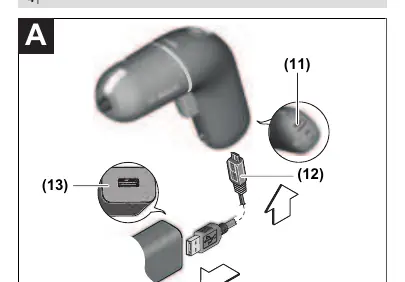
The battery is supplied partially charged. To ensure full capacity, charge the battery completely in the charger before first use. Connect the charging cable (12) to the port on the bottom of the handle and to the power adapter (13). Plug the power adapter into a mains socket. The battery charge indicator (4) will flash during the charging process. The handle may warm up during charging, which is normal.
Operation
Direction of rotation: Use the direction switch (5) to change the rotation. Push it forward for clockwise rotation (driving screws) and backward for counter-clockwise rotation (removing screws). This cannot be changed while the On/Off switch (8) is pressed.
On/Off: Press and hold the On/Off switch (8) to start the tool. The work light (9) illuminates when the switch is pressed. Release the switch to stop the tool.
Speed control: The speed is controlled by the pressure applied to the On/Off switch (8). Light pressure results in low speed; increased pressure increases the speed.
Adapters
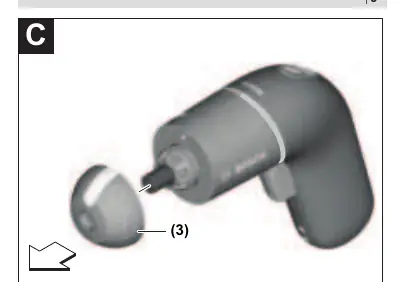
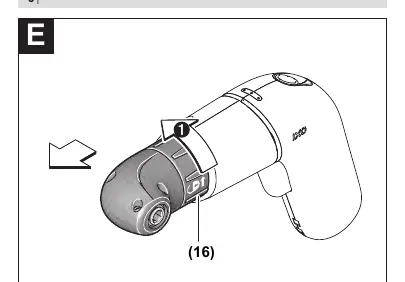
To mount an adapter, pull the rubber cap (3) forward. Attach the desired adapter (e.g., angle or eccentric adapter). Adapters can be mounted in 45° increments. To remove, turn the locking ring (16) and pull the adapter forward, then replace the rubber cap.
Maintenance and service
Keep the tool and ventilation slots clean for safe operation. If the battery fails, contact an authorized Bosch service center. Do not attempt to repair the battery yourself.
Manufacturer information
Bosch
Practical help
Common problems
Tool does not start during charging
This is normal; the tool cannot be used while it is connected to the charger.
Tool stops under heavy load
The tool is equipped with overload protection. Switch the tool off and on again to reset.
Handle warms up during charging
This is a normal phenomenon during the charging process.
Before use
- Charge the battery fully before the first use.
- Ensure the screwdriver bit is securely inserted into the tool holder.
- Check that the direction switch is set to the desired rotation.
- Verify the power adapter voltage matches your local supply.
- Ensure the work area is clean and well-lit.
Specs in practice
- Nominal voltage (3.6V)
- The operating voltage of the internal battery.
- No-load speed (0-215 min-1)
- The maximum rotational speed of the tool without resistance.
- Max torque (4.5/3.0 Nm)
- Maximum torque for hard/soft screw driving applications.
- Max screw diameter (5 mm)
- The largest screw size recommended for this tool.
Images and diagrams
- Page 3: Overview of the tool components.
- Page 4: Charging procedure (A) and bit insertion (B).
- Page 5-6: Attaching and removing adapters (C-F).
Model compatibility
- Not compatible with the grass shear adapter (1 600 A00 10D).

Manual page author
David Miller
Documentation analyst
Organizes user manual content into clear summaries, with attention to model details, product context, and everyday usability.