Tools / Power Tools
Bosch GO Professional Cordless Screwdriver User Manual
Quick guide for the Bosch GO Professional cordless screwdriver. Learn about charging, torque settings, operation, and maintenance.
Table of contents
Quick guide from the manual
The Bosch GO Professional is a cordless screwdriver designed for driving in and loosening screws. It features a compact design with a torque presetting ring and two methods for starting the tool.
Product features
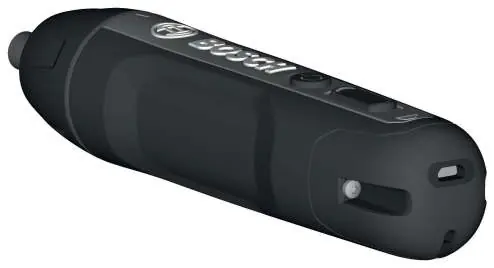
- (1) Screwdriver bit
- (2) Tool holder
- (3) Torque presetting ring
- (4) On/off switch
- (5) Rotational direction switch
- (6) Battery charge indicator
- (7) Micro USB port
- (8) Handle (insulated gripping surface)
- (9) USB cable
- (10) Power supply
Assembly and charging
The battery is supplied partially charged. Use the provided power supply and USB cable to fully charge the battery before first use. The battery charge indicator flashes green during charging and remains lit when fully charged. The tool cannot be used while charging.
Operation
Setting the rotational direction: Slide the rotational direction switch forward for clockwise rotation (driving in screws) and backward for anti-clockwise rotation (loosening screws). Do not operate this switch while the tool is running.
Locking the spindle: Set the rotational direction switch to the middle position to lock the spindle. This allows the tool to be used as a manual screwdriver even if the battery is discharged.
Preselecting the torque: Use the torque presetting ring to select one of six stages. Stage 1 provides lower torque for small screws or soft materials, while Stage 6 provides higher torque for larger screws or hard materials.
Switching on and off: There are two ways to start the tool: either by exerting pressure on the spindle or by pressing the on/off switch.
Maintenance and cleaning
Always keep the tool and ventilation slots clean for safe and efficient operation. If the battery fails, contact an authorized Bosch service agent. Do not attempt to repair the battery yourself.
Disposal
Power tools, batteries, accessories, and packaging should be sorted for environmentally friendly recycling. Do not dispose of these items in household waste.
Manufacturer information
Bosch
Practical help
Common problems
Tool does not start
Ensure the battery is charged or the rotational direction switch is not in the middle (locked) position.
Tool stops during operation
The tool may be overloaded or the battery temperature is too high. The electronics will switch it off until it cools down.
Before use
- Charge the battery fully before the first use.
- Ensure the rotational direction switch is in the middle position during transport.
- Check the tool for any visible damage.
- Select the appropriate screwdriver bit for your task.
Specs in practice
- No-load speed: 360 min-1
- The maximum rotation speed of the tool without any load.
- Max. torque: 5/2.5 Nm
- Maximum force for hard/soft screwdriving applications.
- Charging time: 1.5 h
- The time required to fully charge the battery.
Images and diagrams
- Figure A: Charging the tool using the USB cable and power supply.
- Figure B: Setting the rotational direction (forward for driving, backward for loosening).
- Figure C: Locking the spindle by setting the switch to the middle position.
Model compatibility
- Use only the specified power supply for charging.
- Do not use two-sided screwdriver blades longer than 25 mm.

Manual page author
Emily Carter
User documentation editor
Prepares concise manual descriptions and highlights the most useful setup, operation, and maintenance information for readers.