Electronics / Jobsite Audio
User Manual for Bosch GPB 18VH-6 SRC Construction Site Radio
Quick guide for the Bosch GPB 18VH-6 SRC construction site radio. Learn about power supply, audio modes (DAB+, FM, Bluetooth, AUX), charging features, and maintenance.
Table of contents
Manual images
Click an image to enlargeQuick guide from the manual
The Bosch GPB 18VH-6 SRC is a professional construction site radio designed for playing radio programs and audio signals from various sources. It also functions as a charger for Bosch Li-ion batteries and can charge external devices via a USB-C port.
Product Description
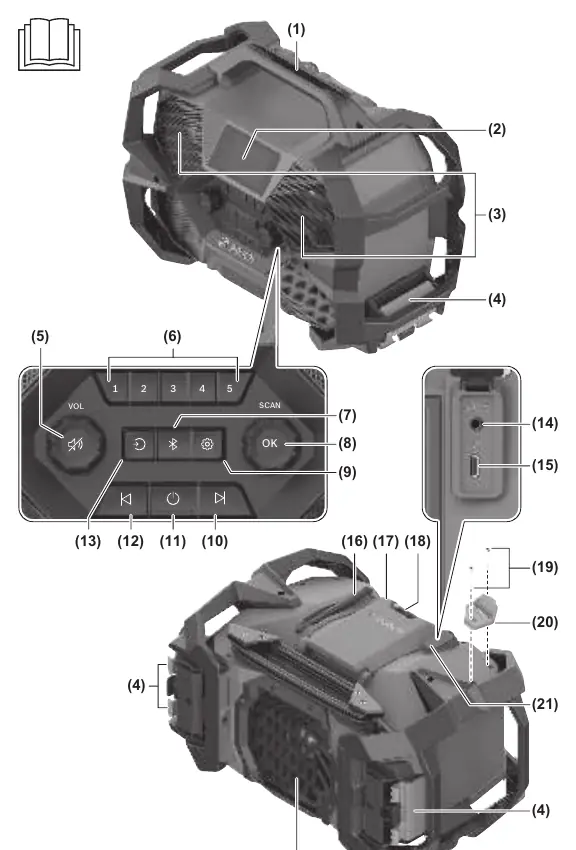
The radio features a carrying handle, a display, speakers, and various control buttons including volume, preset buttons, Bluetooth, and audio source selection. It includes an AUX port and a USB-C output port for charging external devices.
Power Supply
The radio can be powered by:
- Mains connection (220-240V).
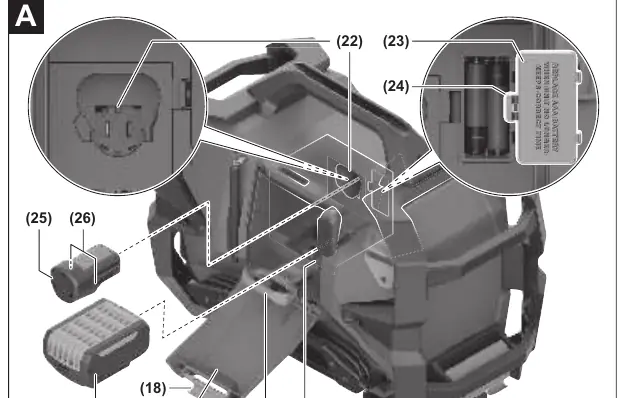
- Bosch 18V Li-ion batteries (GBA 18V/ProCORE18V) or AMPShare partner batteries.
- Bosch 12V Li-ion batteries (GBA 12V).
When connected to the mains, the radio automatically charges an inserted battery.
Assembly
Fitting the Bottle Opener
A bottle opener can be mounted on the radio using the provided screws.
Attaching the Radio to the L-BOXX
The radio can be attached to an L-BOXX by engaging the L-BOXX latches on both sides of the radio.
Audio Operation
Switching On and Off
Press the On/Off button to switch the radio on or off. The radio automatically switches off after 20 minutes if no connection is established or no playback is occurring.
Audio Sources
Select the audio source by pressing the audio source button. Available sources include:
- DAB+ (Digital radio)
- FM (Analogue radio)
- Bluetooth (External audio source)
- Multi-Speaker Stream (Streaming via Bluetooth)
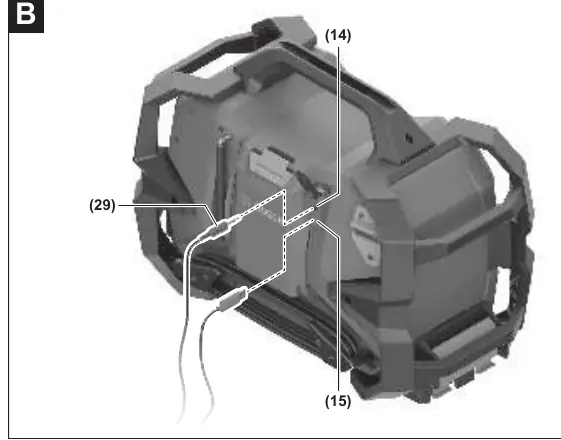
- AUX (External audio source via 3.5mm port)
Settings
Access the settings menu by pressing the settings button. You can adjust sound settings (Equalizer), time settings, display brightness, and view device information or perform a factory reset.
Charging Mode
Charging Li-Ion Batteries
Charging starts automatically when the radio is connected to the mains and a battery is inserted. The charging progress is shown on the battery charge indicator.
Charging External Devices
External devices can be charged via the USB-C port (max 1.5A). The radio must be switched on for this function.
Maintenance and Cleaning
Keep the radio clean for safe operation. Use a damp, soft cloth for cleaning. Do not use detergents or solvents.
Manufacturer information
Bosch
Practical help
Common problems
Radio does not charge battery
Ensure the battery is functional, fully inserted, and clean. Check the mains connection. Reset settings via Factory Reset. Ensure the temperature is within the charging range (0-45°C).
No DAB+ station found
Start the AutoScan function in the menu.
Time is not saved
Replace the backup AAA batteries.
Before use
- Check mains voltage
- Charge battery fully before first use
- Insert backup AAA batteries for time memory
- Ensure battery compartment and connector compartment covers are closed for IP54 protection
Specs in practice
- Multi-Speaker Stream
- Allows streaming audio to multiple compatible devices via Bluetooth.
- USB Output Type-C
- Provides up to 1.5A charging current for external devices.
Images and diagrams
- Figure A: Battery insertion and removal
- Figure B: AUX connection and USB charging
Model compatibility
- Compatible with Bosch 18V and 12V Li-ion batteries and AMPShare partner batteries.

Manual page author
Michael Turner
Technical manual editor
Reviews PDF manuals for structure, safety notes, and practical product details so readers can find the right information quickly.