Power / Power Inverters
Ridgid 18V Compact Radio Operator's Manual
Comprehensive operator's manual for the Ridgid 18V Compact Radio (R84086). This guide covers battery installation, Bluetooth pairing, radio tuning, preset management, and USB charging instructions.
Quick answers from the manual
Quick answer
- The Ridgid 18V Compact Radio (R84086) is a portable radio that supports AM/FM, Bluetooth streaming, and auxiliary input. It is powered by Ridgid 18V battery packs and includes a 1A USB charging port. p. 1, 5, 7
Key actions
- Pairing Bluetooth p. 7
- Setting Clock p. 6
- Storing Presets p. 6
First start
- Install two AAA batteries (pull tab) for memory, then install an 18V battery pack. p. 5
Problems and fixes
Radio won't turn on
Hold the ON/OFF/VOLUME knob for up to 3 seconds.
p. 6
Bluetooth pairing fails
Unpair all signals by holding the Bluetooth button for 3 seconds, then restart the process.
p. 7Maintenance and reset
- Clean with a dry cloth; avoid solvents. p. 2, 8
Technical specifications
| Parameter | Value | Meaning | Pages |
|---|---|---|---|
| USB Charging | 1 Amp | Charging power for USB devices. | p. 7 |
| Presets | 20 | Total memory locations (10 FM, 10 AM). | p. 6 |
Where to find it in the PDF
- Safety Instructions p. 2, 3
- Assembly and Operation p. 5, 6, 7, 8
- Diagrams p. 29
Table of contents
Quick guide from the manual
The Ridgid 18V Compact Radio (R84086) is designed for job site audio, featuring AM/FM radio, Bluetooth streaming, auxiliary input, and a 1A USB charging port. It operates on Ridgid 18V battery packs. Before first use, ensure you install the two AAA batteries (included) to maintain clock and memory settings.
Safety instructions
- Electrical Safety: Recharge battery packs only with the specified charger. Do not use damaged or modified batteries.
- Personal Safety: Do not use the radio near water or in explosive atmospheres. Avoid high volume levels to prevent hearing damage.
- General: Keep the radio dry, clean, and free from oil and grease. Do not use solvents for cleaning.
Assembly
Clock/Memory Batteries: Two AAA batteries are preinstalled. Remove the pull tab before first use. If replacing, you have a 15-second window to swap them without losing memory settings.
Battery Pack Installation: Align the ribs on the 18V battery pack with the grooves in the radio's battery port. Ensure the latches snap into place.
Operation
Radio Tuning
- Mode Selection: Press the MODE button to cycle through FM, AM, AUX, and Bluetooth modes.
- Tuning: Use the left/right arrow buttons to tune frequencies. Hold for 3 seconds to SEEK or SCAN.
- Presets: You can store up to 20 frequencies (10 FM, 10 AM). Tune to the desired station, then hold the PRESETS button for 3 seconds to save.
Bluetooth and Auxiliary
- Bluetooth: Press the Bluetooth button or cycle to Bluetooth mode. Select "STRM–RIDGID Mini Radio" on your device. Hold the Bluetooth button for 3 seconds to unpair.
- Auxiliary: Connect your device to the AUX jack using an auxiliary cable. The radio acts as an amplifier.
USB Charging
The USB port provides up to 1 Amp of charging power. It will continue to function for approximately 1 hour after the radio is turned off if a charged battery pack is connected.
Maintenance
Use only identical replacement parts for servicing. Clean plastic parts with a clean cloth; avoid commercial solvents which may damage the enclosure.
Manufacturer information
RIDGID
Practical help
Common problems
Radio will not turn on
Hold the ON/OFF/VOLUME knob for up to 3 seconds. If it still fails, check the 18V battery pack charge.
Bluetooth pairing fails
Unpair all signals by holding the Bluetooth button for 3 seconds, then restart the pairing process.
Radio settings/clock reset
The AAA memory batteries are likely dead or were not replaced within the 15-second window.
Before use
- Remove the pull tab from the AAA battery compartment.
- Ensure the 18V battery pack is fully charged.
- Check that the antenna is extended for better reception.
- Verify the radio is not in a damp or wet location.
Specs in practice
- USB Charging Port
- Provides 1 Amp of power for charging devices like phones or tablets.
- Memory Presets
- Allows saving up to 20 stations (10 FM, 10 AM).
- Bluetooth Mode
- Enables wireless audio streaming from compatible devices.
Images and diagrams
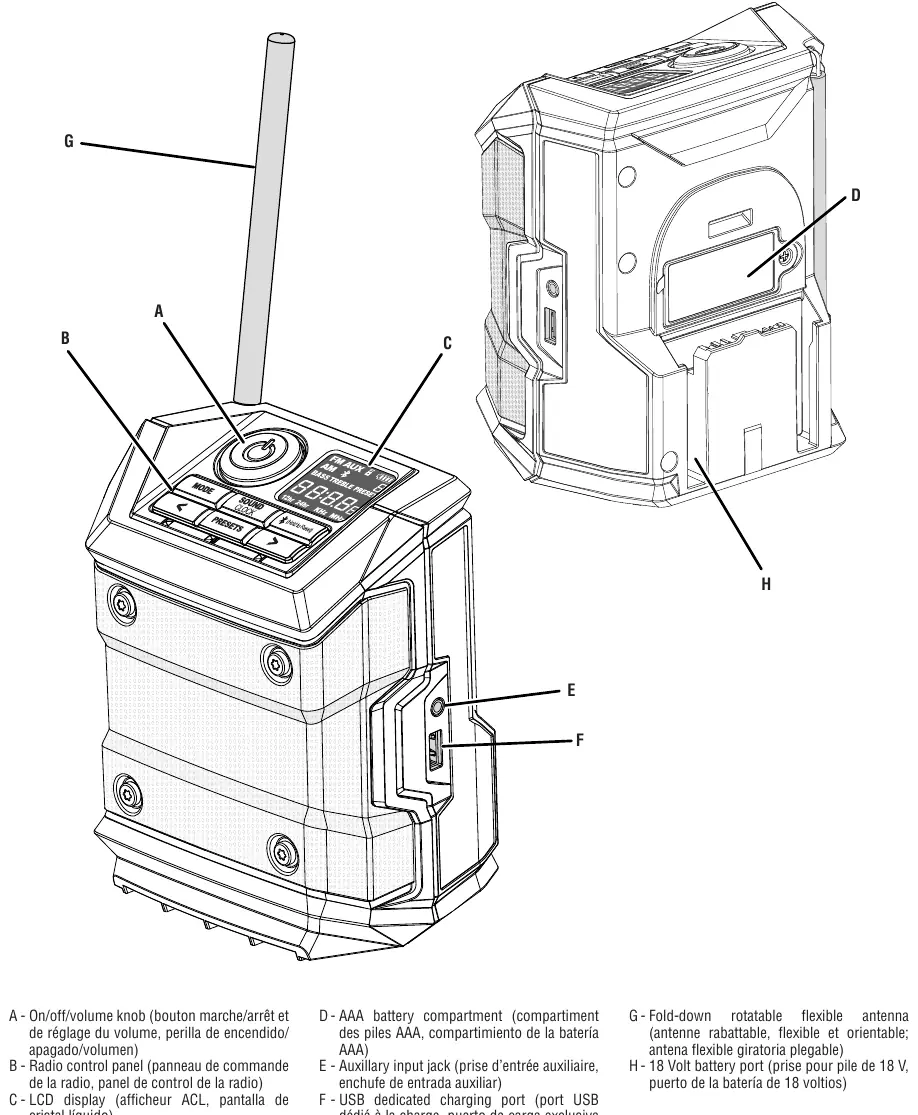
- Page 29 provides a comprehensive diagram of the radio, labeling the On/Off/Volume knob, control panel, LCD display, battery compartments, auxiliary jack, USB port, and antenna.
Model compatibility
- Compatible with Ridgid 18V lithium-ion battery packs.
- USB port is for charging only; it does not provide data communication.

Manual page author
David Miller
Documentation analyst
Organizes user manual content into clear summaries, with attention to model details, product context, and everyday usability.