Electronics / Jobsite Audio
Bosch GPB 18V-2 C / GPB 18V-2 SC Workplace Radio User Manual
Quick guide for the Bosch GPB 18V-2 C and GPB 18V-2 SC workplace radio. Includes setup, power supply options, radio station tuning, Bluetooth pairing, and maintenance instructions.
Table of contents
Manual images
Click an image to enlargeQuick guide from the manual
This guide provides essential information for operating the Bosch GPB 18V-2 C and GPB 18V-2 SC workplace radios. Always refer to the full manual for complete safety instructions and detailed technical specifications.
Device Description
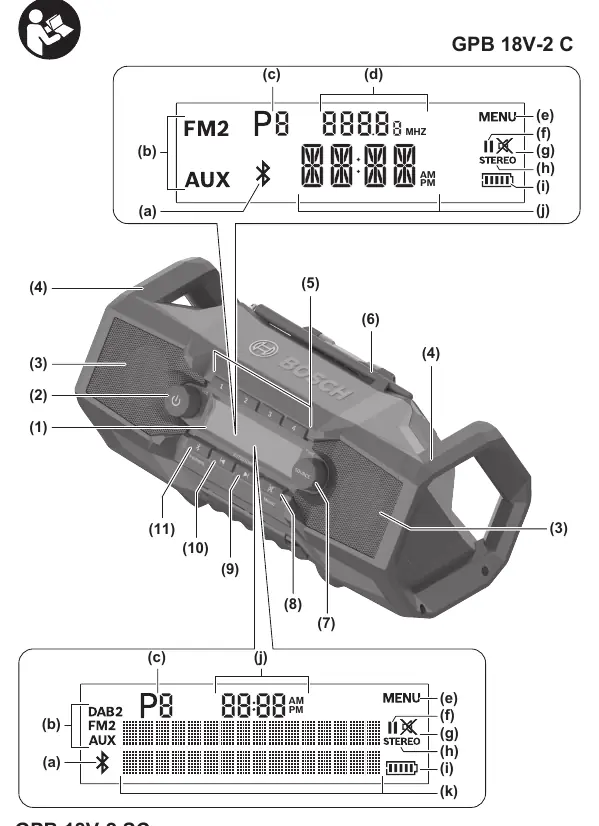
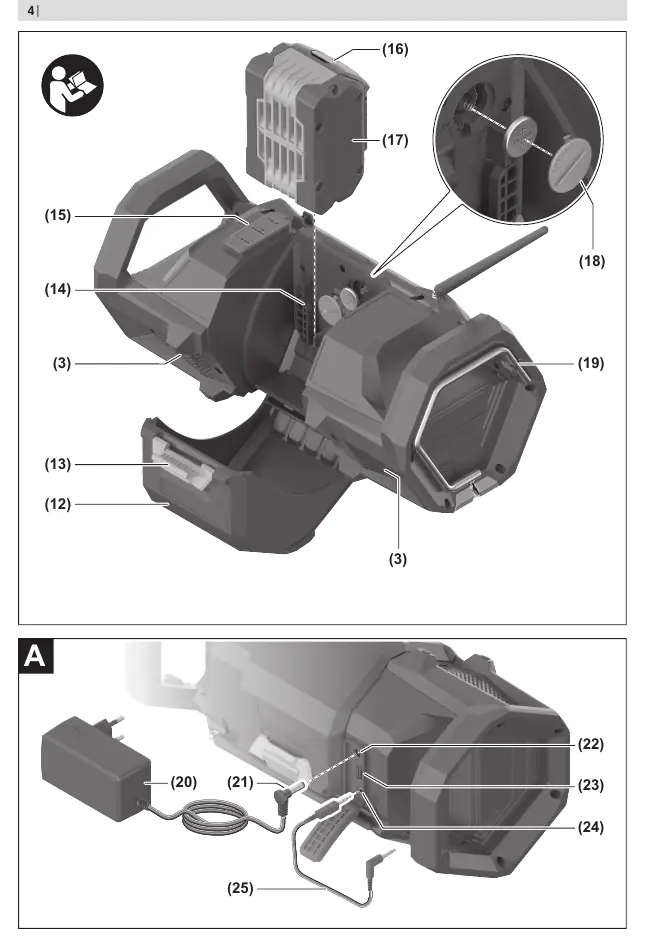
The radio features a display, on/off button, volume control, source button, preset buttons, and a rod antenna. The connector compartment houses the DC IN, USB charging, and AUX IN ports.
Power Supply
The radio can be powered by a Bosch 18V Li-ion battery or the included power supply. To insert a battery, open the battery cover, slide the battery into the holder until it engages, and close the cover. To use the power supply, open the connector compartment, insert the plug into the DC IN socket, and connect to the mains.
Operation
Press the on/off button to turn the radio on or off. Turn the button to adjust the volume. Press the Source button to cycle through audio sources: DAB/DAB2 (GPB 18V-2 SC only), FM/FM2, AUX, and Bluetooth.
Radio Station Tuning
For DAB+ (GPB 18V-2 SC) and FM stations, use the Source button to select the band. Use the seek buttons to find stations. To save a station, press and hold a preset button until the storage space number appears.
Bluetooth Operation
Press the Source button until the Bluetooth indicator appears or press the Bluetooth button. If the radio is in pairing mode, the indicator will flash. Select the radio on your smartphone's Bluetooth menu to connect. Once connected, the indicator will light up continuously.
True Wireless Stereo (TWS)
If playing audio via Bluetooth, you can use two radios as left and right speakers. Select the TWS menu option on both radios to assign them as left or right speakers.
Maintenance
Keep the radio and power supply clean. Wipe with a damp, soft cloth. Do not use detergents or solvents. Occasionally clean the battery ventilation slots with a soft, dry brush.
Manufacturer information
Bosch
Practical help
Common problems
Radio does not turn on
Check if the battery is charged or if the power supply is properly connected.
No sound
Check volume level or if mute is active.
Bluetooth connection fails
Ensure the radio is in pairing mode and the audio source is within range.
Before use
- Check radio, power supply, cable, and plug for damage.
- Ensure the battery is charged or the power supply is connected.
- Remove the protective strip from the button cell (back-up battery) before first use.
Specs in practice
- Amplifier output
- 2 x 7.5 W
- FM reception range
- 87.5-108 MHz
- DAB+ reception range
- 174.928-239.200 MHz (GPB 18V-2 SC only)
- Protection rating
- IP 54 (dust and splash-proof)
Images and diagrams
- The radio features a display, on/off button, volume control, source button, and preset buttons.
- The connector compartment houses the DC IN, USB charging, and AUX IN ports.
Model compatibility
- Compatible with Bosch 18V GBA and ProCORE18V batteries.

Manual page author
Michael Turner
Technical manual editor
Reviews PDF manuals for structure, safety notes, and practical product details so readers can find the right information quickly.