Tools / Saws
User Manual for Ryobi 18V Bluetooth Speaker PAD01
Quick guide for the Ryobi 18V Bluetooth Speaker (PAD01). Learn how to pair devices, use the USB charging port, install the battery, and maintain your speaker.
Quick answers from the manual
Quick answer
- The Ryobi PAD01 is an 18V Bluetooth speaker. It features a USB charging port, Bluetooth connectivity, and volume/track controls. p. 1, 7
Key actions
- Pairing via Bluetooth p. 7
- Charging USB devices p. 7
First start
- Install the battery pack, turn on the unit, and pair via Bluetooth. p. 6, 7
Problems and fixes
Speaker does not pair
Turn the power to the speaker off, wait 5 seconds, then turn the power back on and start the pairing process again.
p. 7Maintenance and reset
- Clean with a dry cloth; avoid solvents. p. 8
Technical specifications
| Parameter | Value | Meaning | Pages |
|---|---|---|---|
| USB Output | 5V DC, 2.1A | Charging power for USB devices. | p. 7 |
Where to find it in the PDF
- Safety Instructions p. 2, 3, 4
- Assembly and Operation p. 6, 7
- Illustrations p. 21, 22
Table of contents
Manual images
Click an image to enlargeQuick guide from the manual
The Ryobi PAD01 is an 18V Bluetooth speaker designed for streaming audio and charging USB devices. Always read the safety instructions before use. The speaker is not waterproof and should be kept away from water and extreme heat.
Assembly
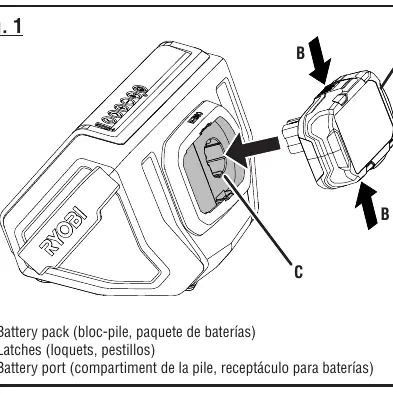
To install the battery pack, align the rib on the battery pack with the groove in the battery port and slide it in until the latches snap into place. To remove, depress the latches.
Operation
Bluetooth Pairing
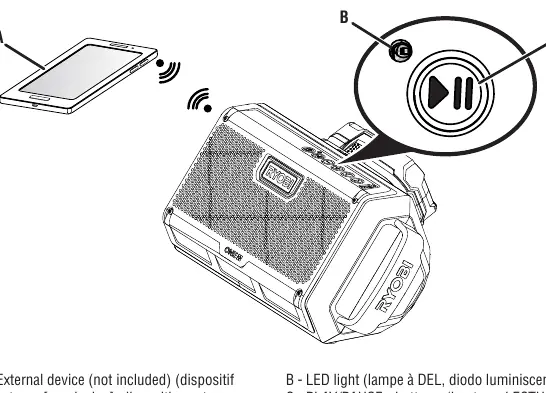
Turn on the speaker. It will automatically attempt to connect to the last paired device. If no device is paired, the LED will flash. Select RYOBI PAD01 from your device's Bluetooth menu. No PIN is required. For best results, keep the device within 50 ft of the speaker.
Controls
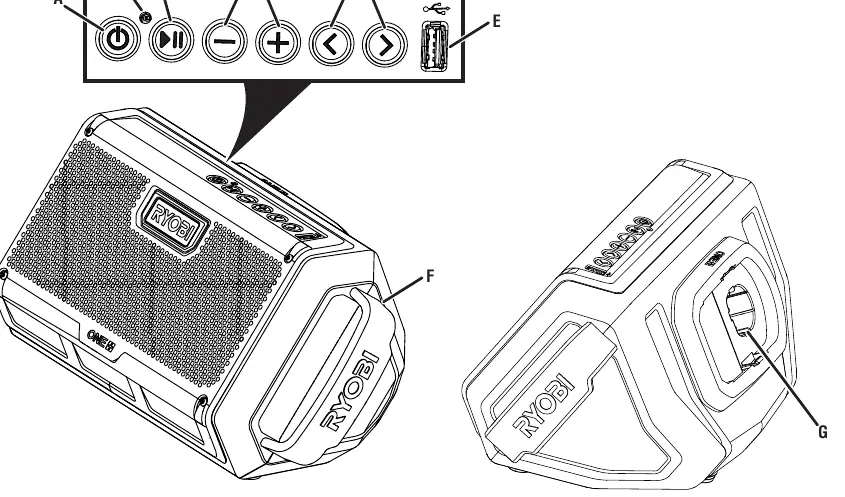
- Power: On/Off button.
- Play/Pause: Press to play or pause. Hold for 3 seconds to disconnect Bluetooth.
- Volume: Use VOL + and VOL - buttons.
- Scan: Use arrow buttons to skip tracks.
USB Charging
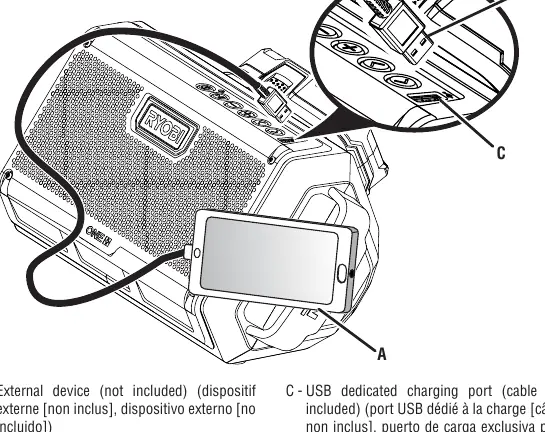
The speaker features a dedicated USB charging port (5V DC, 2.1A). Connect your USB cable to the port to charge devices. The speaker must be on to charge. Charging stops if no audio is streamed for two hours.
Maintenance
Clean plastic parts with a dry cloth. Avoid solvents as they can damage the plastic. Keep the unit dry and free from oil and grease.
Manufacturer information
Ryobi
Practical help
Common problems
Speaker won't pair with device
Turn off the speaker, wait 5 seconds, turn it back on, and restart the pairing process.
Battery drains quickly
Always disconnect the battery pack when the speaker is not in use.
USB charging stops
The speaker must be powered on to charge devices. Charging will stop if no audio is streamed for two hours.
Before use
- Ensure the battery pack is fully charged.
- Check that the speaker is not damaged or missing parts.
- Ensure the area is free of flammable liquids or gases.
- Keep the speaker away from water and damp locations.
Specs in practice
- Bluetooth Range
- Up to 50 ft (15.24 m) for optimal connection.
Images and diagrams
- Fig 1: Battery installation and removal.
- Fig 2: Control panel layout (Power, Play/Pause, Volume, Scan, USB).
- Fig 3: Bluetooth pairing process.
- Fig 4: USB charging port usage.
Model compatibility
- Compatible with Ryobi 18V battery packs.
- USB port is for charging only; it does not provide data communication.

Manual page author
Michael Turner
Technical manual editor
Reviews PDF manuals for structure, safety notes, and practical product details so readers can find the right information quickly.