Electronics / Jobsite Audio
Metabo HPT UR 18DA Cordless Radio Instruction Manual
Quick guide for the Metabo HPT UR 18DA Cordless Radio. Learn how to operate, charge the battery, connect via Bluetooth, and maintain your device safely.
Quick answers from the manual
Quick answer
- The UR 18DA is a cordless radio powered by a Metabo HPT 18V slide battery or the included AC adapter. It features FM/AM radio and Bluetooth connectivity. p. 10, 11
Key actions
- Install Battery p. 12
- Connect AC Adapter p. 12
- Pair Bluetooth p. 15
First start
- Charge the battery fully before first use. Insert battery or connect AC adapter, then press the power button. p. 6, 12, 15
Problems and fixes
Radio stops
Battery low or overloaded. Charge battery or remove overload.
p. 15
Pilot lamp flickers
Check for foreign objects in charger connector.
p. 15Maintenance and reset
- Regularly inspect mounting screws and keep terminals clean. p. 16
Technical specifications
| Parameter | Value | Meaning | Pages |
|---|---|---|---|
| Bluetooth | Ver. 4.2 | Bluetooth version | p. 11 |
| Weight | 4.0 lbs (1.8 kg) | Weight without battery | p. 11 |
Where to find it in the PDF
- Safety Instructions p. 2, 3, 4, 5
- Functional Description p. 10
- Specifications p. 11, 12
- Assembly and Operation p. 12, 13, 14, 15
Table of contents
Manual images
Click an image to enlargeQuick guide from the manual
The Metabo HPT UR 18DA is a cordless radio designed for use with Metabo HPT 18V slide batteries or the included AC adapter. This manual provides essential safety, operation, and maintenance instructions.
Functional Description
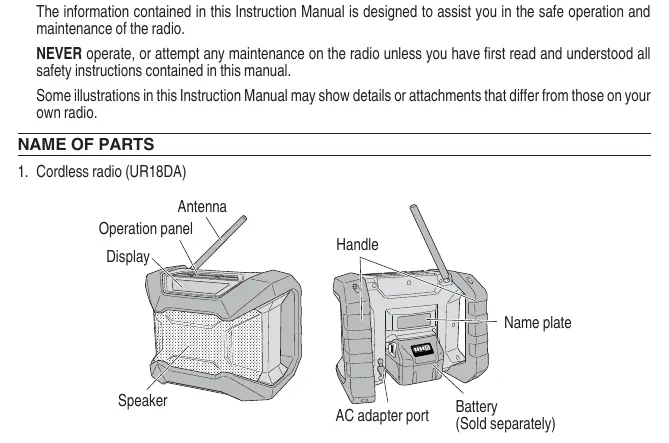
The radio features an operation panel with buttons for Power, Volume (+/-), Mode (FM/AM/Bluetooth), Channel selection, and Station saving. The display shows the current mode, frequency, battery level, and volume settings.
Assembly and Operation
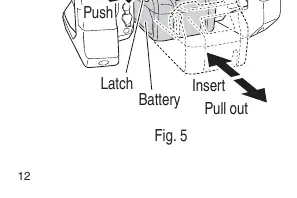
Battery Installation: Align the battery with the groove in the tool and slide it into place until it locks with a click. To remove, press the latch on the battery and pull it out.
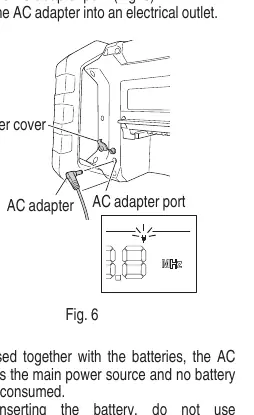
AC Adapter Installation: Pull back the rubber cover on the radio, connect the AC adapter to the port, and plug the adapter into a standard household outlet.
Using the Radio
- Switching On/Off: Press the power button.
- Volume: Use the '+' and '-' buttons.
- Mode Selection: Press the 'MODE' button to cycle between FM, AM, and Bluetooth (BT).
- Bluetooth Pairing: Select 'BT' mode. Activate Bluetooth on your smartphone and connect to 'UR18DA'.
- Radio Stations: Use the channel buttons to find a frequency. To save a station, press the 'STATION' button for a long time until the memory number blinks, then press it briefly to save.
Maintenance and Inspection
Regularly inspect mounting screws and tighten if loose. Keep the radio clean by wiping with a soft, dry cloth or a cloth dampened with soapy water. Do not use solvents like gasoline or paint thinner. Ensure terminals are free of dust and swarf to prevent malfunctions.
Practical help
Common problems
Radio stops working during use
The battery may be low or the unit is overloaded. Charge the battery or remove the cause of the overload.
Battery will not charge
Check for foreign objects in the charger connector. Ensure the battery is not overheated; let it cool before charging.
Bluetooth connection fails
Ensure the radio is in 'BT' mode and that your smartphone is searching for the device named 'UR18DA'.
Before use
- Ensure the battery is fully charged or the AC adapter is connected.
- Check that the AC adapter cord is not damaged.
- Verify the radio is placed on a stable, dry surface.
- Ensure battery terminals are free of dust and swarf.
- Read all safety instructions regarding battery and charger use.
Specs in practice
- Frequency Band
- FM: 87.5 to 107.9 MHz; AM: 530 to 1710 KHz.
Images and diagrams
- Fig 2: Overview of the operation panel, display, and parts.
- Fig 5: Correct method for installing and removing the battery.
- Fig 6: Connecting the AC adapter to the radio.
- Fig 7: Inserting the battery into the charger.
Model compatibility
- Use only Metabo HPT BSL36B18 battery.
- Use only Metabo HPT UC18YFSL charger.
- Radio is for indoor use only.

Manual page author
David Miller
Documentation analyst
Organizes user manual content into clear summaries, with attention to model details, product context, and everyday usability.