Tools / Power Tools
User Manual for Bosch GDR 12V-EC and GDS 12V-EC Cordless Impact Driver
Quick guide for the Bosch GDR 12V-EC and GDS 12V-EC cordless impact drivers. Includes setup, battery operation, tool bit installation, and maintenance instructions.
Table of contents
Manual images
Click an image to enlargeQuick guide from the manual
This manual covers the operation and maintenance of the Bosch GDR 12V-EC and GDS 12V-EC cordless impact drivers. These tools are designed for driving and loosening screws and bolts, as well as tightening and loosening nuts.
- Battery: Always charge the battery fully before first use. Use only recommended chargers.
- Safety: Remove the battery before performing any maintenance, changing tools, or transporting the device to prevent accidental activation.
- Operation: The tool features an impact mechanism that activates when the screw or nut is tightened.
Product Description
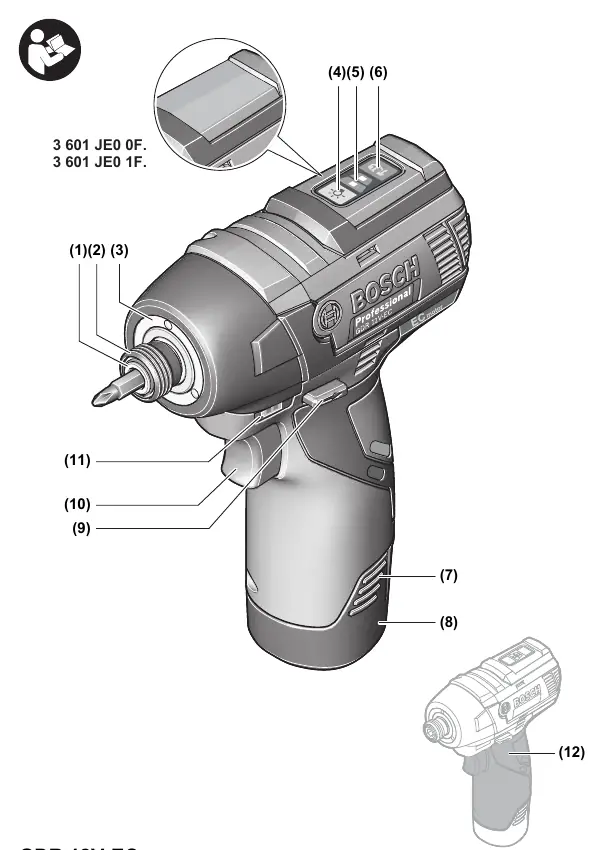
The tool features a tool holder (1), locking sleeve (2), and an on/off switch (10). The GDR 12V-EC model uses a 1/4" internal hexagon tool holder, while the GDS 12V-EC uses a 3/8" square drive.
Battery Operation
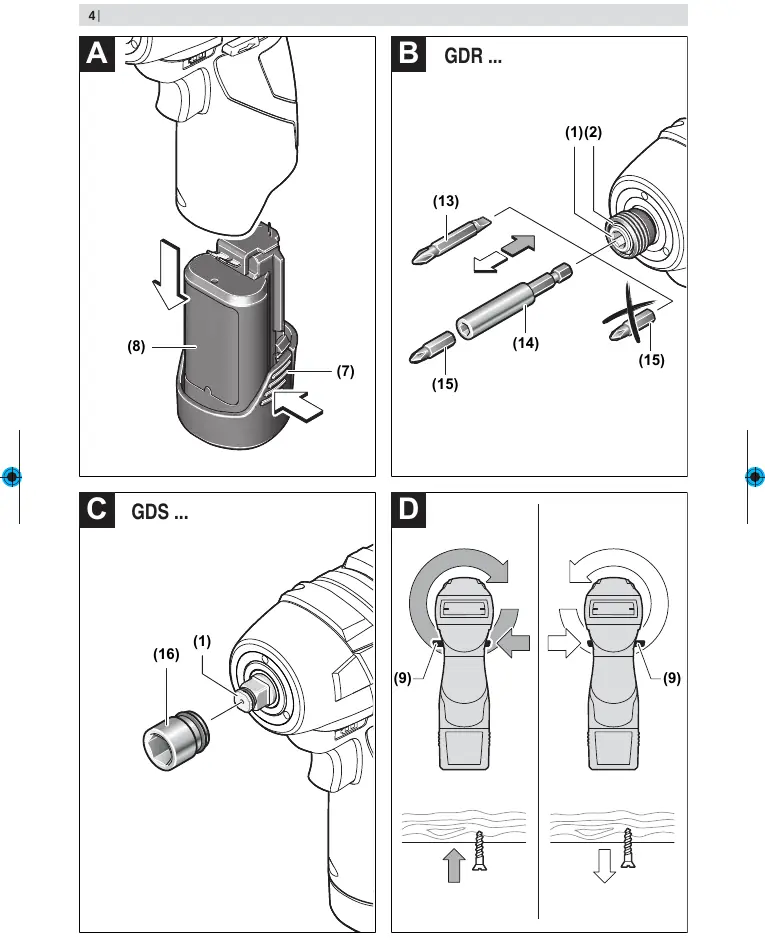
To insert the battery, push it into the battery holder until it clicks into place. To remove, press the battery release buttons and pull the battery out. The battery charge indicator shows the state of charge when the on/off switch is pressed halfway.
Tool Installation
GDR 12V-EC: Pull the locking sleeve (2) forward, insert the application tool (1) into the holder as far as it will go, and release the sleeve to lock it.
GDS 12V-EC: Slide the application tool (16) onto the square drive of the tool holder (1).
Operation
Use the rotational direction switch (9) to change the direction of the tool. Press the switch to the left for right rotation (driving screws) and to the right for left rotation (loosening screws). The speed can be adjusted by varying the pressure on the on/off switch (10).
Maintenance
Clean the air vents on the tool regularly to prevent dust accumulation. Periodically clean the tool holder (1) and locking sleeve (2). Always remove the battery before performing maintenance.
Manufacturer information
Bosch
Practical help
Common problems
Tool stops or speed reduces during operation.
The tool is overloaded or the battery temperature is outside the permitted range. Switch off the tool, let the battery cool down, or reduce the load.
Application tool comes off during use.
Ensure the application tool is securely connected to the tool holder.
Before use
- Charge the battery fully before first use.
- Ensure the rotational direction switch is in the correct position.
- Check that the correct application tool (bit or socket) is securely inserted.
- Verify the battery is clicked into place.
Specs in practice
- Rated voltage
- 12V
- No-load speed
- 0-2600 min-1
Images and diagrams
- Figure A: Battery insertion and release.
- Figure B: Inserting bits into GDR 12V-EC.
- Figure C: Inserting sockets into GDS 12V-EC.
- Figure D: Rotational direction switch.
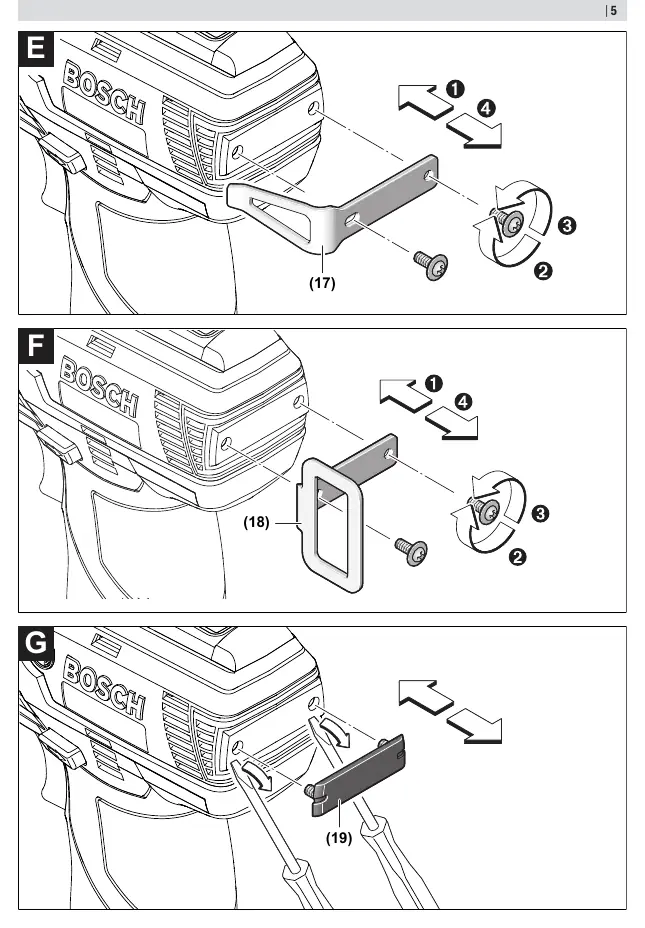
- Figure E-G: Using belt clip, holder, and coloured clip.
Model compatibility
- GDR 12V-EC uses 1/4 inch internal hexagon.
- GDS 12V-EC uses 3/8 inch square drive.

Manual page author
Michael Turner
Technical manual editor
Reviews PDF manuals for structure, safety notes, and practical product details so readers can find the right information quickly.