Tools / Power Tools
Bosch GSS 12V-13 Professional Cordless Orbital Sander User Manual
Quick guide for the Bosch GSS 12V-13 Professional Cordless Orbital Sander. Includes assembly, operation, dust extraction, and maintenance instructions.
Table of contents
Manual images
Click an image to enlargeQuick guide from the manual
This manual provides essential information for the safe and efficient operation of the Bosch GSS 12V-13 Professional Cordless Orbital Sander. Always read the full safety instructions before use.
Product Description
The GSS 12V-13 is a cordless orbital sander intended for dry sanding of wood, plastic, filler, and coated surfaces. Key components include:
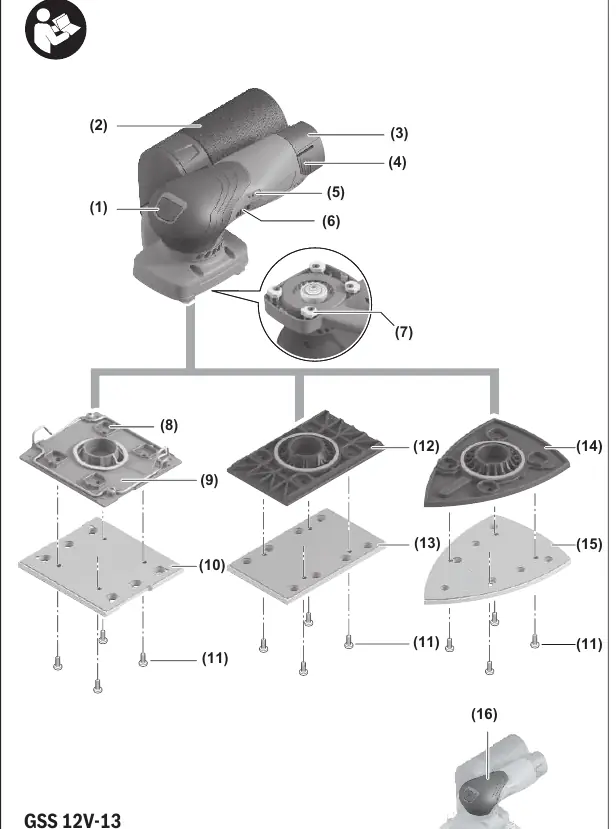
- (1) On/off switch
- (2) Complete dust bag
- (6) Orbital stroke rate preselection thumbwheel
- (7) Pivoting feet
- (9/12/14) Interchangeable base plates (square, rectangular, triangular)
- (21) Extraction outlet
Assembly
Before performing any work on the tool (maintenance, tool change, etc.), remove the battery.
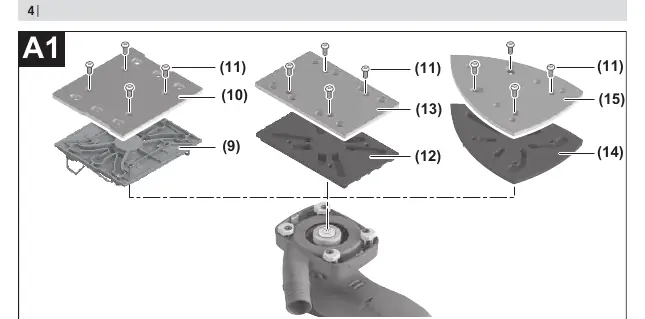

Changing/fitting base plate and foam pad
- Unscrew the 4 screws (11) completely.
- Pull the base plate away from the four pivoting feet (7).
- Place the replacement pad on the four pivoting feet (7) and push the feet into the recess (8).
- Position the foam pad.
- Secure both parts with the screws (11).
Changing the sanding sheet
Remove dirt and dust from the sanding plate before attaching a new sheet. Ensure the punched holes in the sanding sheet align with the holes in the sanding plate for optimal dust extraction.
Dust/Chip Extraction
Dust from materials like lead paint, certain woods, and minerals can be harmful. Use a dust extraction system whenever possible.
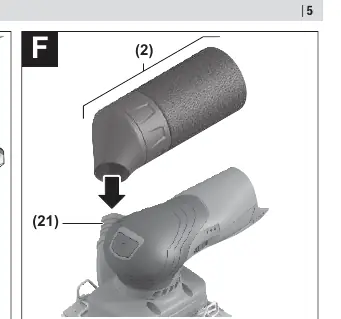
- Self-generated extraction: Attach the complete dust bag (2) onto the extraction outlet (21) until it lines up precisely. Empty the dust bag (22) in good time.
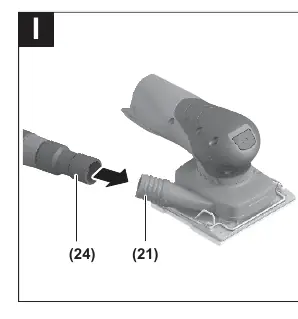
- External extraction: Fit a dust extraction hose (24) onto the extraction outlet (21) and connect it to a suitable vacuum cleaner.
Operation
Switching On/Off
Press the on/off switch (1) to turn the tool on. Press it again to turn it off.
Preselecting the orbital stroke rate
Use the thumbwheel (6) to select the required stroke rate during operation:
- 1–2: Low rate
- 3–4: Medium rate
- 5–6: High rate
The required rate depends on the material and working conditions and can be determined by practical tests.
Maintenance and Cleaning
Always keep the power tool and ventilation slots clean for safe and efficient operation. Remove the battery before any maintenance work.
Manufacturer information
Bosch
Practical help
Common problems
Battery charge indicator flashes quickly
Battery temperature is outside the operating range (-30 to +70°C) or overload protection has triggered.
Poor dust extraction
Empty the dust bag (22) in good time. Ensure punched holes in the sanding sheet align with holes in the sanding plate.
Reduced sanding performance
Check if the sanding sheet is worn out or if the wrong speed setting is selected for the material.
Before use
- Ensure the battery is fully charged.
- Check that the correct base plate and foam pad are installed.
- Ensure the sanding sheet is correctly attached and holes are aligned.
- Connect a dust extraction system if working in enclosed spaces.
Specs in practice
- No-load orbital stroke rate
- 12,000–20,000 min⁻¹, determines the speed of sanding.
- Orbit diameter
- 1.6 mm, the size of the sanding movement.
- Rated voltage
- 12 V, battery voltage required.
Images and diagrams
- (1) On/off switch
- (6) Orbital stroke rate preselection thumbwheel
- (7) Pivoting feet
- (9/12/14) Base plates
Model compatibility
- Compatible with GBA 12V batteries.
- Use only original Bosch sanding accessories.

Manual page author
David Miller
Documentation analyst
Organizes user manual content into clear summaries, with attention to model details, product context, and everyday usability.