Tools / Power Tools
Cordless Palm Router Bosch GKF 12V-8
Quick guide for the Bosch GKF 12V-8 cordless palm router. Learn about setup, bit changing, depth adjustment, and safe operation.
Table of contents
Manual images
Click an image to enlargeQuick guide from the manual
This cordless palm router is designed for edge and profile routing in wood, plastic, and non-metallic lightweight materials. Before use, ensure the battery is fully charged. Always wear protective gloves when handling router bits to prevent injury.
Product Description
The GKF 12V-8 features a spindle lock for easy bit changes, a fine adjustment thumbwheel for precise depth control, and an LED indicator for temperature and overload protection.
Assembly
Battery: Insert the charged battery into the battery holder until it clicks into place. To remove, press the release button and pull upwards.
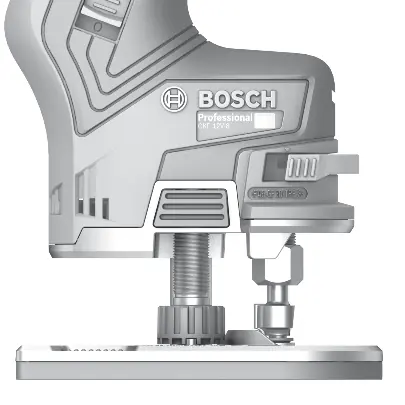
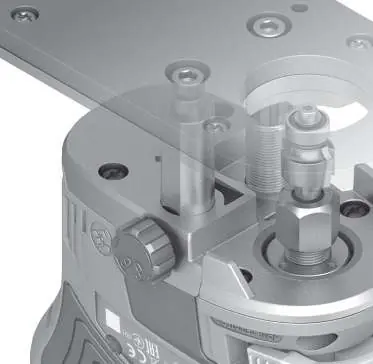
Changing the Collet: If the collet size needs changing, pull out the spindle locking lever to the marking arrow. Use the open-ended spanner to unscrew the cap nut. Clean parts if necessary before installing the new collet.
Inserting the Router Bit: Pull out the spindle locking lever to the marking arrow. Unscrew the cap nut, insert the router bit at least 20 mm into the collet, and retighten the cap nut securely.
Operation
Adjusting Routing Depth: Ensure the tool is switched off. Turn the locking wheel anticlockwise to unlock. Press and hold the coarse adjustment button to move the drive unit to the approximate depth. Use the fine adjustment thumbwheel for precision (one revolution equals 1 mm). Lock the setting by turning the locking wheel clockwise.
Routing: Always route against the direction of the bit's rotation (up-cut). Move the tool with a uniform feed rate. Do not set the tool down until the bit has come to a complete stop.
Maintenance
Keep the tool and ventilation slots clean. Ensure guide columns are free of wood dust. Lubricate the smooth guide column with a drop of lubricant occasionally.
Troubleshooting
The red LED indicator (3) monitors battery temperature and motor overload. If it lights up permanently red, the battery is too hot; switch off and let it cool. If it flashes red, the tool is blocked; remove it from the workpiece to clear the blockage.
Manufacturer information
Bosch
Practical help
Common problems
Tool stops automatically
Battery is empty or overheated. Check LED indicator (3).
Tool blocked
LED (3) flashes red. Pull tool out of workpiece and clear blockage.
Poor routing quality
Check if router bit is blunt or damaged. Replace if necessary.
Before use
- Ensure battery is fully charged
- Wear protective gloves
- Check router bit sharpness
- Ensure workpiece is secured to a stable platform
Specs in practice
- No-load speed
- 13,000 min-1
- Router cage stroke
- 36 mm
- Compatible collets
- 6/8 mm or 1/4 inch
Images and diagrams
- (7) Spindle locking lever
- (9) Cap nut with collet
- (10) Fine adjustment thumbwheel
- (14) Locking wheel
Model compatibility
- Use only Bosch GBA 12V batteries
- Use only recommended chargers (GAL 12..., GAX 18...)

Manual page author
Emily Carter
User documentation editor
Prepares concise manual descriptions and highlights the most useful setup, operation, and maintenance information for readers.