Tools / Power Tools
Bosch Professional GEX 18V-150-3 Cordless Random Orbit Sander User Manual
Quick guide for the Bosch Professional GEX 18V-150-3 cordless random orbit sander. Includes setup, operation, sanding techniques, maintenance, and safety instructions.
Table of contents
Manual images
Click an image to enlargeQuick guide from the manual
This cordless random orbit sander is designed for dry sanding of wood, plastic, filler, and coated surfaces. Before starting, ensure the battery is fully charged and inserted correctly. Attach the appropriate sanding sheet to the sanding pad, ensuring the holes align for dust extraction. Install the dust box or connect an external vacuum cleaner to the extraction outlet. Use the speed preselection buttons to adjust the orbital stroke rate based on the material and application.
Safety Instructions
General Power Tool Safety: Always keep the work area clean and well-lit. Do not operate in explosive atmospheres. Keep children and bystanders away. Ensure the switch is in the off-position before connecting the battery.
Sander Safety: Use only for dry sanding. Empty the dust container before breaks to prevent fire hazards, especially if sanding dust is mixed with paint or chemical residues. Do not modify or open the battery.
Product Features
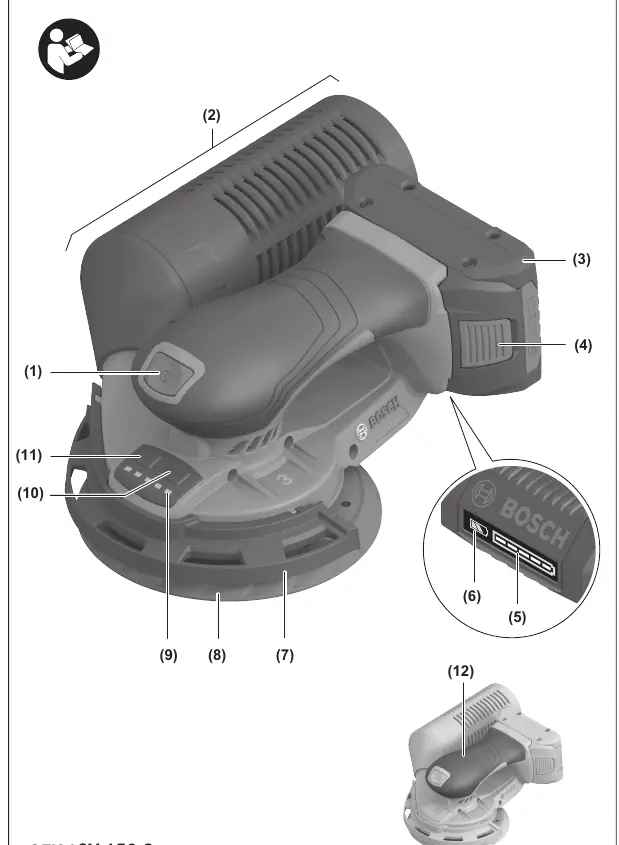
- On/off switch
- Dust box assembly
- Battery release button
- Sanding pad
- Speed preselection buttons
- Extraction outlet
Operation
Switching On/Off: Press the on/off switch to start. Press it again to stop. Ensure you can press the switch without releasing the handle.
Speed Preselection: Use the two buttons to preselect the required speed. The speed can be adjusted during operation. After working at low speeds, run the tool at maximum speed for approximately 3 minutes without load to cool it down.
Assembly
Changing the Sanding Sheet: Lift the old sheet from the side and pull it off the sanding pad. Clean the pad with a brush before attaching a new sheet. Press the new sheet firmly onto the pad, ensuring the holes align.

Changing the Sanding Plate: If the sanding pad is damaged, unscrew the screw, remove the pad, clean the surface, lubricate the marked ring with synthetic grease, attach the new pad, and retighten the screw.
Dust Extraction
Self-generated: Slide the complete dust box onto the extraction outlet until it is flush. Empty the box by pulling it off and unscrewing the adapter.

External: Fit an extraction hose onto the extraction outlet. Connect the hose to a suitable vacuum cleaner. Using anti-static hoses is recommended to prevent static charge.
Working Advice
Rough Sanding: Use a coarse grit sanding sheet. Apply light pressure for higher orbital stroke rates and material removal.
Fine Sanding: Use a fine grit sanding sheet. Vary the contact pressure or change the speed setting to reduce the orbital stroke rate while maintaining the random orbit motion.
Maintenance and Service
Always remove the battery before maintenance. Keep the tool and ventilation slots clean. If the braking effect deteriorates, check the sanding pad for wear and replace it or the pad brake/rubber sleeve if necessary.
Manufacturer information
Bosch
Practical help
Common problems
Braking effect is deteriorating
Check the sanding pad for wear and replace it if necessary. Replace the pad brake/rubber sleeve if damaged.
Tool stops or speed is reduced
The tool is overloaded or the battery temperature is outside the permitted range. Allow the tool to cool down or reduce the load.
Before use
- Ensure the battery is fully charged
- Attach the appropriate sanding sheet for the material
- Ensure the sanding sheet holes align with the pad holes
- Check that the dust box is empty and properly installed
- Select the appropriate speed setting for the task
Specs in practice
- Orbital stroke rate
- Determines the material removal rate; adjustable for different materials and conditions.
- Orbit diameter
- 3 mm, defines the sanding pattern and efficiency.
Images and diagrams
- (1) On/off switch
- (8) Sanding pad
- (17) Extraction outlet
Model compatibility
- Compatible with Bosch GBA 18V and ProCORE18V battery series.

Manual page author
Emily Carter
User documentation editor
Prepares concise manual descriptions and highlights the most useful setup, operation, and maintenance information for readers.