Tools / Power Tools
User Manual for Bosch GDR 18V-215 and GDX 18V-285 Cordless Impact Screwdrivers
Quick guide for the Bosch GDR 18V-215 and GDX 18V-285 cordless impact screwdrivers. Includes setup, operation, working modes, and maintenance instructions.
Table of contents
Manual images
Click an image to enlargeQuick Guide from the Manual
This manual provides essential information for operating the Bosch GDR 18V-215 and GDX 18V-285 cordless impact screwdrivers. These tools are designed for driving and loosening screws and bolts, as well as tightening and loosening nuts.
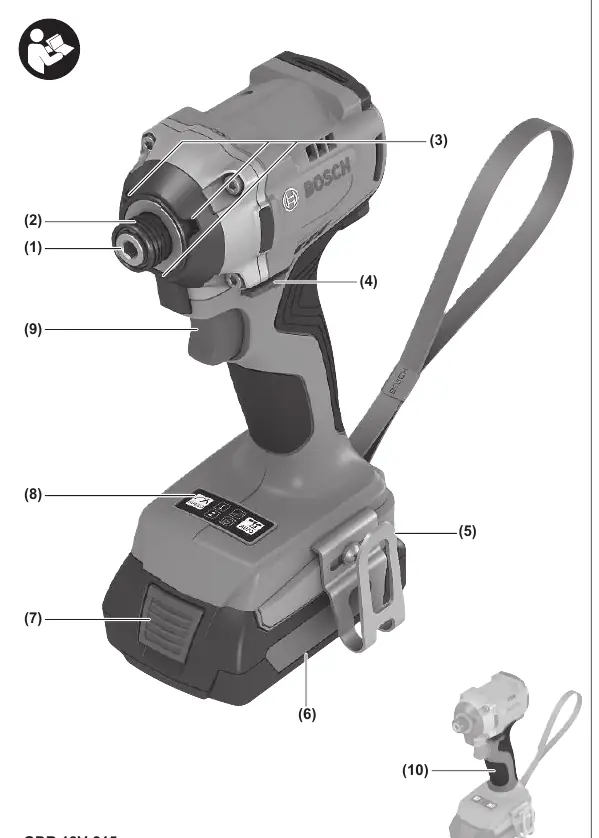
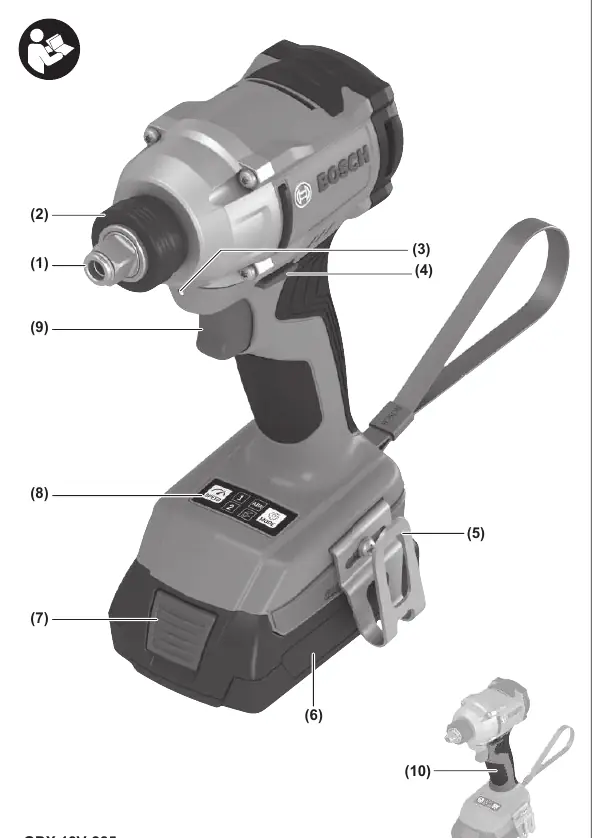
Product Components
- Tool holder: For attaching bits or sockets.
- Locking sleeve: Secures the application tool.
- Worklight: Illuminates the work area.
- Rotational direction switch: Changes the direction of rotation.
- User Interface: Used for speed preselection and working mode selection.
- On/Off switch: Controls tool operation and speed.
Assembly
Inserting the Battery: Push the charged battery into the battery holder until it clicks into place.
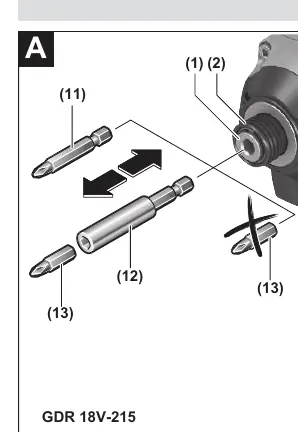
Inserting the Application Tool:
- GDR 18V-215: Pull the locking sleeve forward, insert the bit into the tool holder, and release the sleeve to lock it.
- GDX 18V-285: Slide the application tool onto the square drive of the tool holder.
Operation
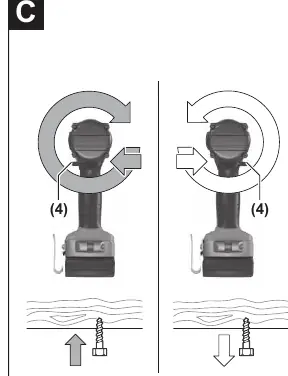
Direction of Rotation: Use the rotational direction switch to change the direction. Do not change while the tool is running.
Speed/Impact Rate: Regulate the speed by varying the pressure on the On/Off switch.
Working Modes: The tool features preset working modes for specific applications, selectable via the User Interface:
- ABR (GDX 18V-285): Automatic shutdown when the nut is loosened.
- Auto Shut-off (Metal): Stops the tool automatically when the torque increases and impact function starts.
- Auto Slow-down (Wood) (GDR 18V-215): Reduces speed during tightening to prevent over-tightening.
Maintenance
Clean the air vents regularly to prevent dust accumulation. Clean the tool holder and locking sleeve periodically. Always remove the battery before performing any maintenance or tool changes.
Manufacturer information
Bosch
Practical help
Common problems
Tool does not start
Check if the battery is charged and properly inserted.
Tool stops automatically during operation
Check if a working mode (like ABR or Auto Shut-off) is active and has triggered.
Bit falls out of the tool holder
Ensure the locking sleeve is fully engaged and the bit is properly seated.
Before use
- Ensure the battery is fully charged.
- Check that the tool is switched off before inserting the battery.
- Select the appropriate bit or socket for the task.
- Verify the rotational direction switch is in the desired position.
- Select the appropriate working mode on the user interface if needed.
Specs in practice
- Max. tightening torque
- The maximum force the tool can apply to a fastener.
- No-load speed
- The rotational speed of the tool without any resistance.
Images and diagrams
- Figure A/B: Shows how to insert and remove bits and sockets.
- Figure C: Shows the rotational direction switch.
- Figure D/E: Shows the user interface and how to select working modes.
Model compatibility
- GDR 18V-215: Uses 1/4" internal hexagon.
- GDX 18V-285: Uses 1/2" external square and 1/4" internal hexagon.

Manual page author
Emily Carter
User documentation editor
Prepares concise manual descriptions and highlights the most useful setup, operation, and maintenance information for readers.