Garden / Pruning Tools
User Manual for Bosch Professional GGP 12V-25 Pruning Shears
Quick guide for the Bosch Professional GGP 12V-25 battery-operated pruning shears. Includes setup, operation, maintenance, and troubleshooting.
Quick answers from the manual
Quick answer
- The Bosch Professional GGP 12V-25 is a battery-operated pruning shear designed for professional use in pruning branches and plants with a diameter up to 25 mm. p. 8, 15
Key actions
- Insert battery p. 9, 16
- Switch on (Sleep mode) p. 9, 16
- Activate knife (Ready to cut) p. 10, 16
- Deactivate/lock blade p. 10, 16
First start
- Charge battery fully p. 9, 15
- Insert battery and activate p. 9, 16
Problems and fixes
Warning LED (2) flashes red
Power tool is jammed; blade returns to open position automatically.
p. 10, 16
Warning LED (2) lights up red continuously
Temperature too high; allow to cool down.
p. 10, 17
Blade (1) does not move
Charge battery, press on/off switch, or activate (Ready to cut).
p. 10, 17
Blade (1) jammed in branch
Release switch, press on/off or remove battery, pull blade out.
p. 10, 17Error codes
| Code | Meaning | Action | Pages |
|---|---|---|---|
| Warning LED (2) flashes red | Power tool is jammed | Blade returns to open position automatically | p. 10, 16 |
| Warning LED (2) lights up red... | Temperature too high | Allow to cool down | p. 10, 17 |
Maintenance and reset
- Adjusting distance between blade and jaw p. 10, 17
- Blade lubrication p. 11, 17
Technical specifications
| Parameter | Value | Meaning | Pages |
|---|---|---|---|
| Rated voltage | 12 V | Operating voltage | p. 8, 15 |
| Max. cutting performance | 25 mm | Maximum branch diameter | p. 8, 15 |
| Weight | 1.0 kg | Weight of the tool | p. 8, 15 |
Where to find it in the PDF
- Technical Data p. 8, 15
- Troubleshooting p. 10, 16, 17
- Maintenance and Service p. 10, 11, 17
Table of contents
Quick guide from the manual
The Bosch Professional GGP 12V-25 is a battery-operated pruning shear designed for professional use. To start, insert a charged battery into the handle until it clicks. Press the On/Off switch (7) to enter Sleep mode. Press the cutting switch (9) twice to activate the blade (Ready to cut). Press and hold the cutting switch (9) to perform a cut. To lock the blade, hold the cutting switch (9) for 4 seconds.
Product Description
The tool features a blade (1), a jaw (10), a cutting switch (9), and an oil filler opening (14) for maintenance. The status LED (3) and warning LED (2) provide feedback on the tool's state.
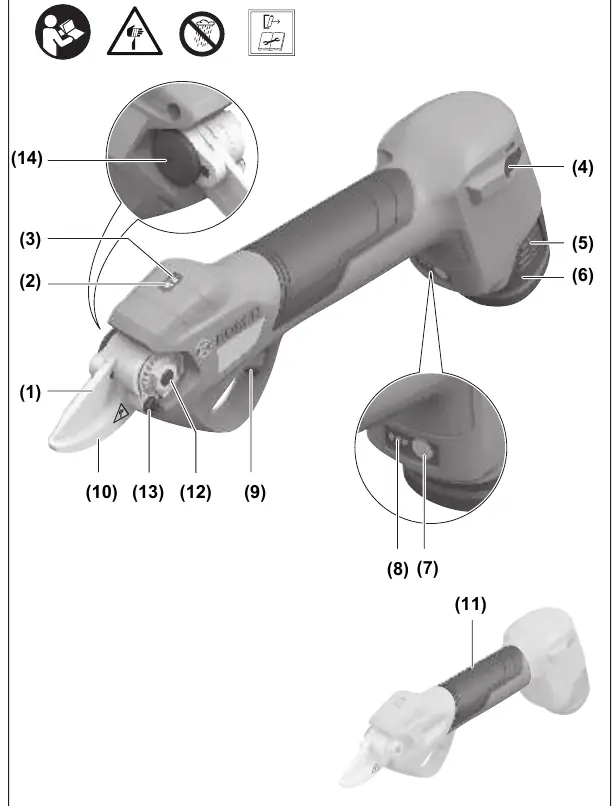
Operation
Sleep mode: Press the On/Off switch (7). The status LED (3) flashes. The blade (1) and jaw (10) remain stationary.
Ready to cut: Press the cutting switch (9) twice. The status LED (3) lights up continuously.
Cutting: Press and hold the cutting switch (9) until the cut is complete. Release the switch to return the blade to the home position.
Maintenance
Always remove the battery before performing any maintenance. Clean the blade with a damp cloth after use. Lubricate the blade by pouring a small amount of oil into the oil filler opening (14). The frequency of lubrication depends on usage.
Troubleshooting
If the warning LED (2) flashes red, the tool is jammed. If the warning LED (2) lights up red continuously, the battery, motor, or electronic module is too hot and needs to cool down.
Manufacturer information
Bosch
Practical help
Common problems
Warning LED (2) flashes red
Tool is jammed. The blade will return to the open position automatically.
Warning LED (2) lights up red continuously
Temperature of battery, motor, or electronic module is too high. Let the tool cool down.
Blade (1) does not move after pressing cutting switch (9)
Check if battery is charged, if the tool is in Sleep mode (press switch twice), or if the On/Off switch (7) is pressed.
Blade (1) is jammed in a branch
Release the cutting switch (9). Press the On/Off switch (7) or remove the battery (5), then pull the blade (1) out of the branch slowly and straight.
Before use
- Ensure the battery is fully charged.
- Check that the blade is clean and sharp.
- Ensure the jaw and blade are properly adjusted.
- Check for foreign objects like wire fences in the branches.
Images and diagrams
- (9) Cutting switch
- (14) Oil filler opening
Model compatibility
- Compatible with GBA 12V batteries.
- Compatible with GAL 12... and GAX 18... chargers.

Manual page author
Michael Turner
Technical manual editor
Reviews PDF manuals for structure, safety notes, and practical product details so readers can find the right information quickly.