Electronics / Cameras
Canon 15x50 IS All Weather Binoculars Instruction Manual
Comprehensive user guide for the Canon 15x50 IS All Weather binoculars, covering setup, image stabilization operation, maintenance, and troubleshooting.
Table of contents
Product Overview
The Canon 15x50 IS All Weather binoculars are high-magnification optical instruments featuring a unique Image Stabilizer system with a vari-angle prism. Designed for versatility, they are suitable for activities ranging from bird watching to astronomical observations. The 50mm objective lenses and UD (Ultra-low Dispersion) glass ensure bright, sharp images even at the periphery. These binoculars are built to be water-resistant, allowing for use in rainy conditions.
Getting Started
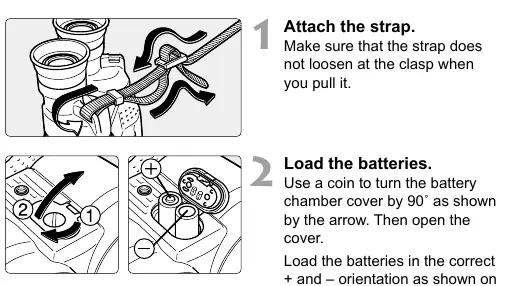
Before use, attach the provided strap securely. To power the Image Stabilizer, insert two AA batteries into the battery chamber by turning the cover 90 degrees with a coin. Always ensure correct polarity. Before viewing, adjust the width of the binoculars until the left and right images converge to minimize eye fatigue. If you wear eyeglasses, fold back the rubber eye cups.
Focusing and Diopter Adjustment
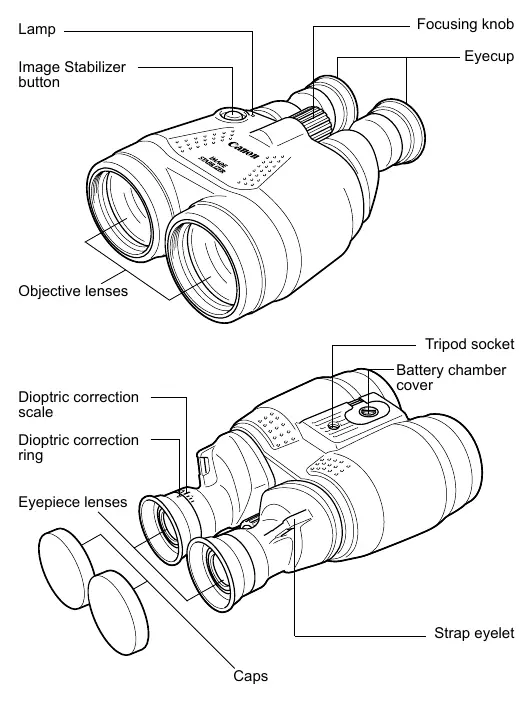
To achieve a sharp image, first look through the left eyepiece and adjust the central focusing knob. Next, look through the right eyepiece and rotate the dioptric correction ring until the image is sharp. This ensures the binoculars are calibrated to your specific vision requirements.
Using the Image Stabilizer
The Image Stabilizer helps maintain a steady view by compensating for hand tremors. There are two modes of operation: holding down the button for continuous stabilization or pressing it once for a five-minute cycle. A lamp indicates when the system is active. Note that the stabilizer may not compensate for severe shaking and may produce minor noise when battery power is low.
Maintenance and Safety
Handle these precision instruments with care. Avoid dropping them or exposing them to extreme temperatures. If the lenses become dirty, use a blower brush to remove dust before gently wiping with a soft, dry cloth. Never use organic solvents. When moving between environments with significant temperature differences, place the binoculars in an airtight plastic bag to prevent condensation. If storing for an extended period, remove the batteries to prevent leakage and corrosion.
Troubleshooting
- Image not clear: Check if the lens is dirty, the width is adjusted correctly, or the diopter/focus settings are accurate.
- Stabilizer not working: Ensure batteries are installed correctly and have sufficient charge.
- Strange noise: This may occur if batteries are nearly exhausted while the stabilizer is active.
- Air bubbles: These may appear due to pressure changes (e.g., in airplanes) and are not a defect; they typically disappear within a week.
Related manuals
Related manuals from the same brand or category.
Electronics / Cameras
Canon Prima Super 150U Film Camera Instructions
CanonElectronics / Cameras
Canon EOS Rebel T7 / EOS 1500D Instruction Manual
CanonElectronics / Cameras
Canon RF 14-35mm F/4.0 L IS USM Wide Zoom Lens Instructions
CanonElectronics / Cameras
Canon RF-S 14-30mm f/4-6.3 IS STM PZ Lens Instructions
CanonElectronics / Cameras
Canon RF 135mm F1.8 L IS USM Lens Instructions
CanonComputers / Printers
Canon imageRUNNER 1643iF / 1643i User's Guide
Canon
Manual page author
Emily Carter
User documentation editor
Prepares concise manual descriptions and highlights the most useful setup, operation, and maintenance information for readers.