Electronics / Cameras
Canon RF 16-28mm F2.8 IS STM Lens Instructions
Comprehensive guide for the Canon RF 16-28mm F2.8 IS STM wide-angle zoom lens, covering setup, operation, safety, and technical specifications for EOS R series cameras.
Table of contents
Product Overview
The Canon RF 16-28mm F2.8 IS STM is a high-performance wide-angle zoom lens designed specifically for Canon EOS R series cameras. It features an integrated Image Stabilizer (IS) and a Stepping Motor (STM) for smooth, quiet autofocus performance. This lens is ideal for various shooting scenarios, including landscapes, architecture, and indoor photography.
Safety Precautions
To ensure safe operation and prevent injury or equipment damage, please observe the following:
- Do not look directly at the sun or strong light sources through the lens, as this may cause permanent vision loss.
- Avoid leaving the lens in direct sunlight without the lens cap attached, as it can concentrate light and cause a fire or internal damage.
- Protect the product from extreme temperatures, which can cause malfunctions or physical injury upon contact.
Getting Started
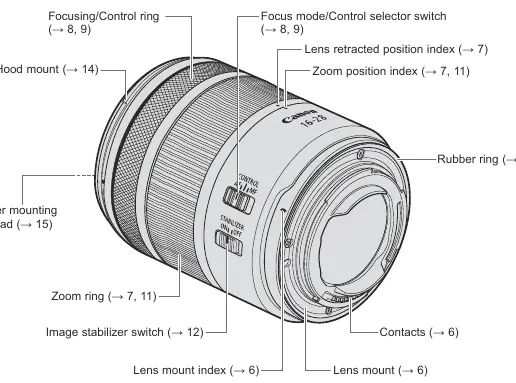
Before using the lens, ensure your camera firmware is updated to the latest version to maintain full compatibility, including features like magnified view. To attach the lens, align the lens mount index with the camera's mount index and rotate clockwise until it clicks. To detach, press the camera's lens release button and rotate the lens counterclockwise.
Operation and Features
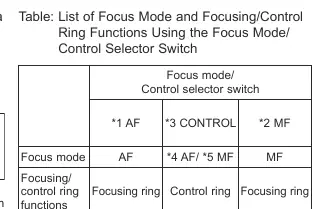
The lens includes a versatile Focusing/Control ring that can be toggled between focus adjustment and custom control functions (such as aperture or shutter speed) via the focus mode/control selector switch. The lens also features a retraction mechanism to save space during storage; ensure the lens is extended to the shooting position before use.
Zooming and Focusing
To zoom, simply rotate the zoom ring. Note that the minimum focusing distance varies by focal length, ranging from 0.2m at 28mm to 0.25m at 16mm. For best results, complete your zooming before focusing, as zooming after focusing may shift the focus point.
Image Stabilization
The built-in Image Stabilizer helps reduce blur in hand-held shots, particularly in low-light conditions or when using slower shutter speeds. Use the switch on the side of the lens to toggle stabilization on or off. Note that stabilization may be less effective when using a tripod or shooting from a moving vehicle.
Maintenance and Care
Keep the lens contacts clean and free of fingerprints to ensure reliable communication with the camera. If the lens is moved between cold and warm environments, place it in an airtight plastic bag to prevent condensation. The lens mount includes a rubber ring for dust and water resistance; if this becomes worn, it can be replaced at a Canon Service Center.
Technical Specifications
- Focal Length: 16-28mm
- Maximum Aperture: f/2.8
- Lens Construction: 13 groups, 16 elements
- Filter Diameter: 67mm
- Weight: Approx. 445g
Related manuals
Related manuals from the same brand or category.
Electronics / Cameras
Canon Prima Super 150U Film Camera Instructions
CanonElectronics / Cameras
Canon EOS Rebel T7 / EOS 1500D Instruction Manual
CanonElectronics / Cameras
Canon RF 14-35mm F/4.0 L IS USM Wide Zoom Lens Instructions
CanonElectronics / Cameras
Canon RF-S 14-30mm f/4-6.3 IS STM PZ Lens Instructions
CanonElectronics / Cameras
Canon RF 135mm F1.8 L IS USM Lens Instructions
CanonComputers / Printers
Canon imageRUNNER 1643iF / 1643i User's Guide
Canon
Manual page author
David Miller
Documentation analyst
Organizes user manual content into clear summaries, with attention to model details, product context, and everyday usability.