Electronics / Cameras
Canon EF 100mm f/2.8L Macro IS USM Lens
Comprehensive instruction manual for the Canon EF 100mm f/2.8L Macro IS USM lens, covering setup, operation, image stabilization, and macro photography techniques.
Table of contents
Manual images
Jump to the sectionProduct Overview
The Canon EF 100mm f/2.8L Macro IS USM is a high-performance macro lens designed for Canon EOS cameras. It features an advanced Image Stabilizer (IS) and an Ultrasonic Motor (USM) for fast, quiet autofocusing. The lens is capable of 1:1 life-size magnification, making it ideal for detailed close-up photography as well as standard portrait work.
Key Features
The lens incorporates UD lens elements for superior image quality and a rounded aperture for smooth background blur. Its robust construction includes a dust-proof and drip-proof design. The integrated Image Stabilizer is highly effective, providing the equivalent of up to four stops of shutter speed compensation during normal shooting, and remains effective even during close-up photography.
Focusing and Operation
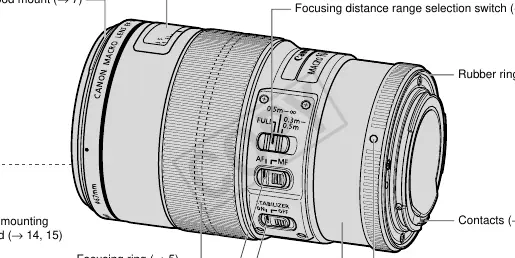
Users can switch between autofocus (AF) and manual focus (MF) using the focus mode switch. The lens also features a focusing distance range selection switch to optimize autofocus speed by limiting the search range. Full-time manual focus is available after autofocusing in One Shot AF mode. An infinity compensation mark is provided to adjust for focus shifts caused by temperature changes.
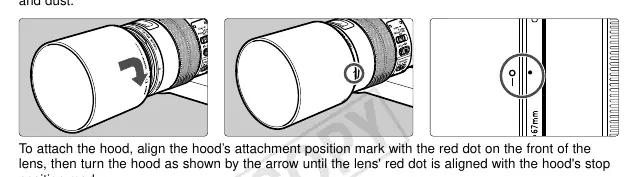
Image Stabilization
The Image Stabilizer is effective for hand-held shots, especially in low-light conditions, during close-up work, or when panning. It should be turned off when using a tripod or during long exposures (Bulb setting) to prevent potential errors. The stabilizer operates for approximately two seconds after the shutter button is released.
Macro Photography Techniques
Macro photography requires careful attention to depth of field, which is very shallow at high magnifications. To minimize camera shake during hand-held close-ups, it is recommended to hold the camera firmly, use a tripod, or utilize techniques such as leaning against a steady object. Setting the camera to AI Servo AF can also help maintain focus on moving subjects.
Maintenance and Safety
Always attach the lens cap when the lens is not in use. Avoid looking directly at the sun or bright light sources through the lens. When moving the lens between environments with significant temperature differences, place it in an airtight plastic bag to prevent condensation. Keep electrical contacts clean and free of fingerprints to ensure proper communication between the lens and camera.
Manufacturer information
Canon Inc.
Practical help
Common problems
Condensation on lens
Place the lens in an airtight plastic bag before moving it between cold and warm environments to allow it to warm up gradually.
Blurred images during close-ups
Use a tripod, hold the camera firmly, or use AI Servo AF mode to minimize the impact of shallow depth of field and camera shake.
Image Stabilizer causing errors
Turn off the Image Stabilizer when using a tripod or when shooting with long exposures (Bulb setting).
Faulty camera/lens communication
Clean the electrical contacts on the lens mount with a soft, dry cloth.
Before use
- Ensure the lens is securely mounted to the camera body.
- Check that the focus mode switch is set to the desired mode (AF or MF).
- Verify the focusing distance range switch is set correctly for your subject.
- Remove the lens cap before shooting.
- Attach the lens hood to block unwanted light and protect the front element.
- Ensure the Image Stabilizer switch is ON for hand-held shooting.
Specs in practice
- Focal Length
- 100mm, providing a medium-telephoto perspective.
- Minimum Aperture
- f/32, allowing for deep depth of field when needed.
- Max. Magnification
- 1x, allowing for life-size reproduction of subjects.
- Min. Focusing Distance
- 0.3m (1.0 ft.), the closest distance the lens can focus on a subject.
- Filter Diameter
- 67mm, the size required for screw-on filters.
Images and diagrams
- The nomenclature diagram identifies the focusing ring, focus mode switch, and distance scale.
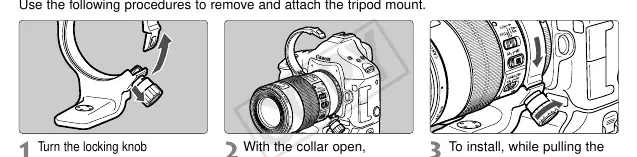
- The tripod mount section illustrates how to loosen the locking knob to rotate the lens.
- The hood attachment diagram shows aligning the hood mark with the red dot on the lens.
- The mounting section shows the lens mount index for proper alignment with the camera.
Model compatibility
- Dedicated to Canon EOS cameras.
- Compatible with Extension Tubes EF12 II and EF25 II.
- Not compatible with EF 1.4X II or EF 2X II extenders.
- Macro flash (MR-14EX/MT-24EX) requires the Macro Lite Adapter 67.

Manual page author
David Miller
Documentation analyst
Organizes user manual content into clear summaries, with attention to model details, product context, and everyday usability.