Electronics / Cameras
Canon RF-S 14-30mm F4-6.3 IS STM PZ Lens Instructions
Quick guide for the Canon RF-S 14-30mm F4-6.3 IS STM PZ lens, covering lens attachment, power zoom operation, image stabilizer usage, and safety precautions.
Table of contents
Manual images
Jump to the sectionQuick guide from the manual
This document provides essential instructions for the Canon RF-S 14-30mm F4-6.3 IS STM PZ lens. It covers proper handling, mounting procedures, and the use of specialized features like Power Zoom and Image Stabilization. Always ensure your camera firmware is updated to the latest version to ensure full compatibility and functionality.
Attaching and Detaching the Lens
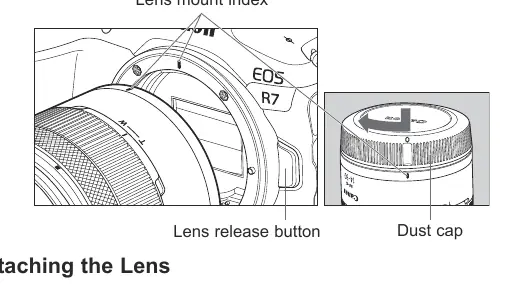
To attach the lens, align the lens mount index on the lens with the corresponding index on the camera body. Rotate the lens clockwise until it clicks into place. To detach, press the camera's lens release button and rotate the lens counterclockwise until it stops. Always turn the camera power off before changing lenses and attach the dust cap immediately after removal to protect the contacts.
Focusing and Control Ring
The lens features a dual-purpose ring that functions as either a focusing ring or a control ring, depending on camera settings. In manual focus mode, turn the ring to adjust focus. When used as a control ring, it can be assigned to functions like aperture or shutter speed via the camera menu.
Zooming
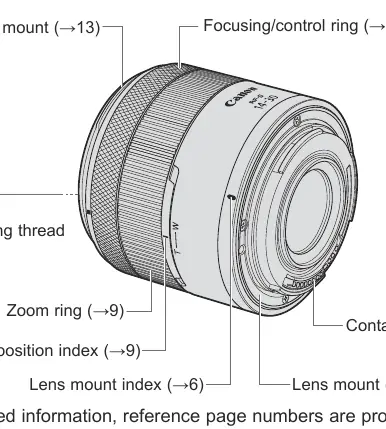
This lens utilizes motorized Power Zoom. Turning the zoom ring towards the W (wide-angle) position or T (telephoto) position adjusts the focal length. Zoom speed is variable based on how far the ring is turned. Note that zooming should be completed before focusing to maintain image sharpness.
Image Stabilizer
The Image Stabilizer (IS) is controlled via camera settings. It is highly effective for hand-held shooting in low light or when using slower shutter speeds. It is recommended to turn the IS off when using a tripod. The stabilizer also supports panning shots by compensating for vertical or horizontal shake depending on the direction of movement.
Hood and Filters
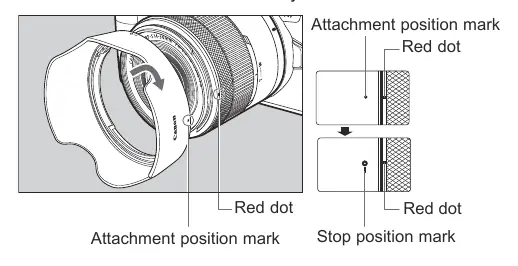
The lens supports a custom hood (sold separately) to reduce flare and protect the front element. Align the hood's attachment mark with the red dot on the lens and rotate until it clicks. Filters with a 58mm diameter can be attached to the front thread; only one filter should be used at a time.
Safety and Handling
Avoid looking directly at the sun through the lens. Do not leave the lens in direct sunlight without a cap, as it can concentrate light and cause fire. Protect the lens from extreme temperatures and condensation by using an airtight bag when moving between cold and warm environments.
Manufacturer information
Canon Inc.
Practical help
Common problems
Magnified view functionality not available
Ensure the camera firmware is updated to a compatible version.
Blurred images during zooming
Avoid zooming at high speeds and ensure zooming is finished before focusing.
Operational sound recorded during video
Zoom at a slower speed to reduce mechanical noise.
Vignetting (darkening of corners)
Ensure the lens hood is attached correctly.
Before use
- Check that the camera firmware is the latest version.
- Ensure the lens mount indexes are aligned before attaching.
- Set the camera power switch to OFF before mounting or removing the lens.
- Clean lens contacts with a soft cloth if soiled.
- Verify that the focus mode (AF/MF) is set correctly on the camera.
Specs in practice
- Filter Diameter
- 58mm: Size of compatible screw-on filters.
Images and diagrams
- The lens mount index is used to align the lens with the camera body.
- The zoom ring features W (wide) and T (telephoto) positions.
- The red dot on the lens is used for aligning the lens hood.
- The lens release button must be pressed to detach the lens from the camera.
Model compatibility
- Designed for EOS R series cameras compatible with RF-S lenses.
- Extenders cannot be used with this lens.
- Multiple exposure shooting is not possible on certain camera models.
- Some features (like zoom settings) may be excluded on specific older EOS R models.

Manual page author
Emily Carter
User documentation editor
Prepares concise manual descriptions and highlights the most useful setup, operation, and maintenance information for readers.