Electronics / Cameras
Canon EOS Rebel T6 1300D Camera Instruction Manual
Quick guide for the Canon EOS Rebel T6 / 1300D digital SLR camera, covering setup, basic shooting, Live View, movie recording, and wireless functions.
Table of contents
Manual images
Jump to the sectionQuick guide from the manual
This document provides essential instructions for the Canon EOS Rebel T6 (W) / 1300D (W) digital SLR camera. It covers initial setup, basic operation, and wireless functionality. For detailed technical specifications and advanced troubleshooting, please download the full instruction manual from the official Canon website at www.canon.com/icpd.
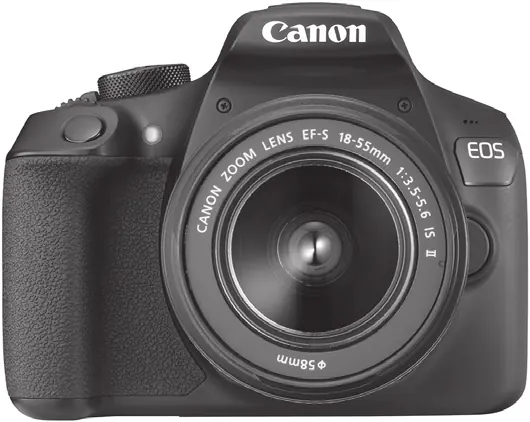
Getting Started
Before using the camera, ensure you have the following items: the camera body, battery pack LP-E10, battery charger LC-E10/LC-E10E, strap, and interface cable. Follow these steps for initial setup:
- Charge the battery: Use the provided charger. A full charge takes approximately 2 hours at room temperature.
- Insert battery and card: Open the compartment cover, insert the charged battery until it locks, and insert an SD/SDHC/SDXC memory card.
- Attach the lens: Align the lens mount index (red or white) with the camera's index and turn the lens until it clicks. Set the focus mode switch on the lens to AF.
- Power on: Set the power switch to ON. If the date/time/zone screen appears, follow the on-screen instructions to set them.
Basic Shooting
For beginners, the Scene Intelligent Auto (A+) mode is recommended. The camera automatically analyzes the scene and applies optimal settings. To take a picture, look through the viewfinder, press the shutter button halfway to focus, and press it completely to capture the image.
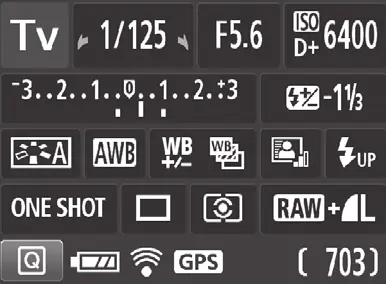
Live View Shooting
You can shoot while viewing the image on the LCD monitor. Press the Live View button to enable this mode. Note that using a tripod is recommended to prevent camera shake during Live View shooting.
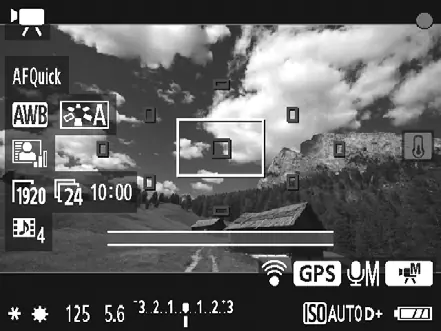
Shooting Movies
Set the Mode Dial to the movie icon to enable movie shooting. Press the Live View button to start and stop recording. Sound is captured via the built-in microphone.
Wireless Functions
The camera features built-in Wi-Fi and NFC for connecting to smartphones or Canon Connect Stations. You must register a nickname for the camera in the menu settings before using these functions. Use the Camera Connect app on your smartphone to transfer images or control the camera remotely.
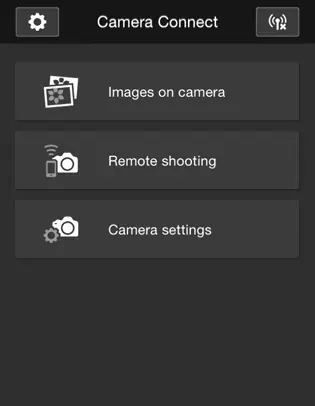
Safety and Maintenance
- Battery safety: Do not short-circuit, disassemble, or expose the battery to fire or water.
- Camera care: The camera is not waterproof. Avoid extreme temperatures, high humidity, and strong magnetic fields.
- Cleaning: Use a blower to remove dust from the lens or sensor. Do not use organic solvents.
Official resources from the manual
Manufacturer information
Canon Inc.
Practical help
Common problems
Focus indicator blinks and focus is not achieved.
Aim the AF point over an area with good contrast and try again. If too close to the subject, move away.
Flash fired in daylight.
The camera may fire the flash to lighten dark areas in backlit subjects. Use Flash Off mode if you do not want the flash to fire.
Bottom part of the picture is unnaturally dark.
The lens barrel is casting a shadow. Move further away from the subject or remove the lens hood.
Camera does not connect to a smartphone via NFC.
Ensure the camera's Wi-Fi/NFC setting is enabled and that the smartphone's Wi-Fi and NFC functions are turned on.
Before use
- Charge the battery pack LP-E10 fully.
- Insert a compatible SD, SDHC, or SDXC memory card.
- Attach a compatible Canon EF or EF-S lens.
- Set the lens focus mode switch to AF.
- Register a camera nickname in the menu for wireless functions.
- Set the date, time, and zone.
Specs in practice
- 18.0 effective megapixels
- The resolution of the CMOS sensor for high-detail images.
Images and diagrams
- The Mode Dial allows switching between Basic Zone (automatic) and Creative Zone (manual) modes.
- The shutter button has two stages: halfway press for focus/exposure, full press to take the picture.
- The button opens the Quick Control screen for fast access to shooting settings.
- The lamp indicates wireless connection status (On = Connected, Blinking = Sending/Waiting).
Model compatibility
- Compatible with all Canon EF and EF-S lenses.
- Not compatible with EF-M lenses.
- Supports SD, SDHC, and SDXC memory cards.
- Multimedia cards (MMC) cannot be used.

Manual page author
David Miller
Documentation analyst
Organizes user manual content into clear summaries, with attention to model details, product context, and everyday usability.