Electronics / Cameras
Canon RF 100-400mm f/5.6-8 IS USM Lens Guide
Comprehensive user guide for the Canon RF 100-400mm f/5.6-8 IS USM telephoto zoom lens, covering installation, operation, image stabilization, and maintenance.
Table of contents
Manual images
Jump to the sectionProduct Overview
The Canon RF 100-400mm f/5.6-8 IS USM is a high-performance telephoto zoom lens designed specifically for Canon EOS R series mirrorless cameras. It features an integrated Image Stabilizer (IS) for steady handheld shots and an Ultrasonic Motor (USM) for fast, quiet autofocus performance. This lens is ideal for capturing distant subjects, wildlife, and sports.
Safety and Handling
To ensure safe operation and prevent damage to your equipment, please observe the following precautions:
- Never look directly at the sun or strong light sources through the lens, as this can cause permanent eye damage.
- Always attach the lens cap when the lens is not in use to prevent sunlight from concentrating inside and causing a fire.
- Avoid exposing the lens to extreme temperatures. If moving the lens between cold and warm environments, place it in an airtight plastic bag to prevent condensation from forming on internal elements.
- Keep the lens contacts clean and free of fingerprints to ensure proper communication with the camera body.
Installation and Operation
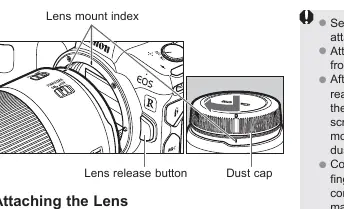
To attach the lens, align the lens mount index on the lens with the corresponding index on the camera body and rotate the lens clockwise until it clicks into place. To detach, press the camera's lens release button and rotate the lens counterclockwise.
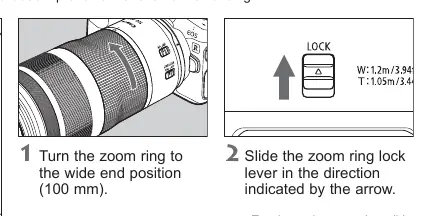
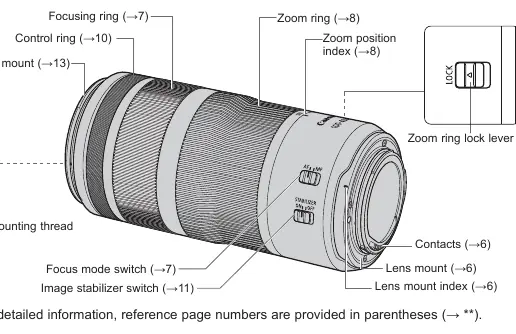
The lens features a focus mode switch to toggle between Autofocus (AF) and Manual Focus (MF). When in MF mode, use the electronic focusing ring to adjust focus. The zoom ring allows you to adjust the focal length, and a dedicated zoom ring lock lever is provided to secure the lens at the 100mm position for easier transport.
Image Stabilization
The built-in Image Stabilizer helps reduce camera shake, making it easier to shoot in low-light conditions or when using slower shutter speeds. Use the switch on the side of the lens to enable or disable this feature. For tripod use, it is generally recommended to turn the Image Stabilizer off.
Customization and Accessories
The lens includes a customizable control ring that can be assigned to various camera functions, such as aperture or shutter speed adjustments. Additionally, the lens supports the use of RF 1.4x and RF 2x extenders for increased reach, though these may affect autofocus speed and aperture range. A dedicated lens hood can be attached to reduce flare and protect the front element from environmental elements.

Manufacturer information
Canon Inc.
Practical help
Common problems
Condensation on lens elements
Place the lens in an airtight plastic bag before moving it between cold and warm environments to allow it to adjust gradually.
Blurred images despite Image Stabilizer
Ensure the subject is not moving, use a faster shutter speed, or turn off the Image Stabilizer when using a tripod.
Dirty or scratched contacts
Clean the contacts gently with a soft, dry cloth to ensure proper communication with the camera.
Vignetting in photos
Ensure the lens hood is attached correctly and fully locked into position.
Before use
- Ensure camera firmware is updated to the latest version.
- Check that the lens mount is clean and free of debris.
- Verify the focus mode switch is set to the desired mode (AF or MF).
- Ensure the zoom ring lock is released before attempting to zoom.
- Confirm the lens hood is properly attached if shooting in bright light.
Specs in practice
- Focal Length
- The range of magnification (100-400mm) determining how close or far the subject appears.
- Aperture (f/5.6-8)
- The range of light-gathering capability; higher numbers indicate a smaller opening.
- Min. Focusing Distance
- The closest distance the lens can be to a subject while maintaining sharp focus, which varies by focal length.
- Filter Diameter
- The size of the thread on the front of the lens (67mm) required for attaching filters.
Images and diagrams
- The nomenclature diagram identifies the focusing ring, zoom ring, control ring, and various switches.
- The lens mount index is crucial for aligning the lens correctly with the camera body.
- The zoom ring lock lever is shown to prevent the lens from extending during transport.
- The hood attachment procedure highlights the alignment of the red dots for secure mounting.
Model compatibility
- Designed for use with Canon EOS R series mirrorless cameras.
- Compatible with Canon RF 1.4x and RF 2x extenders.
- Not compatible with Close-up Lens 250D/500D.
- Only one filter can be attached to the lens at a time.

Manual page author
Emily Carter
User documentation editor
Prepares concise manual descriptions and highlights the most useful setup, operation, and maintenance information for readers.