Electronics / Cameras
Canon RF 100-500mm F4.5-7.1 L IS USM Lens Instructions
Comprehensive user guide for the Canon RF 100-500mm F4.5-7.1 L IS USM telephoto zoom lens, covering setup, operation, image stabilization, and maintenance.
Table of contents
Manual images
Jump to the sectionProduct Overview
The Canon RF 100-500mm F4.5-7.1 L IS USM is a high-performance telephoto zoom lens designed specifically for the EOS R series of mirrorless cameras. It features advanced Image Stabilizer (IS) technology and a high-speed Ultrasonic Motor (USM) for precise autofocus performance. This L-series lens is built to deliver exceptional image quality across its entire zoom range.
Safety Precautions
To ensure safe operation, please observe the following guidelines:
- Never look directly at the sun or intense light sources through the lens, as this can cause permanent vision damage.
- Always keep the lens cap attached when the lens is not in use to prevent sunlight from concentrating inside and causing fire or damage.
- Avoid exposing the lens to extreme temperatures, which may cause malfunctions or physical injury upon contact.
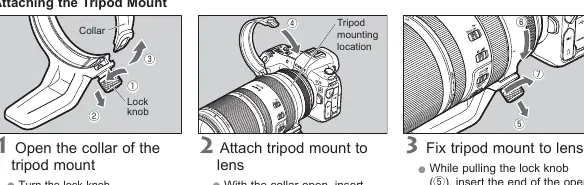
- Ensure that any tripod used is sturdy and that the tripod mount lock knob is securely tightened before carrying the equipment.
Getting Started
To attach the lens, align the lens mount index on the lens with the corresponding index on the camera body and rotate it clockwise until it clicks into place. Always turn the camera power off before attaching or detaching the lens. Keep the lens contacts clean and free of fingerprints to ensure reliable communication between the lens and the camera.
Lens Operation
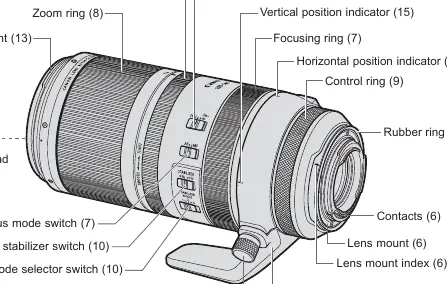
The lens features a focus mode switch for toggling between autofocus (AF) and manual focus (MF). The focusing distance range selector allows you to limit the focus range to prevent the lens from hunting for subjects at unintended distances. The zoom ring includes an adjustment ring that allows you to customize the operational feel, ranging from smooth to tight, which helps prevent the lens from extending unintentionally when not in use.
Image Stabilization
The built-in Image Stabilizer helps reduce blur caused by camera shake during handheld shooting. It offers three modes: Mode 1 for still subjects, Mode 2 for panning shots, and Mode 3 for irregularly moving subjects. For best results, consider turning the stabilizer off when using a tripod, depending on the specific shooting conditions.
Maintenance and Handling
If moving the lens between environments with significant temperature differences, place it in an airtight plastic bag to prevent condensation. If the lens interior appears to waver, this is normal and does not indicate a defect. Always store the lens with the zoom ring set to the tightest position to protect the internal mechanism.
Manufacturer information
Canon Inc.
Practical help
Common problems
Lens will not zoom toward WIDE setting after removing an extender.
Turn the zoom ring slightly toward the TELE setting to release the lock, then proceed to turn it toward WIDE.
Blurry images despite using Image Stabilizer.
Ensure the subject is not moving too fast, check if the shutter speed is appropriate, or turn off IS if using a tripod.
Condensation on lens surface.
Place the lens in an airtight plastic bag when moving between cold and warm environments until it reaches ambient temperature.
Before use
- Ensure camera firmware is updated to the latest version.
- Check that the lens mount is clean and free of debris.
- Verify the tripod mount lock knob is tightened if using a tripod.
- Set the focus mode switch to the desired AF or MF position.
- Adjust the zoom ring tension to your preference.
- Ensure the lens hood is properly attached to prevent vignetting.
Specs in practice
- Focal Length
- 100-500mm zoom range for versatile telephoto reach.
- Lens Construction
- 14 groups and 20 elements for high-quality optical performance.
- Filter Diameter
- 77mm thread size for attaching compatible filters.
Images and diagrams
- The nomenclature diagram identifies the zoom ring, focus ring, and control ring locations.
- The tripod mount section illustrates how to open the collar and secure it to the lens.
- The hood attachment diagram shows the alignment of the red dots for proper locking.
- The filter adjustment window diagram demonstrates how to access the circular polarizing filter.
Model compatibility
- Designed for use with Canon EOS R series cameras.
- Compatible with RF 1.4x and RF 2x extenders.
- Supports 77mm screw-in filters.
- Compatible with 500D (77mm) Close-up Lens.

Manual page author
Michael Turner
Technical manual editor
Reviews PDF manuals for structure, safety notes, and practical product details so readers can find the right information quickly.