Toys / RC Models & Drones
Carson Jeep Wrangler 2.4 GHz Remote Control Car User Manual
Comprehensive user guide for the Carson Jeep Wrangler 2.4 GHz remote control car. Includes setup, battery charging, operation, and safety instructions.
Quick answers from the manual
Quick answer
- To start your Carson Jeep Wrangler, charge the 7.2V NiMH battery, install 2x AA batteries in the transmitter, and switch on the transmitter before the car. p. 3
Key actions
- Charge the NiMH battery p. 3
- Switch on the system p. 3
First start
- Charge the battery, install transmitter batteries, turn on transmitter, then turn on the car. p. 3
Problems and fixes
Vehicle does not respond
Check battery levels and ensure both units are switched on.
p. 5Maintenance and reset
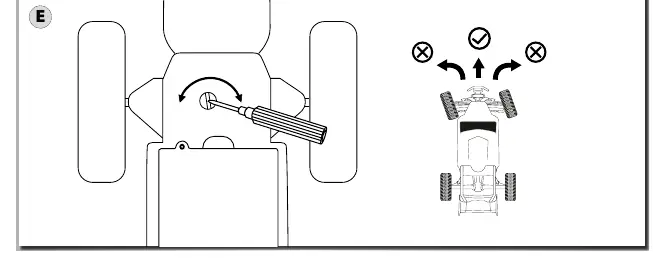
- Adjust steering trim on the underside of the car if it does not drive straight. p. 4
Technical specifications
| Parameter | Value | Meaning | Pages |
|---|---|---|---|
| Battery | 7.2V 400mAh NiMH | Power source for the vehicle | p. 3 |
| Transmitter | 2x 1.5V AA | Power source for the remote | p. 3 |
Where to find it in the PDF
- Setup and Charging p. 3
- Operation p. 4
Table of contents
Manual images
Click an image to enlargeQuick guide from the manual
The Carson Jeep Wrangler 2.4 GHz is a Ready-to-Run (RTR) model. To begin, ensure the NiMH battery is fully charged and the transmitter is equipped with fresh batteries. Always switch on the transmitter before the vehicle to ensure a stable connection.
Battery installation and charging
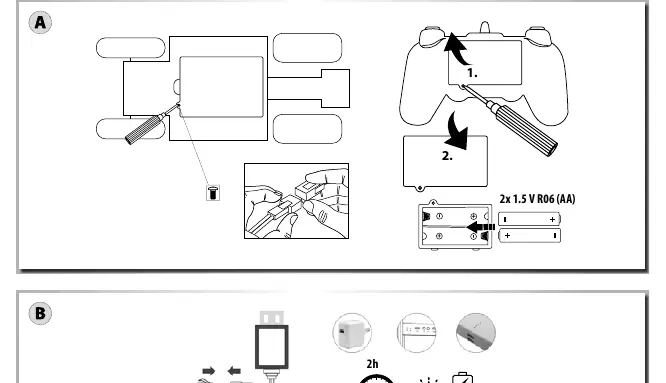
- Transmitter: Open the battery compartment and insert 2x 1.5V AA (R06) batteries, ensuring correct polarity.
- Vehicle: Connect the included 7.2V 400mAh NiMH battery to the charger. Charging takes approximately 2 hours.
- Safety: Only charge the battery in dry rooms. Never leave the battery unsupervised during charging.
Operation
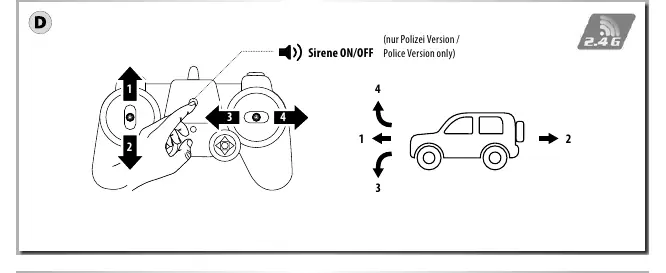
- Switching on: Turn on the transmitter first, then the vehicle.
- Switching off: Turn off the vehicle first, then the transmitter.
- Controls: Use the transmitter sticks to control forward, backward, left, and right movement.
- Steering Trim: If the vehicle does not drive straight, adjust the steering trim located on the underside of the car.
Safety precautions
- Not suitable for children under 3 years due to small parts and choking hazards.
- Do not lift the vehicle while wheels are turning.
- Keep fingers, hair, and loose clothing away from the motor and wheels when the unit is switched ON.
- Always remove batteries from the toy when not in use.
Maintenance and troubleshooting
If the model behaves erratically or loses range, check the battery levels in both the transmitter and the vehicle. Ensure the antenna is not damaged and that there is no radio interference in the area.
Manufacturer information
CARSON-MODEL SPORT
Practical help
Common problems
Car does not respond to transmitter
Check if both the transmitter and car are switched ON. Replace or recharge batteries in both units.
Vehicle drives erratically or loses signal
Ensure the transmitter batteries are fresh. Check for radio interference in the environment.
Vehicle does not drive straight
Adjust the steering trim located on the underside of the vehicle.
Before use
- Charge the 7.2V NiMH battery for approximately 2 hours.
- Install 2x 1.5V AA batteries in the transmitter.
- Ensure the battery polarity is correct in both the car and transmitter.
- Switch on the transmitter first, then the vehicle.
Specs in practice
- NiMH 7.2V 400mAh
- The type and capacity of the rechargeable battery pack for the car.
Images and diagrams
- Page 3: Battery installation for transmitter and car, and charging instructions.
- Page 4: Transmitter control layout and steering trim adjustment.
Model compatibility
- Use only the specified batteries.
- Do not mix old and new batteries.
- Do not mix alkaline, standard, and rechargeable batteries.

Manual page author
David Miller
Documentation analyst
Organizes user manual content into clear summaries, with attention to model details, product context, and everyday usability.