Toys / RC Models & Drones
User Manual for Sharper Image 2.4GHz 5-Channel R-C Walking Simulation Velociraptor
Quick guide for the Sharper Image 2.4GHz 5-Channel R-C Walking Simulation Velociraptor (Model 208702). Includes setup, charging instructions, pairing, and troubleshooting.
Quick answers from the manual
Quick answer
- To start the game, turn on the transmitter, then turn on the dinosaur. They will pair automatically. p. 1
Key actions
- Charging the dinosaur p. 1
- Pairing the devices p. 1
First start
- Install batteries in the transmitter and charge the dinosaur. p. 1
Problems and fixes
Out of control
Check for interference or low battery.
p. 1Maintenance and reset
- Keep the toy clean and dry. Remove batteries if not in use. p. 1
Technical specifications
| Parameter | Value | Meaning | Pages |
|---|---|---|---|
| Frequency | 2.4GHz | Wireless communication frequency | p. 1 |
| Charging Time | ~2 hours | Time to fully charge the dinosaur | p. 1 |
Where to find it in the PDF
- Main Instructions p. 1
Table of contents
Manual images
Click an image to enlargeQuick Guide
To start playing with your Velociraptor, follow these steps:
- Install 2x AAA batteries into the transmitter.
- Charge the dinosaur using the provided USB cable.
- Turn on the transmitter first, then turn on the dinosaur. The devices will pair automatically.
Safety Precautions
Please adhere to the following safety guidelines:
- Keep small parts away from children.
- Do not mix old and new batteries or different types of batteries.
- Do not dispose of batteries in fire.
- Do not submerge the toy in water.
- If the toy is not in use for a long period, remove the batteries from the transmitter.
Charging the Velociraptor
The dinosaur uses a built-in rechargeable lithium battery.
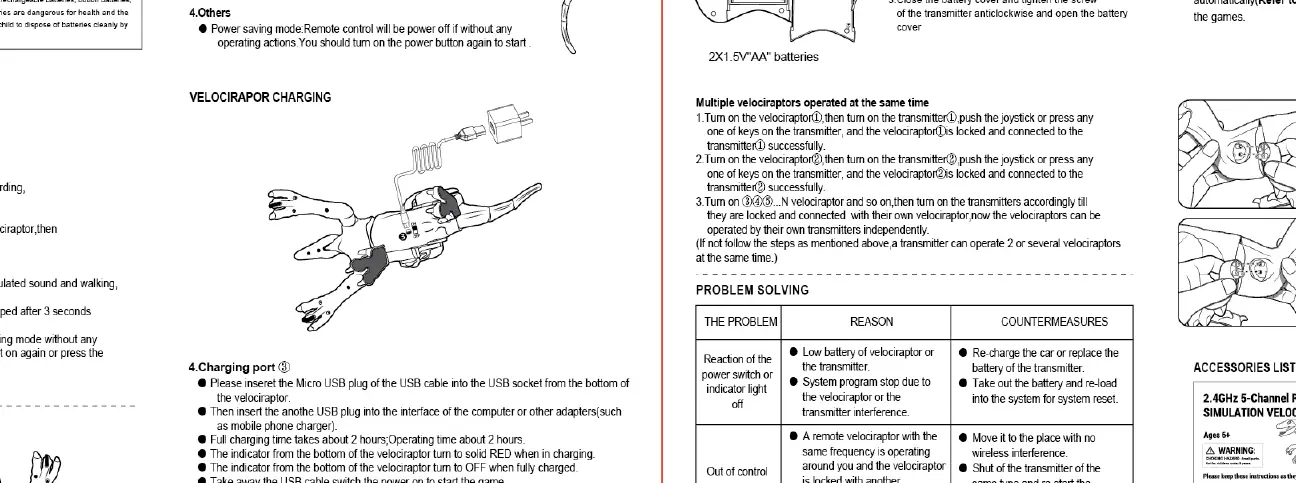
- Connect the provided USB cable to the charging port on the dinosaur.
- Connect the other end to a computer or a suitable USB adapter.
- Charging takes approximately 2 hours.
- The indicator light will turn on while charging and turn off when fully charged.
Transmitter Controls
The transmitter features the following controls:
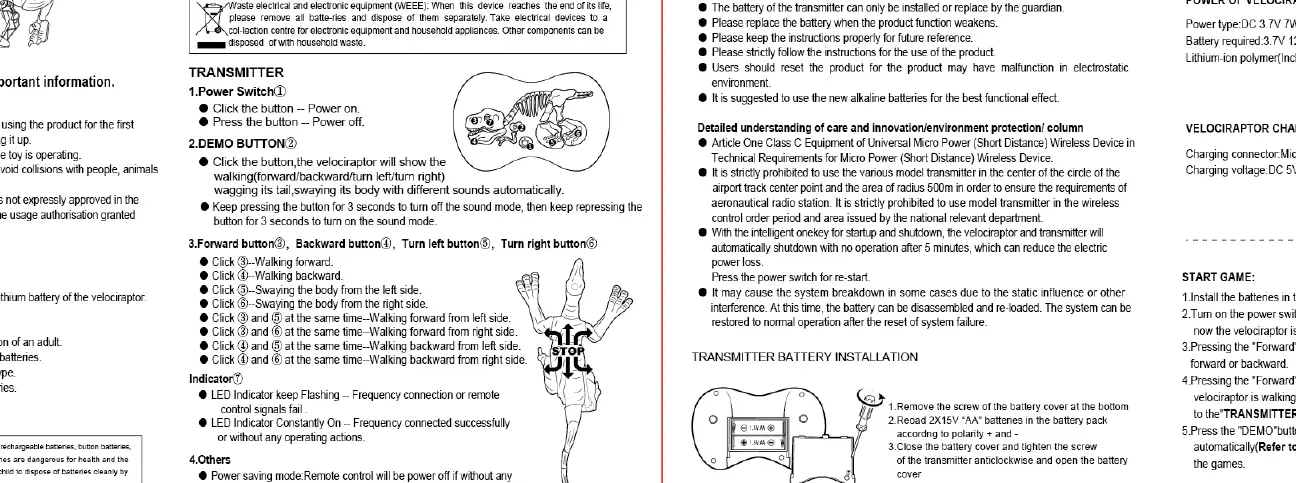
- Power Switch: Turns the transmitter on or off.
- Demo Button: Initiates a demonstration mode.
- Forward/Backward Buttons: Controls the movement of the dinosaur.
- Turn Left/Right Buttons: Steers the dinosaur.
Troubleshooting
If you encounter issues, check the following:
- Out of control: Check for frequency interference or low battery. Move to a different location or replace batteries.
- Interruptions: Ensure the transmitter and dinosaur are within range and not blocked by obstacles.
- Slow movement: The battery is likely low; please charge the dinosaur.
Technical Specifications
- Frequency: 2.4GHz
- Charging Time: Approximately 2 hours
- Operating Time: Approximately 40 minutes
- Transmitter Power: 2x AAA batteries (not included)
- Dinosaur Power: Built-in rechargeable Li-ion battery
Manufacturer information
Sharper Image
Practical help
Common problems
Dinosaur is out of control
Check for frequency interference from other devices or low battery levels. Move to a different area.
Movement is slow
The battery is low. Connect the dinosaur to the USB charger for approximately 2 hours.
Signal interruptions
Ensure the transmitter and dinosaur are within range and not obstructed by large metal objects.
Before use
- Install 2x AAA batteries in the transmitter
- Charge the dinosaur battery fully using the USB cable
- Ensure the transmitter is turned on before the dinosaur
- Check that the area is clear of obstacles
Specs in practice
- Charging Time
- Approximately 2 hours required for a full charge.
- Operating Time
- Approximately 40 minutes of play time on a full charge.
Images and diagrams
- The transmitter diagram shows the location of the power switch, demo button, and directional controls.
- The charging diagram illustrates how to connect the USB cable to the dinosaur's charging port.
Model compatibility
- Requires 2x AAA batteries for the transmitter (not included).
- Designed for indoor/outdoor use on flat surfaces.

Manual page author
Emily Carter
User documentation editor
Prepares concise manual descriptions and highlights the most useful setup, operation, and maintenance information for readers.