Toys / RC Models & Drones
User Manual for Sharper Image Flip Stunt Rally RC Car 1013840
Quick guide for the Sharper Image Flip Stunt Rally RC Car (Model 1013840). Learn how to install batteries, operate the remote control, and follow safety guidelines for optimal performance.
Quick answers from the manual
Quick answer
- The Sharper Image Flip Stunt Rally RC Car requires 4 AAA batteries for the vehicle and 1 9V battery for the remote control. Ensure both units are switched to the ON position before use. p. 1
Key actions
- Install batteries p. 1
First start
- Switch both car and remote buttons to ON position. p. 1
Problems and fixes
Car does not operate
Check battery installation and ensure both switches are ON.
p. 1Technical specifications
| Parameter | Value | Meaning | Pages |
|---|---|---|---|
| Car Battery | 4x AAA 1.5V | Power source for the vehicle | p. 1 |
| Remote Battery | 1x 9V | Power source for the remote | p. 1 |
Where to find it in the PDF
- Operating Instructions p. 1
Table of contents
Manual images
Click an image to enlargeQuick guide from the manual
The Sharper Image Flip Stunt Rally RC Car is designed for stunt driving. For optimal performance, use the car on hard surfaces like wood or tile for general driving, and on asphalt or carpeted surfaces for flipping maneuvers. The vehicle requires 4 AAA batteries and the remote requires 1 9V battery.
Battery installation
Vehicle: The battery compartment is located under the white side of the vehicle. Use a standard screwdriver to unscrew the white side, insert 4 AAA 1.5V batteries observing the correct polarity, and replace the cover and screws.
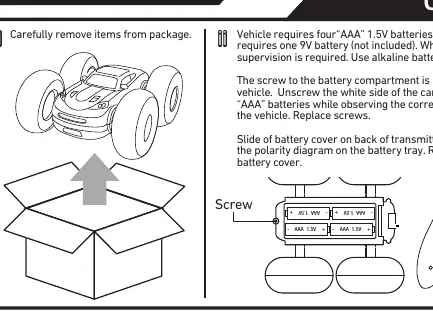
Remote Control: Slide the battery cover on the back of the transmitter. Insert one 9V battery according to the polarity diagram inside the battery tray, then replace the cover.
Operating instructions
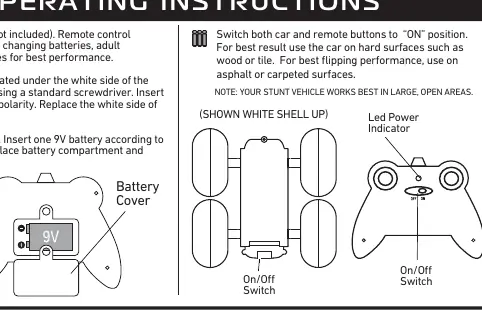
To begin operation, ensure both the car and the remote control switches are set to the ON position. The vehicle works best in large, open areas. Avoid operating the car in confined or crowded spaces to prevent damage to the vehicle or surrounding objects.
Safety precautions
- Do not operate the car during thunderstorms or rain.
- Avoid water, sand, and snow. Do not submerge the car or controller in water.
- Keep fingers, hair, and loose clothing away from tires, gears, and motor while the car is switched ON.
- Do not leave the car or transmitter near heat sources or in direct sunlight for long periods.
- Remove all batteries when not in use to prevent accidental operation.
- Adult supervision is recommended during operation.
Manufacturer information
Sharper Image
Practical help
Common problems
Car does not move
Ensure both the car and the remote control are switched to the ON position and that batteries are fresh and correctly installed.
Poor flipping performance
Ensure you are operating the car on asphalt or carpeted surfaces, as these provide better traction for flipping.
Before use
- Install 4 AAA 1.5V alkaline batteries in the vehicle
- Install 1 9V battery in the remote control
- Ensure the battery compartment screws are secured
- Switch both the car and remote to the ON position
- Clear a large, open area for operation
Specs in practice
- Vehicle Battery
- Requires 4 AAA 1.5V alkaline batteries
- Remote Battery
- Requires 1 9V battery
Images and diagrams
- The manual provides visual guides for battery installation on both the car and the remote.
- Diagrams illustrate the ON/OFF switch locations.
- Visuals demonstrate the car's movement capabilities: Forward, Reverse, Spinning, and Flipping.
Model compatibility
- Best performance on hard surfaces (wood, tile).
- Best flipping performance on asphalt or carpet.

Manual page author
Emily Carter
User documentation editor
Prepares concise manual descriptions and highlights the most useful setup, operation, and maintenance information for readers.