Mobile / Smartphones
Instruction Manual for Celestron Outland X 10X32 Binoculars
Comprehensive user guide for the Celestron Outland X 10X32 binoculars, including setup, diopter adjustment, smartphone adapter usage, and Bluetooth remote pairing.
Table of contents
Manual images
Jump to the sectionProduct Overview
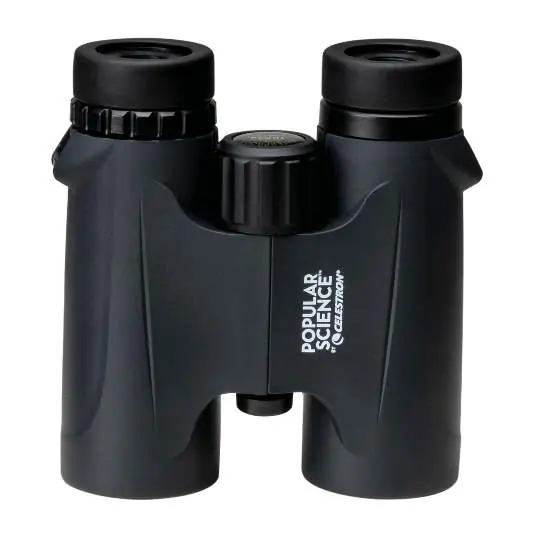
The Celestron Outland X 10X32 binoculars are designed for versatile observation. This model includes a smartphone adapter for digiscoping and a Bluetooth remote for hands-free photography. The device is intended for users aged 14 and older.
Initial Setup
Before use, adjust the interpupillary distance (IPD) by moving the two halves of the binoculars about the hinge until you see a single, clear circular image. If you wear eyeglasses, twist the rubber eyecups down to their lowest position to ensure proper eye relief.
Diopter Adjustment
To compensate for differences in visual acuity between your eyes: 1. Pick a subject about 50 yards away. 2. Cover the right objective lens. 3. Use the center focus dial to bring the image into focus. 4. Cover the left objective lens and uncover the right. 5. If the image is not clear, use the diopter compensation dial to adjust the focus for your right eye.
Smartphone Adapter Usage
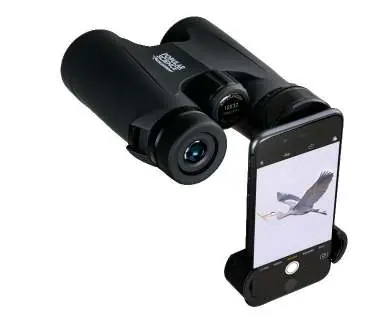
To attach your smartphone: 1. Twist the binocular eyecup to its lowest position. 2. Pull the spring clamp arms outward to secure your phone. 3. Align the adapter aperture with your phone's camera lens. 4. Fit the eyecup cuff over the binocular eyepiece and tighten the tension knob. 5. Use the phone's zoom to eliminate vignetting (the circular black border).
Bluetooth Remote
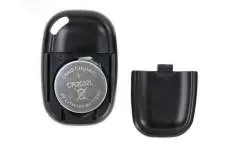
To pair the remote: 1. Press and hold the button for 5 seconds until the blue light blinks. 2. Pair the device named GBshutter in your phone's Bluetooth settings. The remote triggers the camera shutter or starts/stops video recording.
Care and Maintenance
Keep lenses clean using a dedicated lens cleaning kit or a camel's hair brush. Avoid touching glass surfaces, as fingerprints contain mild acids that can damage coatings. If the binoculars are dropped, they may require professional collimation (optical alignment) service. Never attempt to disassemble the binoculars.
Safety
Never look directly at the Sun through the binoculars, as this can cause permanent eye damage. The included Bluetooth remote uses a CR2032 battery; ensure it is inserted with the positive side facing upward.
Manufacturer information
Celestron
Practical help
Common problems
Image is not clear or feels like it is pulling on the eyes.
The diopter compensation dial may have been moved. Repeat the diopter adjustment procedure to re-balance the focus for your eyes.
Vignetting (black circular border) appears when using the smartphone adapter.
This is normal. Use your smartphone's camera zoom function to expand the image until the vignetting disappears.
Bluetooth remote is not connecting.
Ensure the remote is in pairing mode (blue light blinking) and check your phone's Bluetooth settings for the device named GBshutter.
Before use
- Adjust interpupillary distance (IPD) for your eyes.
- Set rubber eyecups (down for glasses, up for no glasses).
- Perform diopter compensation adjustment.
- Ensure CR2032 battery is correctly installed in the Bluetooth remote.
Images and diagrams
- The hinge allows adjustment of the IPD.
- The center focus dial adjusts focus for both eyes simultaneously.
- The diopter compensation dial adjusts focus for the right eye independently.
Model compatibility
- Designed for users 14 years of age and older.
- Smartphone adapter is compatible with most smartphones.
- Bluetooth remote requires a CR2032 battery.

Manual page author
David Miller
Documentation analyst
Organizes user manual content into clear summaries, with attention to model details, product context, and everyday usability.