General / Accessories
Celestron NexStar 130SLT Telescope Quick Set-up Guide
A comprehensive quick set-up guide for the Celestron NexStar 130SLT telescope, covering tripod assembly, optical tube mounting, finderscope alignment, and the SkyAlign computerized hand control procedure.
Table of contents
Manual images
Jump to the sectionQuick guide from the manual
This document provides essential steps for the initial assembly and alignment of the Celestron NexStar 130SLT telescope. It covers the physical setup of the tripod and optical tube, as well as the initial configuration of the computerized hand control system required for celestial navigation.
Assembly and Installation
- Tripod Setup: Spread the tripod legs until the center brace is fully extended. Adjust leg height by loosening the locking knobs, extending to the desired length, and re-tightening. Ensure all legs are equal in length using the built-in bubble level.
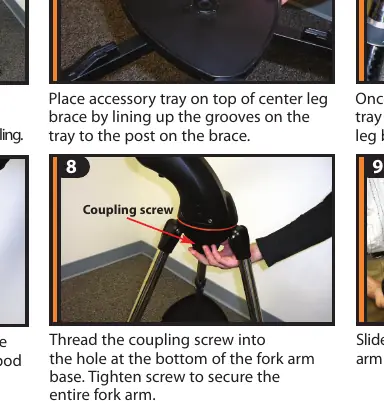
- Accessory Tray: Place the tray on the center brace, aligning the grooves with the posts, and turn until it snaps into the clips.
- Fork Arm and Optical Tube: Place the fork arm base into the tripod mounting platform and secure it with the coupling screw. Slide the optical tube dovetail into the fork arm and tighten the internal screw to secure.
- Finderscope: Loosen the silver screw on the mounting platform, slide the finderscope in, and re-tighten. Ensure the glass window faces the front of the telescope.
- Hand Control: Attach the holder to a tripod leg, slide the hand control into the holder, and plug the cable into the Hand Control port on the fork arm.
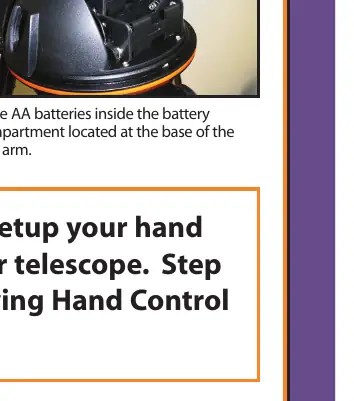
- Power: Insert 8 AA batteries into the compartment at the base of the fork arm.
Finderscope Alignment
Before using the telescope, the finderscope must be aligned with the optical tube:
- Turn on the red LED light (remove the clear plastic battery disk if using for the first time).
- Point the telescope at a distant land object (e.g., a telephone pole) and center it in the 25mm eyepiece.
- Use the azimuth and altitude adjustment knobs on the finderscope to place the red dot directly over the centered object.
- Turn off the LED light after alignment to conserve battery.
SkyAlign Alignment Procedure
To accurately locate objects, the telescope must be aligned with known stars:
- Turn the power switch to ON. When the display reads NexStar SLT, press ENTER.
- Select SkyAlign using the UP/DOWN buttons and press ENTER.
- Enter your site and time information (use UNDO to backspace or enter new data). Select your location via the City Database.
- Use the directional arrow keys to slew the telescope to three bright celestial objects. Center each object in the finderscope, press ENTER, then center it in the eyepiece and press ALIGN.
- Once the third object is aligned, the display will read Match Confirmed.
Manufacturer information
Celestron
Practical help
Common problems
Hand control directional arrows do not scroll through menus.
The directional arrows are only for moving the telescope. Use the UP and DOWN scroll buttons (located on keys 6 and 9) to navigate menus.
Finderscope red dot is not aligned with the telescope view.
Center a distant object in the main eyepiece first, then use the azimuth and altitude knobs on the finderscope to move the red dot onto that same object.
Before use
- Remove the tube lens cap.
- Ensure 8 AA batteries are installed in the fork arm base.
- Remove the clear plastic battery disk from the finderscope.
- Ensure the tripod is level using the bubble level.
- Verify the date, time, and location settings in the hand control.
Specs in practice
- Slew Speed (1-9)
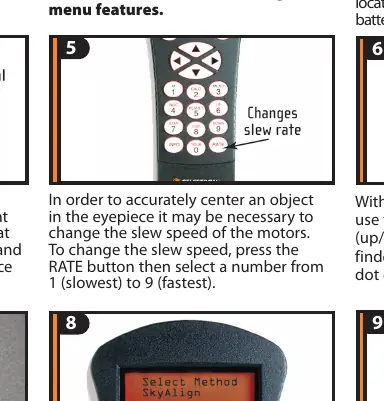
- Controls the motor speed for moving the telescope. 1 is the slowest (for precise centering), 9 is the fastest.
- 25mm Eyepiece
- The low-power eyepiece recommended for initial object centering and alignment.
Images and diagrams
- The tripod legs must be extended 6-8 inches for stability.
- The accessory tray must be snapped into the clips on the leg brace to provide structural support.
- The optical tube dovetail slides into the fork arm; ensure the internal screw is tightened to prevent the tube from slipping.
Model compatibility
- Requires 8 AA batteries for operation.
- The SkyAlign procedure requires a clear view of the sky and knowledge of three bright celestial objects.

Manual page author
Emily Carter
User documentation editor
Prepares concise manual descriptions and highlights the most useful setup, operation, and maintenance information for readers.