General / Accessories
Celestron StarSense Explorer DX 100AZ Refractor Telescope User Guide
Comprehensive setup and operation guide for the Celestron StarSense Explorer DX 100AZ telescope, including tripod assembly, finderscope alignment, and smartphone app integration.
Table of contents
Manual images
Jump to the sectionProduct Overview
The Celestron StarSense Explorer DX 100AZ is a high-quality refractor telescope designed to make stargazing accessible and intuitive. By integrating your smartphone with the StarSense Explorer app, the telescope provides real-time guidance to help you locate and identify celestial objects in the night sky.
Assembly and Setup
Begin by unpacking all components, including the telescope tube, tripod, mount head, accessory tray, eyepieces, erect image diagonal, finderscope, and the StarSense phone dock. Start by setting up the tripod: spread the legs fully, push down the center brace, and extend the legs to your desired height using the hand knobs. Attach the accessory tray to the center brace using the provided thumb screws.
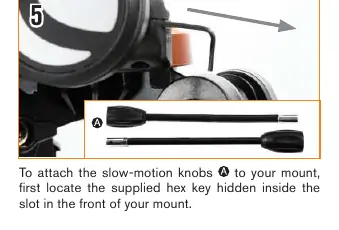
Next, attach the slow-motion control knobs to the mount using the hex key stored in the front of the mount head. Once the mount is ready, attach the telescope tube by sliding the dovetail bar into the mount clamp and securing it with the hand knob. Install the erect image diagonal into the focuser, followed by the 25mm eyepiece.
Aligning the Finderscope
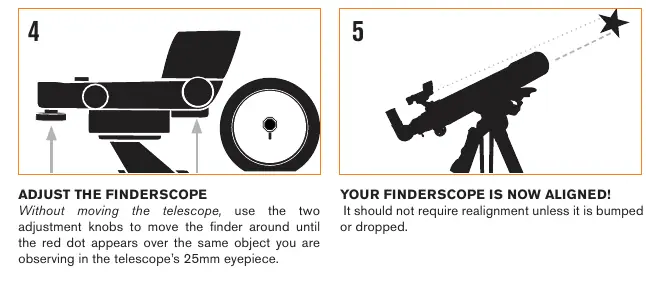
Proper alignment of the finderscope is essential for locating objects. Perform this during the day by choosing a distant, stationary target at least a quarter-mile away. Center the target in the telescope's 25mm eyepiece, then adjust the finderscope's two adjustment knobs until the red dot aligns with the same object. Once aligned, the finderscope will accurately point the telescope at your desired celestial targets.
Using the StarSense Explorer App
Download the StarSense Explorer app on your mobile device. Use the unique activation code found on the orange postcard included in the box to unlock the app's features. To use the system, attach the phone dock to the mount, insert your smartphone, and launch the app. The app will guide you through the process of finding your first astronomical target.
Safety and Maintenance
Solar Warning: Never look directly at the Sun through the telescope without a proper solar filter, as this can cause permanent eye damage. The device includes a button battery for the finderscope; ensure the battery compartment is always securely fastened and keep it out of reach of children. Store the telescope in a dry, cool place and avoid touching the optical surfaces to maintain image clarity.
Manufacturer information
Celestron
Practical help
Common problems
Image is blurry
Gently turn the focus knobs on either side of the telescope until the image comes into sharp focus.
Finderscope not pointing at the same object as the telescope
Perform the alignment procedure again during the day using a distant target.
Smartphone does not fit in the dock
Remove bulky phone cases, such as folio-style cases, before inserting the phone into the spring-loaded holder.
Before use
- Verify all parts are present from the box contents list.
- Ensure the tripod is stable and the center brace is pushed down.
- Check that all setscrews on the focuser and diagonal are tightened.
- Remove the plastic tab from the finderscope battery compartment.
- Download the StarSense Explorer app via Wi-Fi.
- Activate the app using the unique code on the orange postcard.
- Remove the front lens cap before observing.
Specs in practice
- Slip clutches
- Internal mechanisms that allow for large manual movements of the telescope without loosening knobs.
- Dovetail bar
- The mounting rail on the telescope tube that slides into the mount clamp.
- Erect image diagonal
- An optical accessory that allows for comfortable viewing and corrects the image orientation.
Images and diagrams
- The mount features a D-shaped gear shaft for the slow-motion knobs.
- The finderscope bracket slides into a dedicated dovetail slot on the telescope tube.
- The phone dock uses a bayonet mount to attach to the telescope mount.
- The orange release button on the dock allows for quick removal of the smartphone holder.
Model compatibility
- The activation code unlocks the app on up to 5 devices.
- The telescope is designed for users 14 years of age and older.
- Most smartphones fit in the dock with standard cases.

Manual page author
David Miller
Documentation analyst
Organizes user manual content into clear summaries, with attention to model details, product context, and everyday usability.