General / Accessories
Celestron StarSense Explorer DX 102AZ Setup Guide
Comprehensive setup and operation guide for the Celestron StarSense Explorer DX 102AZ telescope, including tripod assembly, finderscope alignment, and smartphone app integration.
Table of contents
Manual images
Jump to the sectionProduct Overview
The Celestron StarSense Explorer DX 102AZ is a high-quality refractor telescope designed to make stargazing accessible and fun. By utilizing your smartphone and the StarSense Explorer app, the telescope helps you locate and identify celestial objects in the night sky with ease. The package includes the telescope tube, a sturdy tripod with a mount head, slow-motion controls, an accessory tray, two eyepieces, an erect image diagonal, a finderscope, and a specialized StarSense phone dock.
Assembly and Setup
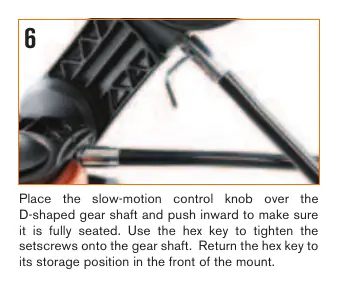
Begin by unpacking all components and verifying them against the included parts list. Set up the tripod by spreading the legs and securing the center leg brace. Attach the accessory tray to the brace using the provided thumb screws. Install the slow-motion control knobs onto the mount using the hex key hidden in the front slot of the mount head. Secure the telescope tube to the mount by sliding the dovetail bar into the clamp and tightening the hand knob. Finally, insert the erect image diagonal into the focuser and attach the 25 mm eyepiece.
Aligning the Finderscope
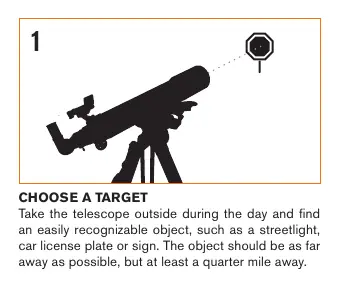
Proper alignment of the finderscope is crucial for locating objects. Perform this during the day by choosing a distant, recognizable target at least a quarter-mile away. Center the target in the telescope's 25 mm eyepiece. Without moving the telescope, use the two adjustment knobs on the finderscope to align the red dot with the same target. Once aligned, the finderscope will accurately point to objects you wish to view.
Using the StarSense App
Before your first night out, download the StarSense Explorer app from the Apple App Store or Google Play. Use the unique activation code found on the orange postcard included in the box to unlock the app features. To use the phone dock, remove the mirror cover, pull the spring-loaded slider, and secure your smartphone flush against the bottom lip of the holder. Launch the app and follow the on-screen tutorial to begin your astronomical journey.
Safety and Maintenance
Solar Warning: Never attempt to view the Sun through your telescope without a proper, certified solar filter, as this can cause permanent eye damage. Keep the telescope in a dry, dust-free environment when not in use. If the finderscope is bumped or dropped, you may need to realign it. Use the slow-motion knobs for fine adjustments and tracking celestial objects across the sky.
Manufacturer information
Celestron
Practical help
Common problems
Image is blurry
Gently turn the focus knobs on either side of the telescope until the image comes into sharp focus.
Finderscope not pointing at the same object as the telescope
Re-align the finderscope during the day using a distant target and the two adjustment knobs.
Smartphone does not fit in the dock
Remove bulky phone cases, especially folio-style cases, to ensure the phone sits flush in the dock.
Before use
- Verify all parts are present from the packing list.
- Ensure tripod legs are fully extended and the brace is locked.
- Check that the slow-motion knobs are securely tightened.
- Remove plastic covers from the diagonal and eyepieces.
- Remove the clear plastic battery tab from the phone dock.
- Download and activate the StarSense Explorer app.
- Perform finderscope alignment during daylight hours.
Images and diagrams
- Tripod setup: Spread legs and secure the center brace.
- Mounting: Attach slow-motion knobs to the D-shaped gear shaft.
- Telescope attachment: Slide the dovetail bar into the mount clamp.
- Finderscope alignment: Use adjustment knobs to match the red dot to the eyepiece view.
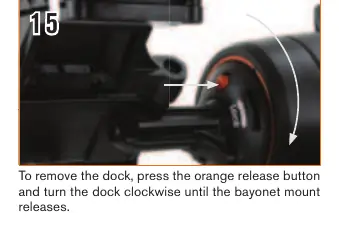
- Smartphone dock: Align the arrow on the dock with the mount mark and rotate to lock.
Model compatibility
- The activation code unlocks the app on up to 5 devices.
- Most smartphones fit in the dock with standard cases.
- The telescope is compatible with standard 1.25-inch eyepieces.

Manual page author
Emily Carter
User documentation editor
Prepares concise manual descriptions and highlights the most useful setup, operation, and maintenance information for readers.