Electronics / Routers
Cisco Aironet 1532I-E Access Point Secure Data Wipe Guide
Learn how to securely erase sensitive data from your Cisco Aironet 1532I-E Access Point using the Secure Data Wipe feature to ensure complete removal of configuration and system files.
Table of contents
Secure Data Wipe Overview
The Secure Data Wipe feature is designed to provide a reliable method for permanently erasing sensitive information from the file system of Cisco Access Points. By utilizing the clear ap config command, administrators can trigger a secure wipe process that ensures data cannot be recovered. This feature is essential for decommissioning devices or preparing them for redeployment in different environments.
Data Removal Scope
When the secure wipe process is initiated, the system targets specific file types to ensure comprehensive sanitization. The following data categories are permanently removed:
- Configuration and backup configuration files
- System crash files
- Diagnostic log files
- Boot variables
- Package logs
Executing and Verifying the Wipe
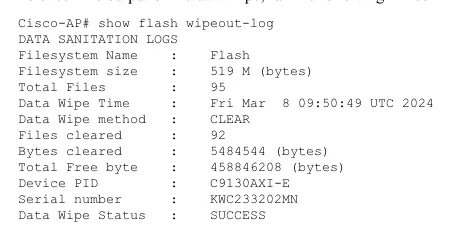
To perform a secure data wipe, use the clear ap config command on the device. Once the process is complete, the system stores metadata regarding the wipeout, which can be used for verification and troubleshooting. To view the history and status of the operation, execute the following command: show flash wipeout-log. This will display details such as the filesystem name, the number of files cleared, the total bytes removed, and the final status of the operation.
Important Considerations for Work Group Bridge Mode
For Access Points operating in Work Group Bridge mode, the standard command may not be applicable. In this specific configuration, the data wipe must be performed manually using the physical mode button on the device. Press and hold the mode button for a duration of 20 to 60 seconds to initiate the removal of storage content.
Compatibility and Firmware Requirements
The Secure Data Wipe feature is supported across various Cisco Access Point models. Compatibility depends on the specific firmware version installed on the device. Users should ensure their device is running a supported version of Cisco IOS XE to utilize this functionality. Please note that support for Cisco Wave 1 and Wave 2 APs varies by release, and administrators should verify their specific firmware version against the official compatibility matrix to ensure the feature is available and functioning correctly.
Related manuals
Related manuals from the same brand or category.
Electronics / Routers
Cisco Business 143AC Mesh Extender
CiscoElectronics / Routers
Cisco Business 142AC Mesh Extender Quick Start Guide
CiscoElectronics / Routers
Cisco Business 141AC Mesh Extender User Guide
CiscoElectronics / Routers