Electronics / Networking
Release Notes for Cisco Catalyst 9800 Series Wireless Controller (Cisco IOS XE Dublin 17.11.x)
Comprehensive release notes and upgrade guide for Cisco Catalyst 9800 Series Wireless Controllers running Cisco IOS XE Dublin 17.11.x. Includes new features, supported hardware, upgrade paths, and compatibility information.
Table of contents
Manual images
Click an image to enlargeQuick Guide from the Manual
This document provides essential release information for the Cisco Catalyst 9800 Series Wireless Controller running Cisco IOS XE Dublin 17.11.x. It covers new software features, supported hardware platforms, upgrade paths, and compatibility requirements.
New Software Features
Cisco IOS XE Dublin 17.11.1 introduces several enhancements, including:
- 6-GHz Radio Support: Added support for Albania, Iceland, Lichtenstein, Norway, and Switzerland.
- Background Scanning: MAP Fast Ancestor Find Mode for improved uplink neighbor switching.
- Captive Portal Improvements: Support for special characters in banner text.
- Client Debug Bundle: New commands to collate trace logs and packet captures for troubleshooting.
- GNSS Support: APs can now track and report GPS information.
- iCAP Spectrum Analysis: Improved spectral capture update rates for WiFi6E APs.
Supported Hardware
The software supports various virtual and hardware platforms, including:
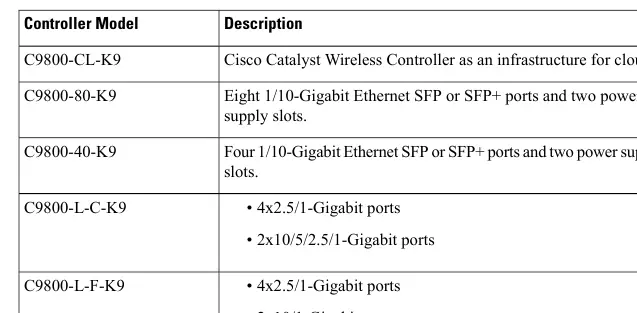
- Cisco Catalyst 9800-80: Modular controller for large enterprises.
- Cisco Catalyst 9800-40: Fixed controller for mid-size to large enterprises.
- Cisco Catalyst 9800-L: Low-end controller for performance.
- Cisco Catalyst 9800-CL: Virtual form factor for private and public clouds.
- Cisco Catalyst 9800 Embedded Wireless Controller: For Cisco Catalyst 9000 switches.
Upgrade and Installation
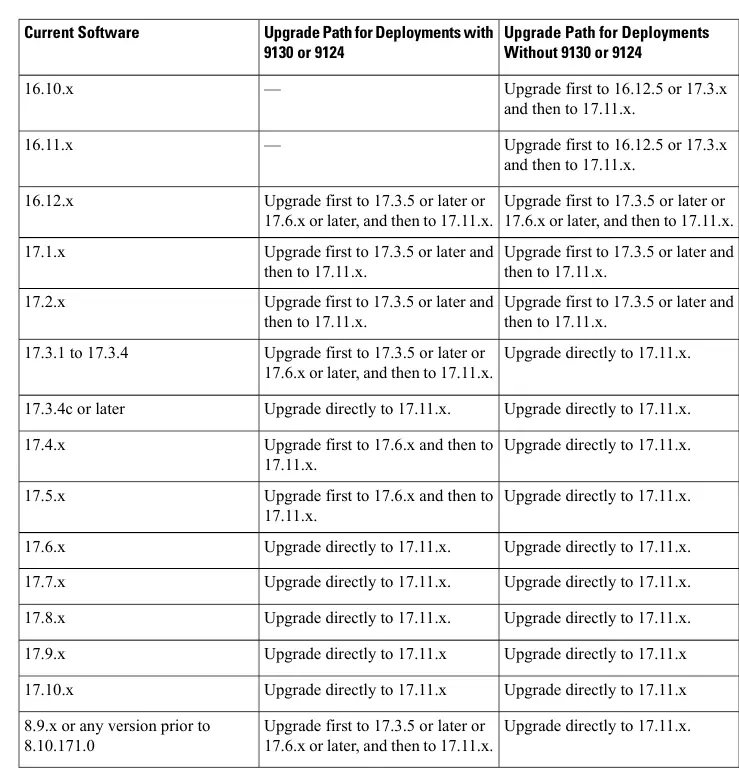
Before upgrading, ensure you review the specific upgrade path for your current software version. The manual provides detailed tables for upgrade paths depending on whether your deployment includes 9130 or 9124 access points. Always verify hardware requirements (minimum 233 MHz processor, 512 MB DRAM) and browser compatibility before proceeding.
Troubleshooting and Support
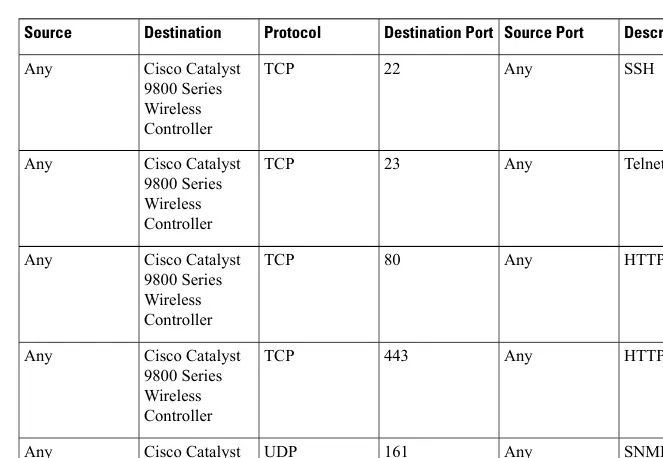
For detailed troubleshooting, use the Cisco Bug Search Tool (BST) to search for specific bug identifiers. The document also provides a comprehensive list of network protocols and port requirements to ensure proper connectivity for services like SSH, Telnet, HTTP, and SNMP.
Manufacturer information
Cisco Systems, Inc.
Practical help
Common problems
Upgrade failure due to insufficient space in /tmp directory
Reboot the AP to clear space before attempting the upgrade.
AP boot loop over WAN link
Refer to the specific Cisco support documentation for WAN link upgrade guidance.
SNMP error SNMP_ERRORSTATUS_NOACCESS 6
This indicates the specified SNMP variable is not accessible.
Controller GUI access issues after upgrade
Ensure the 'ip http active-session-modules' command is correctly configured.
Before use
- Verify current software version using the 'show version' command.
- Check hardware requirements (minimum 233 MHz processor, 512 MB DRAM).
- Ensure browser compatibility (Chrome 59+, Edge 40+, Safari 10+, Firefox 60+).
- Review the upgrade path table for your current software version.
- Remove configurations applicable only to the current version before downgrading.
Specs in practice
- C9800-L-C-K9
- Low-end controller with 4x2.5/1-Gigabit ports and 2x10/5/2.5/1-Gigabit ports.
Images and diagrams
- Network Protocols and Port Matrix: Lists source, destination, protocol, and port requirements for services like SSH, Telnet, HTTP, and SNMP.
Model compatibility
- Supports a wide range of Cisco Aironet and Catalyst access points.
- Compatible with Cisco DNA Center, Cisco Prime Infrastructure, and Cisco Identity Services Engine.

Manual page author
David Miller
Documentation analyst
Organizes user manual content into clear summaries, with attention to model details, product context, and everyday usability.