General / Other Manuals
SYSTIMAX Propel Cabling Solutions for Arista 100G & 200G Transceivers
Comprehensive guide for designing and implementing CommScope Propel cabling systems for Arista 100G and 200G fiber optic transceivers, including direct connection and breakout options.
Table of contents
Manual images
Jump to the sectionOverview of Propel Cabling Solutions
The CommScope Propel cabling system provides a modular and scalable infrastructure designed to support high-speed Arista 100G and 200G fiber optic transceivers. This guide outlines the necessary components and configurations for both direct connections and breakout scenarios, ensuring optimal performance in data center environments.
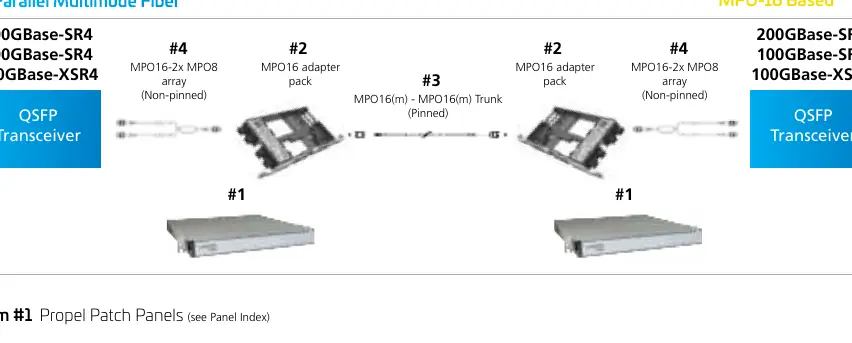

System Components and Connectivity
The Propel system utilizes high-density MPO-8 and MPO-16 based trunk cabling, adapter packs, and distribution modules to facilitate seamless connectivity. Users can choose between various patch cords, including MPO multimode UPC/APC cords and SYSTIMAX Uniboot LC duplex cords, depending on the specific transceiver requirements and reach distances.
Direct Connections
For direct equipment connections, the system supports various multimode and singlemode configurations. Users must select the appropriate patch cord based on the transceiver type (e.g., QSFP-100G-SR4, QSFP-200G-FR4) and the required fiber type (OM4, OM5, or OS2). The guide provides detailed part number selection matrices to ensure compatibility with specific Arista hardware.
Breakout Options
The Propel system excels in breakout applications, allowing users to split high-speed QSFP ports into multiple lower-speed connections, such as 4x25G or 4x50G. By utilizing Propel ULL distribution modules and conversion array cords, network architects can efficiently manage port density and transition between different interface types while maintaining signal integrity.
Installation and Design Considerations
When designing a cabling system, it is critical to account for the specific transceiver requirements, including connector types (MPO-12, LC-Duplex, CS) and reach limitations. The Propel panels are available in 1RU, 2RU, and 4RU configurations, offering flexible port density to meet varying infrastructure needs. Proper planning using the provided reference diagrams ensures that trunk cables, adapter packs, and patch cords are correctly matched for the intended application.
Maintenance and Best Practices
To ensure long-term reliability, all fiber connections should be kept clean and protected with dust caps when not in use. The modular nature of the Propel system allows for easy upgrades and reconfigurations as network demands evolve. Always verify the forward error correction (FEC) settings on both ends of the link to ensure successful interoperability between transceivers.
Manufacturer information
CommScope Holding Company, Inc.
Practical help
Common problems
Link failure between transceivers
Verify that the forward error correction (FEC) mode is identical on both ends of the link.
Incompatible connector types
Consult the transceiver model table to ensure the patch cord connector (MPO, LC, CS) matches the transceiver interface.
Before use
- Identify the specific Arista transceiver model.
- Determine the required fiber type (OM4, OM5, or OS2).
- Verify the reach distance requirements.
- Select the appropriate Propel panel size (1RU, 2RU, or 4RU).
- Choose between MPO-8 or MPO-16 based cabling infrastructure.
- Ensure all fiber end-faces are clean before connection.
Specs in practice
- MPO-8/MPO-16
- Refers to the fiber count and connector interface standard used for trunk cabling and modules.
Images and diagrams
- Reference diagrams illustrate the path from the QSFP transceiver through patch cords, adapter packs, and trunk cables to the destination.
- Breakout diagrams show how to split a single high-speed port into multiple lower-speed connections using distribution modules.
Model compatibility
- MPO-12 applications use 8 fibers and are compatible with both MPO-8 and MPO-16 infrastructure.
- Breakout modes may require third-party optics if Arista does not provide specific SFP-DD or DSFP modules.

Manual page author
Michael Turner
Technical manual editor
Reviews PDF manuals for structure, safety notes, and practical product details so readers can find the right information quickly.