Home Appliances / Air Fryers
User Manual for Cosori Smart 10-Quart Air Fryer Oven
Quick guide for the Cosori Smart 10-Quart Air Fryer Oven (AF701-CS). Includes setup, cooking functions, cleaning, troubleshooting, and app connectivity.
Table of contents
Manual images
Click an image to enlargeQuick guide from the manual
The Cosori Smart 10-Quart Air Fryer Oven is designed for air frying, roasting, baking, and dehydrating. Key features include smart app connectivity via VeSync, a digital display with multiple presets, and dishwasher-safe accessories. Always ensure proper ventilation (5 inches/13 cm clearance) and never fill the basket with oil.
Important Safety Precautions
- Hot Surfaces: The exterior and door become very hot during use. Always use heat-resistant gloves or mitts.
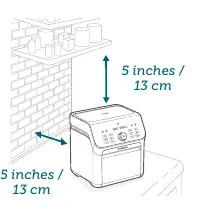
- Clearance: Maintain at least 5 inches (13 cm) of free space on all sides and above the oven.
- No Oil: Do not fill the basket with oil or fat. This is not a deep fryer.
- Electrical Safety: Use only with 120V, 60Hz outlets. Do not use if the cord or plug is damaged.
- Supervision: Close supervision is required when used near children.
Getting to Know Your Air Fryer
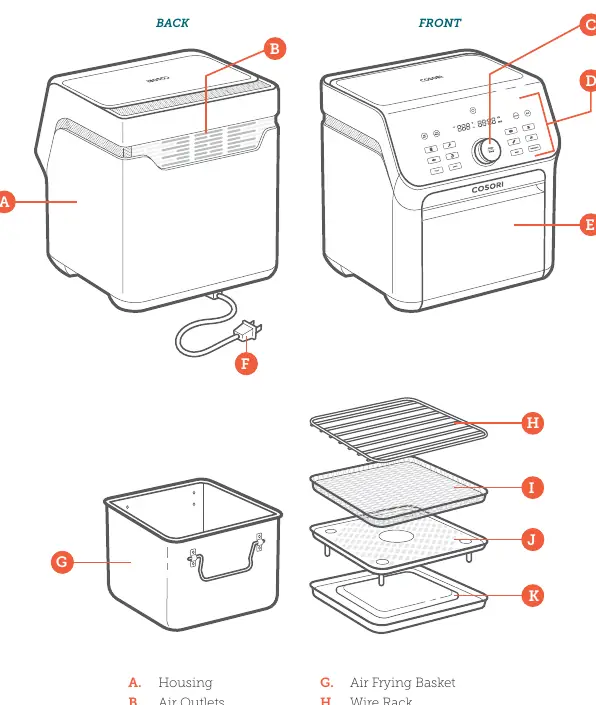
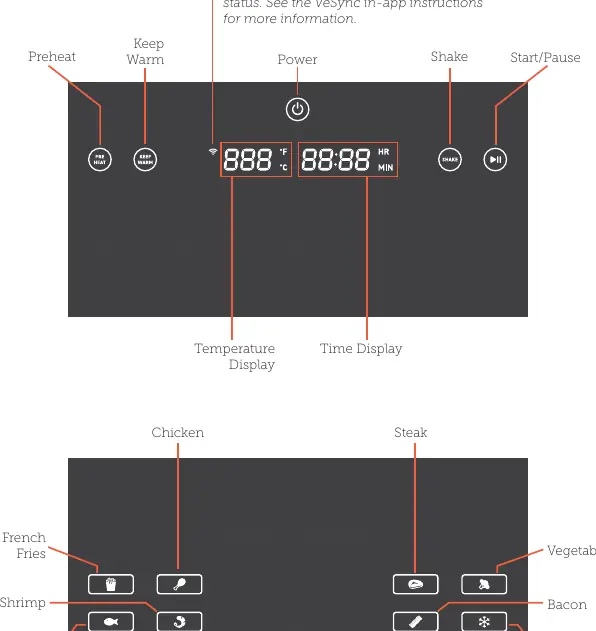
The unit includes an air frying basket, wire rack, dehydrating racks, crisper plate, and crumb tray. The control panel features a Temp/Time knob for adjustments and various cooking function buttons (e.g., French Fries, Chicken, Steak, Toast, Bake).
Before First Use
- Remove all packaging and stickers.
- Place the oven on a stable, level, heat-resistant surface.
- Wash all accessories and the oven interior.
- Perform a test run: Plug in, press the power button, select a preset (e.g., Steak), and run for 5 minutes without food to remove any manufacturing residues.
Cooking Functions
You can use pre-programmed functions or manual cooking. To use a function: select the preset, adjust time/temperature if needed, and press Start/Pause. The oven will beep when preheating is complete and when cooking is finished.
Shaking Food
For small foods like fries or nuggets, shaking ensures even cooking. The oven will beep and display "(Shake)" halfway through the cooking time. Open the door, shake or flip the food, and close the door to resume.
Cleaning and Maintenance
- Oven Interior: Clean after every use. Unplug and allow to cool completely. Use a soft, damp cloth with non-abrasive cleaner.
- Accessories: All accessories are dishwasher-safe. For stubborn grease, use a paste of baking soda and water.
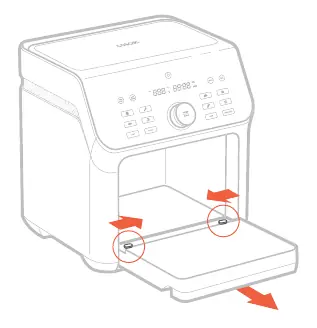
- Door Removal: The door can be removed for easier cleaning by pushing the buttons at the bottom of the door inward simultaneously.
Troubleshooting
If the oven does not turn on, ensure it is plugged in. If food is not cooked, increase time or temperature. If dark smoke appears, immediately stop and unplug the unit. Error codes E1 and E2 indicate a temperature monitor issue; E4 indicates an incorrect power source (must be 120V).
Manufacturer information
COSORI
Practical help
Common problems
The oven will not turn on
Ensure the oven is securely plugged into a 120V outlet.
Food is not completely cooked
Increase the cooking temperature or time, or reduce the quantity of food in the basket.
Dark smoke is coming out
Immediately press Start/Pause and unplug the oven. Food is burning; wait for smoke to clear before opening.
Error Code E1 or E2
There is an open or short circuit in the temperature monitor. Contact Customer Support.
Error Code E4
The oven is plugged into an incorrect power source (e.g., 220-240V). Use only 120V, 60Hz outlets.
Before use
- Remove all packaging and temporary stickers.
- Place on a stable, level, heat-resistant surface.
- Ensure 5 inches (13 cm) of clearance on all sides and above.
- Wash all accessories and the oven interior.
- Perform a test run without food to remove residues.
Specs in practice
- Power Supply
- AC 120V, 60Hz (1800W).
- Temperature Range
- 190°–450°F / 88°–230°C.
Images and diagrams
- Figure 1.1: Shows the required 5-inch clearance around the oven.
- Figure 3.1: Illustrates the door removal process for cleaning.
Model compatibility
- Requires 120V, 60Hz electrical system.
- Compatible with VeSync app for smart features.
- Accessories are nonstick and dishwasher-safe.

Manual page author
Emily Carter
User documentation editor
Prepares concise manual descriptions and highlights the most useful setup, operation, and maintenance information for readers.