Home Appliances / Air Fryers
User Manual for COSORI Lite 2.0-Litre Mini Air Fryer
Comprehensive user guide for the COSORI Lite 2.0-Litre Mini Air Fryer (CAF-LI211). Includes setup, cooking instructions, maintenance, troubleshooting, and safety guidelines.
Quick answers from the manual
Quick answer
- The COSORI Lite 2.0-Litre Mini Air Fryer (CAF-LI211) is a compact appliance for air frying, baking, roasting, and reheating. This manual provides instructions for setup, operation, maintenance, and troubleshooting. p. 3, 11
Key actions
- Perform a test run p. 10
- Clean the basket p. 14
First start
- Remove all packaging, wash the basket and crisper plate, and run a 5-minute test cycle. p. 10
Problems and fixes
Error Code E3
Overheat protection activated. Turn off, unplug, and let cool completely.
p. 15Error codes
| Code | Meaning | Action | Pages |
|---|---|---|---|
| E3 | Overheat protection activated | Turn off, unplug, and let cool | p. 15 |
| E4 | Incorrect voltage | Use 120V, 60Hz outlet | p. 15 |
Maintenance and reset
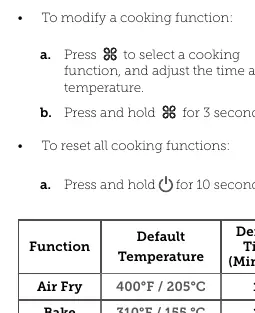
- Press and hold the Power button for 10 seconds to reset the air fryer. p. 9
Technical specifications
| Parameter | Value | Meaning | Pages |
|---|---|---|---|
| Model | CAF-LI211 | Product model number | p. 3 |
| Power Supply | AC 120V, 60Hz | Required electrical input | p. 3 |
| Rated Power | 900W | Power consumption | p. 3 |
Where to find it in the PDF
- Specifications p. 3
- Important Safeguards p. 4
- Before First Use p. 10
- Troubleshooting p. 15
- Warranty Information p. 16
Table of contents
Manual images
Click an image to enlargeQuick Guide from the Manual
The COSORI Lite 2.0-Litre Mini Air Fryer is designed for quick, crispy cooking using rapid 360° air circulation. Before first use, remove all packaging, wash the basket and crisper plate, and perform a test run by running the unit on the Air Fry function for 5 minutes to eliminate manufacturing residues.
Getting to Know Your Air Fryer
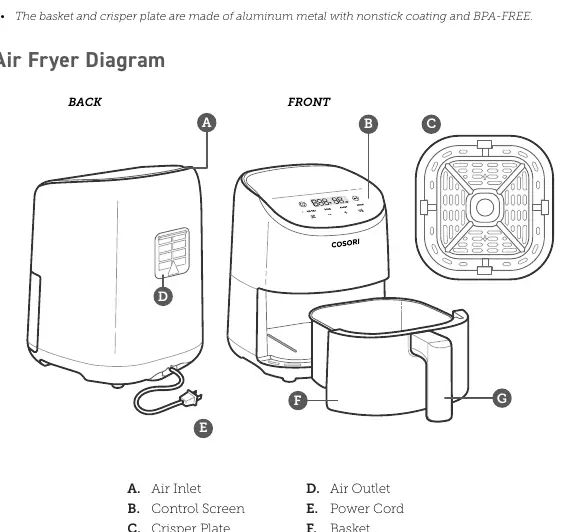
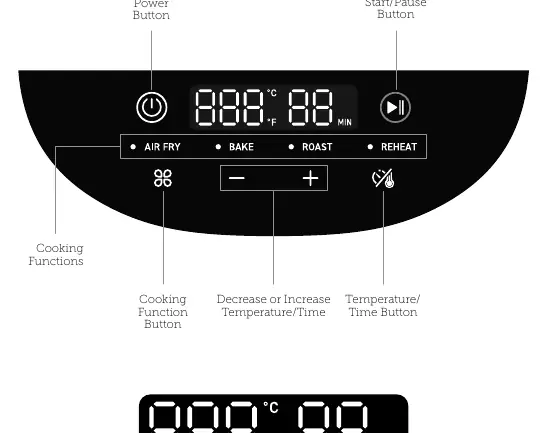
The unit consists of the main housing with an air inlet and outlet, a control screen, a removable basket, and a crisper plate. The control panel allows you to select cooking functions (Air Fry, Bake, Roast, Reheat), adjust temperature and time, and start or pause the cooking process.
Using Your Air Fryer
To use the air fryer, select a cooking function, which comes with pre-programmed ideal time and temperature settings. You can modify these settings by pressing the Temperature/Time button and using the + or - buttons. To pause, press the Start/Pause button; the unit will automatically resume when the basket is replaced.
Air Frying
Place the crisper plate into the basket, add food, and select your desired function. For even cooking, shake or flip food halfway through the cooking time. The air fryer will pause automatically when the basket is removed and resume when it is replaced.
Care & Maintenance
Always clean the basket and crisper plate after every use. They are dishwasher-safe, or can be washed with hot, soapy water and a non-abrasive sponge. Do not use metal utensils or abrasive cleaners. If the heating coil needs cleaning, wipe it with a moist, non-abrasive sponge or cloth. Ensure the unit is completely cool and dry before storing or using again.
Troubleshooting
If the air fryer does not turn on, ensure it is plugged in and the basket is securely inserted. White smoke is normal during the first use or when cooking greasy foods. Dark smoke indicates burning food or a circuit problem; unplug immediately. Error codes E1 and E2 indicate issues with the temperature monitor, while E3 indicates the overheat protection has activated. E4 indicates the unit is plugged into an incompatible voltage outlet.
Manufacturer information
COSORI
Practical help
Common problems
Air fryer will not turn on
Ensure the unit is plugged in and the basket is pushed securely into the air fryer.
White smoke
Normal for first use or if greasy food is cooked; ensure basket and interior are clean.
Dark smoke
Unplug immediately; food is burning or there is a circuit problem.
Error Code E4
The unit is plugged into a 220-240V outlet. Use only 120V, 60Hz outlets.
Before use
- Remove all packaging and temporary stickers
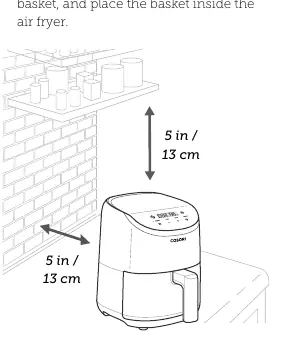
- Place on a stable, level, heat-resistant surface
- Wash the basket and crisper plate
- Wipe the inside and outside with a moist cloth
- Perform a test run for 5 minutes
Specs in practice
- Temperature Range
- 170°–400°F / 75°–205°C
Images and diagrams
- B: Control Screen
- C: Crisper Plate
- D: Air Outlet
- E: Power Cord
- G: Basket Handle
Model compatibility
- Use only 120V, 60Hz electrical systems
- Not for commercial use; household use only

Manual page author
David Miller
Documentation analyst
Organizes user manual content into clear summaries, with attention to model details, product context, and everyday usability.