Power / Batteries & Chargers
User Manual for D'Addario PW-CT-23 Pedal Tuner+
Quick guide for the D'Addario PW-CT-23 Pedal Tuner+. Learn how to use the tuning features, set the countdown timer, and switch between buffered and true bypass modes.
Table of contents
Manual images
Click an image to enlargeQuick guide from the manual
The D'Addario Pedal Tuner+ is a versatile guitar pedal that combines precise tuning capabilities with a built-in countdown timer for set lists or rehearsals. It features switchable bypass modes to maintain signal integrity across long cable runs.
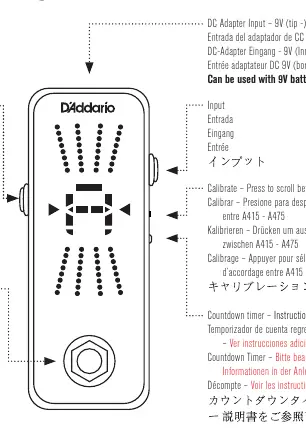
Tuning operation
To tune your instrument, connect it to the Input jack and your amplifier or next pedal to the Output jack. The display provides visual feedback:
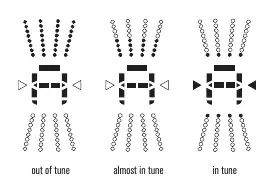
- Out of tune: Upper LEDs light up when sharp; lower LEDs light up when flat.
- In tune: Green LEDs above and below the note light up, along with both left and right arrows.
You can calibrate the reference pitch by pressing the Calibrate button to scroll between A415 and A475 Hz.
Countdown timer
The pedal includes a convenient countdown timer to help monitor your performance time:
- Press the COUNTDOWN button on the side to select the desired time. Each press adds five minutes (press and hold to scroll faster).
- Stop at your desired time. After a few seconds, the setting will flash, indicating the timer is armed.
- Press the COUNTDOWN button again to start the timer. The green arrows will flash to indicate it is active.
- When the timer reaches 5 minutes, a row of red LEDs will flash as a warning.
- When time expires, the display will read 00. Press the COUNTDOWN button to end the function.
You can pause or restart the timer by pressing the COUNTDOWN button while it is active, or press and hold to cancel the function at any time.
Bypass modes
The Pedal Tuner+ offers two bypass modes to suit your signal chain:
- Buffered Bypass: The factory default. It converts high impedance signals to low impedance, preventing signal loss (high-end roll-off) when using multiple pedals or long cables. The gain is adjustable via an internal trim pot.
- True Bypass: Routes the signal directly from input to output without passing through circuitry when the pedal is off. To enable this, remove the back plate of the tuner and set the internal buffer switch to the off position.
Power supply
The device can be powered using a 9V DC adapter (tip negative) or an internal 9V battery.
Practical help
Common problems
Signal loss or high-end roll-off when using multiple pedals
Ensure the pedal is set to Buffered Bypass mode, which strengthens the signal for long cable runs.
Timer does not start
Ensure the setting is flashing (armed) before pressing the COUNTDOWN button to initiate the timer.
Before use
- Connect a 9V DC power supply (tip negative) or install a 9V battery.
- Connect your instrument to the Input jack.
- Connect your amplifier or next pedal to the Output jack.
- Calibrate the reference pitch (A415-A475) if necessary.
- Decide between Buffered or True Bypass mode based on your signal chain length.
Specs in practice
- Buffered Bypass
- Converts high impedance input to low impedance output to prevent signal degradation over long cables.
Model compatibility
- Requires 9V DC power (tip negative) or 9V battery.

Manual page author
Michael Turner
Technical manual editor
Reviews PDF manuals for structure, safety notes, and practical product details so readers can find the right information quickly.