Industrial / Electrical
Danfoss 087R9519 Socket for Wall Mounting User Guide
Comprehensive installation and mounting guide for the Danfoss 087R9519 wall mounting socket, designed for ECL Comfort 200 and 300 series controllers.
Table of contents
Product Overview
The Danfoss 087R9519 is a specialized socket designed for the secure wall mounting of ECL Comfort 200 and 300 series electronic controllers. This mounting base provides a stable interface for the controller, ensuring proper electrical connectivity and mechanical stability in various industrial and residential heating control applications. The design supports both direct wall mounting and DIN-rail mounting, offering flexibility for different installation environments.
Installation Procedures
The installation process is straightforward and designed for efficiency. For wall mounting, the base is secured directly to the surface using appropriate fasteners. Once the base is fixed, the ECL Comfort controller can be easily snapped into place. The design includes integrated locking mechanisms that ensure the controller remains firmly attached to the socket during operation. For DIN-rail installations, the socket is designed to clip onto standard rails, allowing for quick integration into control cabinets.
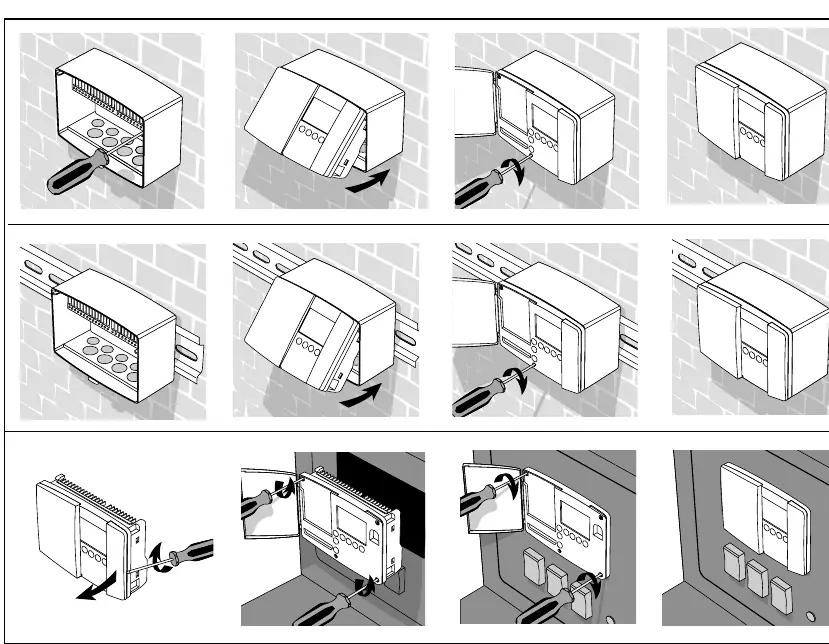
When performing the installation, ensure that the power supply is disconnected to prevent electrical hazards. The socket features clearly marked terminal blocks for wiring connections. Users should follow the provided wiring diagrams carefully, paying close attention to the voltage requirements, as the system supports both 230 V a.c. and 24 V a.c. configurations depending on the specific controller model and application needs.
Wiring and Connectivity
The socket serves as the primary connection point for the ECL Comfort controller. It accommodates various inputs and outputs, including sensor connections (S1-S6), relay outputs (R1-R3), and bus communication lines. Proper wiring is essential for the correct operation of the heating control system. Ensure that all cables are routed neatly and that terminal screws are tightened securely to maintain good electrical contact. The socket also supports optional modules such as RS232 or LON communication interfaces, which can be integrated into the front or rear of the controller assembly.
Maintenance and Safety
Regular maintenance involves checking the physical integrity of the mounting socket and ensuring that all electrical connections remain tight. Over time, vibrations or thermal expansion may loosen terminal connections, so periodic inspections are recommended. Keep the area around the controller free from dust and moisture to prevent potential short circuits or corrosion. If the socket shows signs of damage or degradation, it should be replaced immediately to maintain the safety and reliability of the control system. Always adhere to local electrical codes and safety regulations when working with these components.
Manufacturer information
Danfoss A/S
Practical help
Common problems
Controller not snapping into place
Ensure the mounting base is perfectly level and that no debris is obstructing the locking clips.
Loose electrical connections
Verify that all terminal screws are tightened to the correct torque and that wires are fully inserted.
Before use
- Verify the controller model (ECL Comfort 200 or 300).
- Confirm the power supply voltage (230V or 24V).
- Ensure the mounting surface is flat and stable.
- Check that all necessary tools (screwdrivers) are available.
- Disconnect main power before starting installation.
Specs in practice
- 230 V a.c. / 24 V a.c.
- The socket supports both high and low voltage power supply configurations.
Images and diagrams
- The top section shows the physical mounting process on walls and DIN rails.
- The bottom section provides detailed dimensional drawings for planning space requirements.
- The second page displays specific wiring schematics for 230V and 24V configurations.
Model compatibility
- Compatible with ECL Comfort 200 series controllers.
- Compatible with ECL Comfort 300 series controllers.
- Supports optional RS232 or LON communication modules.

Manual page author
Emily Carter
User documentation editor
Prepares concise manual descriptions and highlights the most useful setup, operation, and maintenance information for readers.