General / Other Manuals
Danfoss AK-XM 102B I/O Module Instructions
Comprehensive installation and configuration guide for the Danfoss AK-XM 102B I/O module, covering technical specifications, wiring, and safety requirements.
Table of contents
Manual images
Jump to the sectionProduct Overview
The Danfoss AK-XM 102B is a specialized I/O module designed for industrial refrigeration and air conditioning control systems. This unit provides 8 digital inputs (DI) capable of handling 230V or 115V AC signals. It is engineered for reliable performance in demanding environments, ensuring precise monitoring of system states such as external main switches, day/night modes, and compressor safety circuits.
Technical Specifications and Safety
The module is designed to operate within an ambient temperature range of -20°C to 55°C (-0°F to 130°F) and supports humidity levels up to 95% RH (non-condensing). It carries an IP10/VBG4 protection rating. Safety is paramount; always ensure that the power supply is completely disconnected before attempting to add, remove, or service the module. The device is UL recognized (E357029), confirming its compliance with safety standards for electrical equipment.
Installation and Mounting
The AK-XM 102B is designed for standard DIN rail mounting, allowing for quick and secure integration into control panels. When installing, ensure the module is properly snapped onto the rail. The design allows for easy expansion by connecting to other modules in the system, such as communication modules or controllers. Proper alignment and secure locking mechanisms ensure the module remains stable during operation.
Wiring and Configuration
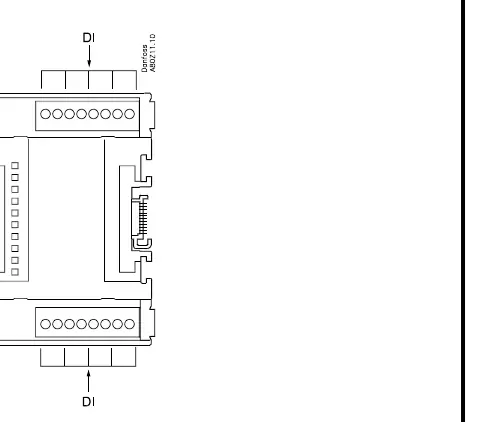
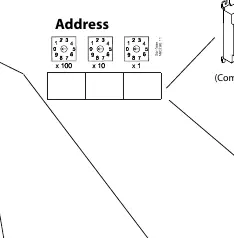
The module features 8 digital inputs, each corresponding to specific terminal pairs. For digital input signals, the system recognizes an 'On' state when the voltage is greater than 80V AC and an 'Off' state when the voltage is less than 24V AC. Users must configure the address settings using the rotary switches on the front of the unit to ensure proper communication within the network. The terminal mapping is clearly defined, with points 1 through 8 corresponding to terminals 1-2 through 15-16 respectively.
Maintenance and Disposal
Regular inspection of the wiring and connections is recommended to ensure long-term reliability. The unit does not require complex maintenance, but it should be kept clean and free from dust or moisture ingress. Regarding end-of-life, this product contains electrical components and must not be disposed of with regular domestic waste. It must be collected separately as electrical and electronic waste in accordance with local and national environmental regulations.
Manufacturer information
Danfoss A/S
Practical help
Common problems
Module not communicating or recognized
Check the address rotary switches to ensure the correct ID is set and verify the physical connection to the controller.
Digital input not triggering
Verify that the input voltage is above 80V AC for 'On' or below 24V AC for 'Off'. Check wiring at the corresponding terminal block.
Before use
- Ensure power is disconnected before installation.
- Verify ambient temperature is between -20°C and 55°C.
- Check that the DIN rail is securely mounted.
- Confirm the address switches are set correctly.
- Ensure all terminal connections are tight and correctly mapped.
Specs in practice
- DI (Digital Input)
- Inputs for monitoring external signals like switches or safety sensors.
Images and diagrams
- The wiring diagram shows 8 digital inputs mapped to terminal pairs 1-2 through 15-16.
- The address section illustrates how to set the module ID using rotary switches.
- The mounting diagram shows the snap-on mechanism for DIN rail installation.
Model compatibility
- Compatible with Danfoss controllers and communication modules.
- Designed for use in refrigeration and air conditioning systems.

Manual page author
Michael Turner
Technical manual editor
Reviews PDF manuals for structure, safety notes, and practical product details so readers can find the right information quickly.