Electronics / Audio
User Manual for Darkglass Electronics ADAM Aggressively Distorting Advanced Machine
Quick guide for the Darkglass Electronics ADAM pedal. Learn about connections, signal chain, preset management, tuner, and USB audio interface setup.
Table of contents
Quick Start Guide
To begin using your ADAM, connect your instrument to the 1/4 inch input and a compatible power supply (9V center negative, minimum 500mA). Connect your output device, such as headphones, an amplifier, or a mixing desk. The device comes pre-programmed with three presets (A, B, and C) selectable via the footswitches. To save changes to a preset, press and hold the corresponding footswitch for two seconds.
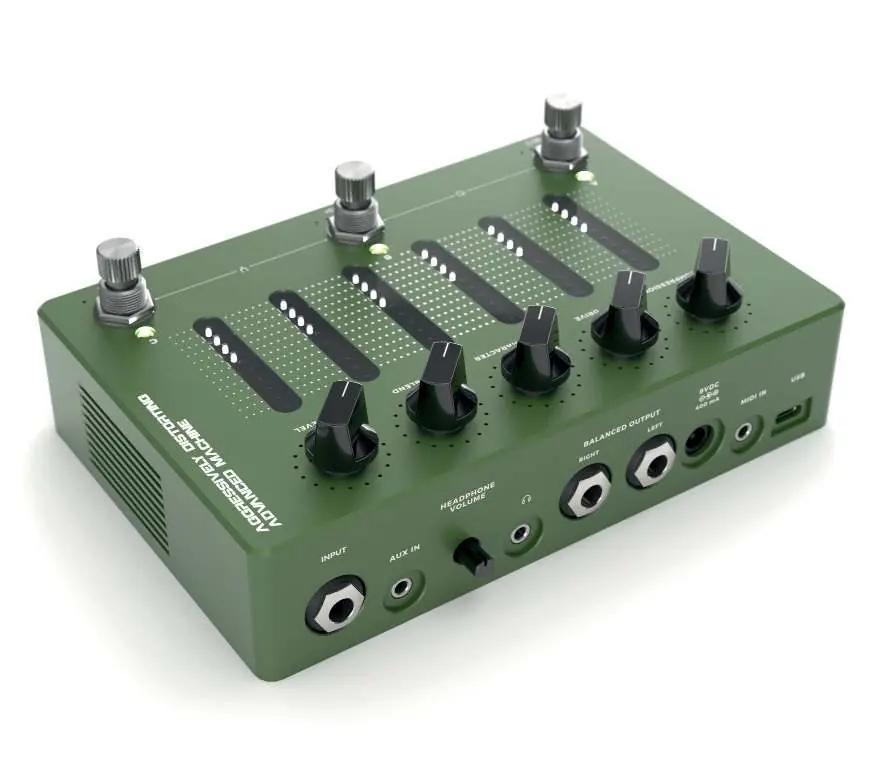
Connections
The ADAM features versatile I/O options:
- Input: Primary 1/4 inch mono jack for your instrument or pedalboard.
- Aux In: 1/8 inch stereo jack for backing tracks.
- Headphone Output: 1/8 inch stereo jack (supports 16-600 ohms impedance).
- Balanced Outputs: Two 1/4 inch jacks for routing to monitors or amplifiers.
- Direct Output: XLR output with ground lift for mixing desks or audio interfaces.
- MIDI In: 1/8 inch TRS jack for external MIDI controllers.
- USB: USB-C port for audio interface capabilities and Darkglass Suite app connectivity.
Signal Chain
The signal processing follows this path: Input > Compressor > Distortion > Cabinet Simulation > Multiband Compressor > Blend > EQ > Output. The compressor offers five ratios (4:1, 8:1, 12:1, 20:1, and ALL IN). The distortion circuit features five modes. The cabinet simulation supports Impulse Response (IR) files, with five slots available on board.
Controls
The interface consists of:
- Smart Potentiometers: Compression, Drive, Character, Blend, and Level. LED rings indicate stored preset positions.
- Touch Sensitive Sliders: Control the 6-band graphic EQ (low shelf, 250 Hz, 500 Hz, 1.5 kHz, 3 kHz, high shelf). Swipe to adjust, double-tap to reset to 0 dB.
- Rotary Footswitch Encoders: A, B, and C allow preset switching, compressor/distortion/IR adjustments, and bypassing.
Basic Operation
Tuner: Press B and C simultaneously to enter. Supports B0 to A#5 tuning. Bypass: Press A and B simultaneously to pass the unprocessed signal. Performance Lock: Press A and C simultaneously to prevent accidental parameter changes. Bluetooth Pairing: Press and hold an encoder while rotating it until all five LEDs illuminate.
USB Audio Interface
The ADAM functions as a USB audio interface. Mac users do not need additional drivers. Windows users must download the latest USB audio drivers from the official Darkglass website.
Technical Specifications
Input impedance: 1 MΩ. Output impedance: 220 Ω. Power: 9V DC, center negative, ~500mA.
Practical help
Common problems
No sound output
Check that the power supply is 9V DC, center negative, and provides at least 500mA. Verify all input/output connections and ensure the device is not in Bypass mode.
Cannot save preset changes
Ensure you are pressing and holding the preset footswitch for at least two seconds until the LEDs flash rapidly.
USB audio interface not recognized on Windows
Download and install the latest USB audio drivers from the Darkglass website.
Before use
- Ensure power supply is 9V DC, center negative, minimum 500mA.
- Connect instrument to the 1/4 inch input.
- Connect output to amplifier, mixing desk, or headphones.
- If using as an audio interface, install drivers (Windows only).
Specs in practice
- Input impedance: 1 MΩ
- Standard impedance for optimal instrument pickup performance.
- Output impedance: 220 Ω
- Standard output impedance for connecting to various audio equipment.
- Power requirements: 9V DC, center negative, 500mA
- Required power specifications to prevent damage or malfunction.
Images and diagrams
- The signal chain flows from Input through Compressor, Distortion, Cabinet Simulation, Multiband Compressor, Blend, and EQ, ending at the Output.
Model compatibility
- Headphones: Supports 16-600 ohms impedance.
- Windows: Requires drivers from Darkglass website.
- Mac: Plug and play (no drivers required).

Manual page author
Michael Turner
Technical manual editor
Reviews PDF manuals for structure, safety notes, and practical product details so readers can find the right information quickly.