Music / Guitar Effects
User Manual for Darkglass Electronics B1K CMOS Bass Overdrive Pedal
Quick guide for the Darkglass Electronics B1K CMOS Bass Overdrive pedal. Learn how to adjust controls, configure DIP switches, and power your device correctly.
Table of contents
Manual images
Click an image to enlargeImportant Information
The Darkglass Electronics B1K is a CMOS Bass Overdrive pedal. It features a unique design with controls split between the front and the back of the unit. The device requires a regulated 9V DC power supply with a center-negative plug. Please note that this unit does not accept batteries for ecological reasons.
Device Overview
The pedal controls are divided into two sections:
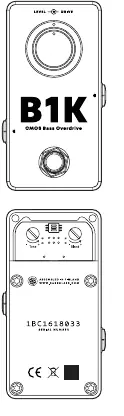
Front Controls
- Level: Adjusts the volume of the overdriven signal.
- Drive: Controls the amount of saturation in the overdriven signal.
Back Controls
To access these controls, open the magnetic bottom lid of the pedal:
- Blend: Mixes the clean input signal with the overdriven signal. The clean signal is fixed at unity gain. Turn clockwise to blend in more of the clean signal.
- Tone: Controls the high-frequency content of the sound using a variable low-pass filter (3 kHz to 8 kHz). Turn counter-clockwise for a brighter sound.
DIP Switches
The B1K features internal DIP switches to further shape your tone:
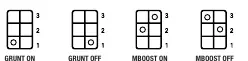
- Grunt: Provides a low-end boost to thicken your sound when engaged.
- MBoost: Provides a subtle 6 dB boost from 300 Hz to 1 kHz to help the sound cut through the mix.
Power Requirements
The Microtubes B1K has a current draw of 30 mA. You must use a regulated 9V DC adapter with a center-negative plug. Using unregulated power supplies or higher voltages may result in suboptimal noise performance or damage to the unit, which will void the warranty.
Technical Specifications
- Input Impedance: 1 MΩ
- Output Impedance: 1 kΩ
- Current Consumption: ~30 mA
- Voltage: 9V DC (Center Negative)
- Dimensions: 50 mm (W) x 100 mm (H) x 45 mm (D)
- Weight: 205 g
Practical help
Common problems
No sound or excessive noise
Ensure you are using a regulated 9V DC power supply with a center-negative plug. Unregulated supplies can cause noise or damage.
Cannot find Tone or Blend controls
These controls are located inside the unit. Open the magnetic bottom lid to access them.
Sound lacks low-end or presence
Adjust the internal DIP switches. Engage 'Grunt' for a low-end boost or 'MBoost' to help the sound cut through the mix.
Before use
- Verify you have a regulated 9V DC power supply.
- Confirm the power supply plug is center-negative.
- Ensure the power supply can provide at least 30 mA of current.
- Do not attempt to insert a battery; the unit does not support battery power.
Specs in practice
- Input Impedance 1 MΩ
- Standard high impedance for bass instruments to ensure signal clarity.
- Current Consumption ~30 mA
- The amount of power the pedal draws; ensure your power supply can handle this load.
- Voltage 9V DC (Center Negative)
- The required power standard; using the wrong polarity or voltage may damage the pedal.
Images and diagrams
- The front panel contains the primary Level and Drive knobs.
- The back panel (under the magnetic lid) contains the Blend and Tone knobs.
- Internal DIP switches allow for Grunt and MBoost configuration.
Model compatibility
- Requires external power supply only.
- Not compatible with batteries.

Manual page author
David Miller
Documentation analyst
Organizes user manual content into clear summaries, with attention to model details, product context, and everyday usability.