Electronics / Audio
User Manual for Darkglass Anagram Multi-Effect Pedal
Quick guide to the Darkglass Anagram multi-effect processor. Learn about connections, preset management, signal chain editing, tuner, looper, and technical specifications.
Table of contents
Manual images
Click an image to enlargeQuick guide from the manual
The Darkglass Anagram is a multi-effect processor and pedalboard platform designed for bass players. It features a 7-inch touchscreen, six rotary knobs, and three footswitches for real-time control.
Overview and connections
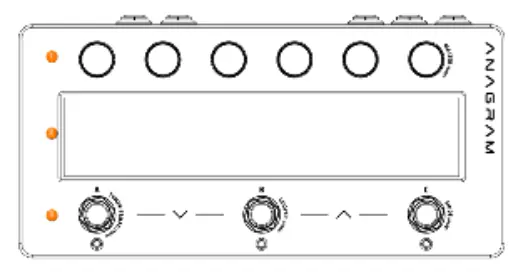
The device features a top panel with six endless rotary push knobs, a 7-inch touchscreen display, and three footswitches. The rear panel includes:
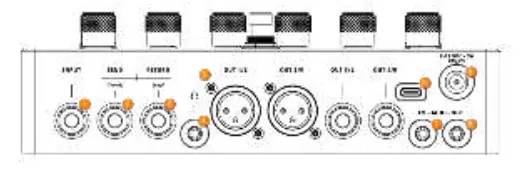
- Input: 1/4 inch instrument input.
- Send (insert): Dual function 1/4 inch jack for stereo send or mono insert.
- Return (exp): Dual function 1/4 inch jack for stereo return or expression pedal.
- Headphones: 3.5mm stereo headphone output.
- Outputs: Two 1/4 inch outputs and two XLR outputs.
- MIDI: In and Out via 3.5mm TRS (Type A).
- USB-C: For MIDI and Darkglass Suite integration.
- Power: 9V DC, 2A input.
Usage and operation
The Anagram operates using presets, which are saved configurations of the signal chain, block settings, and footswitch assignments. The interface uses views and modes to manage interaction.
Views
- Chain View: Visualizes the signal chain and allows for editing blocks.
- Bindings View: Configures physical controls (knobs/footswitches) to parameters.
- Name View: A clean interface for live performance showing the active preset name.
Modes
- Preset Mode: Switch between full preset configurations.
- Stomp Mode: Assign parameters or block states to footswitches for stompbox-like control.
- Scene Mode: Switch between variations within a preset without loading a new one.
Dedicated functions
The device includes several built-in tools:
- Tuner & Tempo: Accessed by holding Footswitch A. Includes reference frequency adjustment and tap tempo.
- Looper: Accessed by holding Footswitch B. Features play/stop, record/overdub, and undo/redo functions.
- Mixer & Global EQ: Accessed by holding the rightmost knob. Allows control of output levels and a six-band equalizer for final tonal shaping.
Blocks
Blocks are the core building units of presets, including:
- Amps & Cabs: Amplifier models and cabinet simulators.
- Overdrive & Distortion: Saturation, fuzz, and clipping tools.
- EQs, Filters & Dynamics: Equalizers, compressors, and noise control.
- Modulation & Pitch: Chorus, flanger, octave, and pitch effects.
- Delay & Reverb: Time-based spatial effects.
- Utilities: Gain control, split/merge routing, and FX loop integration.
Technical specifications
The Anagram has a base latency of 1.31 ms (empty chain) and 2.62 ms with the FX loop or Return block active. Dimensions are 210 mm x 105 mm x 62 mm, with a weight of 815 g.
Practical help
Common problems
Loops lost after reboot
Loops are stored in RAM only and will be lost if the device is rebooted.
Recording stops unexpectedly
Exiting the Looper screen while recording stops the recording automatically.
Global EQ not affecting output
Global EQ is at the end of the signal chain; if an Output block is placed earlier, that signal bypasses the EQ.
Before use
- Ensure power supply provides at least 18 watts.
- Check that all cables are connected to the correct inputs/outputs.
- Register your warranty at mypedal.darkglass.com.
Specs in practice
- Input Impedance
- 1 MΩ for instrument input.
Images and diagrams
- Top View: Shows the 6 rotary knobs, 7-inch touchscreen, and 3 footswitches.
- Rear View: Shows the input, send/return, headphone jack, XLR/1/4 inch outputs, MIDI ports, USB-C, and power input.
Model compatibility
- Supports NAM and AIDA-X neural models.
- MIDI implementation supports Program Change messages (v1.1).

Manual page author
Emily Carter
User documentation editor
Prepares concise manual descriptions and highlights the most useful setup, operation, and maintenance information for readers.