Electronics / Audio
Demonfx Alpha Omicron Bass Distortion Pedal
Quick guide for the Demonfx Alpha Omicron bass distortion pedal. Learn about panel controls, signal blending, distortion modes, and technical specifications for optimal setup.
Table of contents
Quick guide from the manual
The Demonfx Alpha Omicron is a bass distortion pedal featuring a dual distortion engine. It is designed to provide versatile sound shaping, ranging from punchy and defined tones to brutal and raw distortion. This pedal is intended for bassists who need a preamplifier that cuts through in any musical context.
Panel Functions
The pedal features several controls to shape your sound:
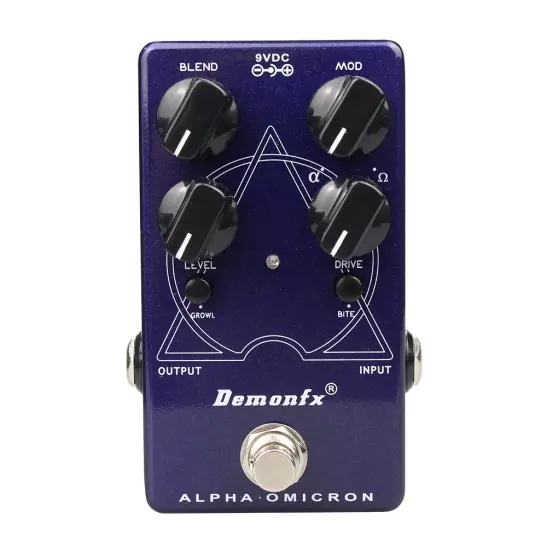
- Blend: Mixes the clean and processed signals. The clean signal remains at unity gain while the volume of the overdriven signal is set by the Level knob, allowing for fine mix tuning.
- Mod: Selects or mixes between the two distinct distortion circuits. The Alpha setting is punchy and tight with high definition, while the Omega setting is brutal and raw.
- Level: Sets the volume of the overdriven signal.
- Drive: Sets the amount of gain in the overdriven signal.
- Growl: A shelving bass boost for a fatter tone and increased low-end saturation.
- Bite: Boosts high mids (2.8kHz) for additional presence and definition.
- Input: Connect your instrument or output from your pedal board to this 1/4 inch mono jack.
- Output: Connect from this 1/4 inch output jack to the input of your amplifier or another effects pedal.
- 9V DC: Power input. Only use a regulated 9V DC adapter with a center-negative plug.
Technical Specifications
The following specifications apply to the Demonfx Alpha Omicron:
- Input Impedance: 1 kOhm
- Output Impedance: 1 kOhm
- Current Consumption: 11mA
- Voltage: 9V DC Center negative
- Dimensions: Width 65 mm, Height 115 mm, Depth 43 mm
- Weight: 300 g
Practical help
Common problems
No sound or signal
Ensure you are using a regulated 9V DC adapter with a center-negative plug. Check that your instrument cable is securely connected to the Input jack and the amplifier cable is connected to the Output jack.
Distortion sounds too thin or too muddy
Adjust the Blend knob to balance the clean and processed signals. Use the Growl switch to add low-end saturation or the Bite switch to increase high-mid presence.
Before use
- Ensure you have a regulated 9V DC power supply with a center-negative plug.
- Connect your bass guitar or pedalboard output to the Input jack.
- Connect the Output jack to your amplifier or the next pedal in your chain.
- Set the Mod knob to your preferred distortion circuit (Alpha or Omega).
Specs in practice
- Current Consumption: 11mA
- The pedal requires a power supply capable of providing at least 11mA of current.
- Input/Output Impedance: 1 kOhm
- Standard impedance values for integration with typical bass guitar signal chains.
- 9V DC Center Negative
- The standard polarity for most guitar pedals; using the wrong polarity may damage the unit.
Images and diagrams
- The pedal layout features four main knobs (Blend, Mod, Level, Drive) and two switches (Growl, Bite) for sound shaping.
- Input and Output jacks are located on the sides of the pedal.
- The power input is located at the top of the pedal.
Model compatibility
- Designed for bass instruments.
- Requires a regulated 9V DC power adapter (center-negative).

Manual page author
Michael Turner
Technical manual editor
Reviews PDF manuals for structure, safety notes, and practical product details so readers can find the right information quickly.