Home Appliances / Small Kitchen Appliances
Dash 2-Pack Mini Waffle & Griddle User Manual
Quick guide for the Dash 2-Pack Mini Waffle & Griddle (DMSW002). Includes setup, usage instructions, cleaning tips, troubleshooting, and recipes.
Quick answers from the manual
Quick answer
- To turn on, plug the power cord into an outlet. The indicator light will turn on while heating and turn off when ready to cook. To turn off, simply unplug the appliance. p. 34
Key actions
- Cleaning the appliance p. 13, 33
- Cooking food p. 10, 11, 30, 31
First start
- Remove all packaging material and thoroughly clean your Mini Maker. p. 9, 29
Problems and fixes
The light on the Mini Maker keeps shutting off.
This is normal. During the cooking process, the heating element will automatically turn on and off to regulate the temperature.
p. 34Technical specifications
| Parameter | Value | Meaning | Pages |
|---|---|---|---|
| Voltage | 120V ~ 60Hz | Standard US household power | p. 47 |
| Power Rating | 350W | Power consumption | p. 47 |
Where to find it in the PDF
- Safety Instructions p. 4, 5, 6, 7
- Parts & Features p. 8, 28
- Using the Appliance p. 9, 10, 11, 12
- Cleaning & Maintenance p. 13, 33
- Troubleshooting p. 34, 35
- Warranty p. 47
Table of contents
Manual images
Click an image to enlargeQuick guide from the manual
The Dash 2-Pack Mini Waffle & Griddle is a simple, plug-and-play appliance. There is no On/Off button; the unit begins heating as soon as it is plugged into a power outlet. The indicator light will illuminate while heating and shut off once the optimal cooking temperature is reached. Always use heat-resistant nylon or silicone utensils to avoid damaging the non-stick surface.
Parts & Features
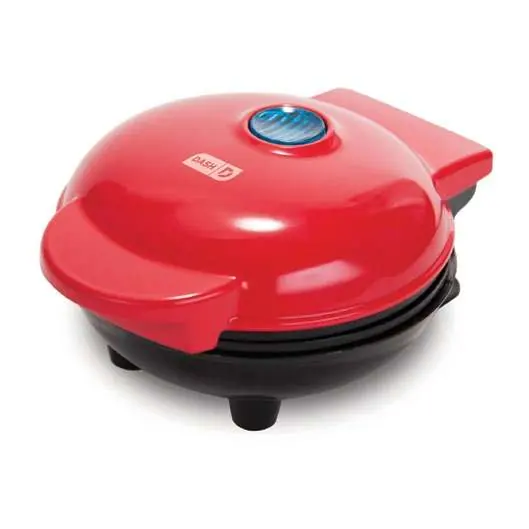
- Cover: The top lid of the appliance.
- Cover Handle: Use this to lift and lower the cover safely.
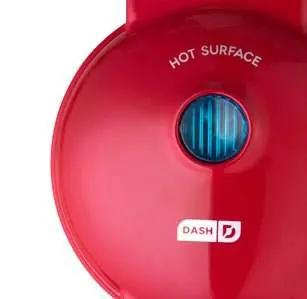
- Indicator Light: Shows when the appliance is heating.
- Cooking Surfaces: Non-stick surfaces for cooking waffles or griddle items.
- Non-slip Feet: Keeps the unit stable during use.
Using your appliance


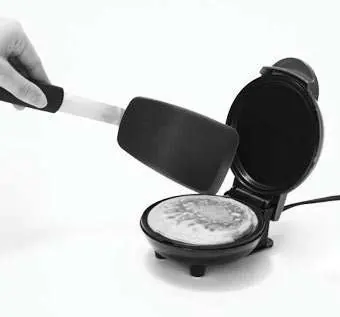
- Place the appliance on a stable and dry surface.
- Plug the power cord into an outlet. The indicator light will turn on, signaling that the unit is heating up.
- Once the indicator light shuts off, the appliance has reached the optimal temperature.
- Carefully lift the cover by the handle and spray both cooking surfaces with a small amount of cooking spray.
- Pour your batter or place your food onto the cooking surface and close the cover.
- Once cooked to your preference, remove the food using a heat-resistant nylon or silicone utensil.
- When finished, unplug the appliance and allow it to cool completely before moving or cleaning.
Cleaning & Maintenance
Always allow the appliance to cool completely before cleaning. Do not submerge the appliance in water or any other liquids.
- Wipe down the cooking surface and cover with a damp, soapy cloth. Rinse the cloth and wipe again.
- Thoroughly dry the appliance before storing.
- If food is burned onto the surface, pour a little cooking oil on it and let it sit for 5 to 10 minutes. Scrub with a sponge or soft-bristled brush to dislodge the food, then wipe clean with a damp, soapy cloth.
- Never use abrasive cleaning agents, as they will damage the non-stick surface.
Troubleshooting
If you encounter issues, check the following:
- Light keeps shutting off: This is normal. The heating element cycles on and off to regulate temperature.
- Food sticking: There may be a build-up of burnt food residue. Follow the cleaning instructions above to remove it.
- Appliance not heating: Ensure the power cord is plugged in, the outlet is working, and there is no power failure in your home.
Customer Support
For assistance, contact the US-based support team Monday through Friday. You can reach them at 1-800-898-6970 or via email at [email protected].
Manufacturer information
Dash
Practical help
Common problems
The indicator light keeps shutting off.
This is normal. The heating element cycles on and off to maintain the correct temperature.
Food is sticking to the cooking surface.
There is likely a build-up of burnt food residue. Allow the unit to cool, apply cooking oil, let sit for 5-10 minutes, and scrub with a soft brush.
The appliance is not heating.
Check that the power cord is plugged in, the outlet is functional, and there is no power failure.
Before use
- Remove all packaging materials.
- Clean the cooking surfaces thoroughly.
- Place the appliance on a stable, dry surface.
- Ensure you have heat-resistant nylon or silicone utensils.
Specs in practice
- Power Rating
- 350W
Images and diagrams
- The indicator light turns off when the unit is ready to cook.
- Always lift the cover by the handle to avoid burns.
- Non-stick surfaces require non-metal utensils.
Model compatibility
- Not dishwasher safe.
- Do not use metal utensils on the cooking surface.
- Do not use outdoors.

Manual page author
David Miller
Documentation analyst
Organizes user manual content into clear summaries, with attention to model details, product context, and everyday usability.