Home Appliances / Air Fryers
Dash 10L Compact Air Fryer Oven
Quick guide for the Dash 10L Compact Air Fryer Oven. Learn how to use the air frying, baking, and rotating basket functions, plus cleaning tips and troubleshooting for model DAFT100.
Table of contents
Manual images
Click an image to enlargeQuick guide from the manual
The Dash 10L Compact Air Fryer Oven is a versatile kitchen appliance designed for air frying, baking, toasting, broiling, and reheating. Before first use, remove all packaging, wash accessories, and run the oven for 15 minutes to eliminate any initial manufacturing odors. Always place the unit on a stable, heat-resistant surface with 2-4 inches of clearance from walls or other objects.
Parts and Features

- Temperature Dial: Adjusts heat from Warm up to 450°F.
- Timer Dial: Sets cooking time up to 60 minutes. For times under 20 minutes, turn past 20 first, then back to the desired time.
- Function Dial: Selects the cooking method (Air Fry, Bake, Toast, Broil, Warm).
- Rotate Button: Turns the Rotating Basket on or off.
- Accessories: Includes an Air Fry Basket, Oven Rack, Baking Pan, Drip Tray, and Removal Tool.
Operating Instructions
Air Frying
- Place the Drip Tray at the bottom of the oven.
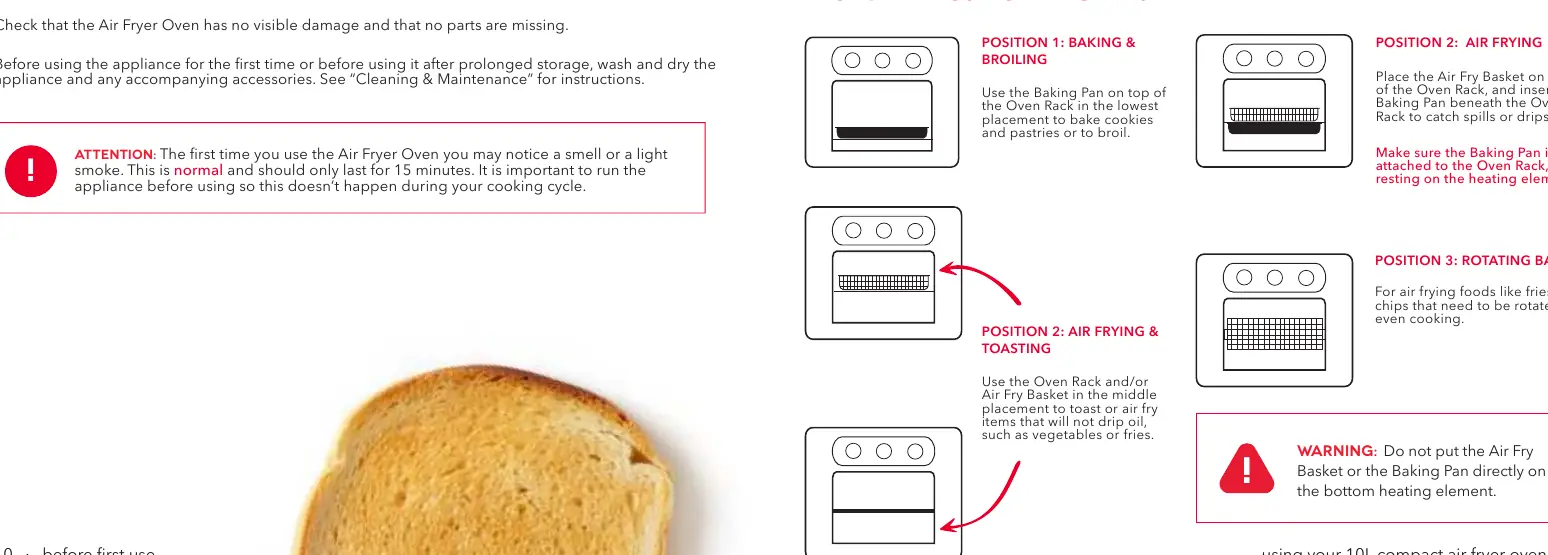
- Place the Air Fry Basket on the Oven Rack in Position 2.
- Set the Function Dial to Air Fry.
- Set the Temperature Dial and Timer Dial.
- For crisper results, shake the basket halfway through the cooking time.
Rotating Basket
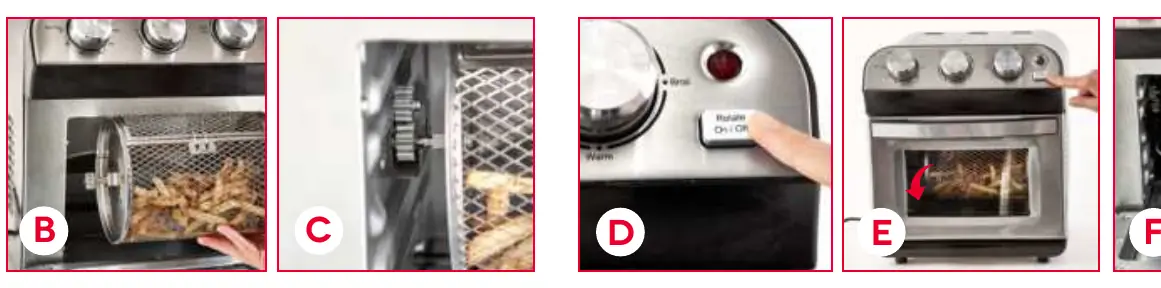
- Place food in the basket and snap the clasp shut.
- Align the gear on the left side of the basket with the gear inside the oven.
- Ensure the basket is properly hooked so the gears mesh.
- Press the Rotate On/Off button.
- Use the Removal Tool to safely remove the hot basket after cooking.
Baking, Toasting, and Broiling
- Baking/Toasting: Use the Baking Pan on the Oven Rack in Position 1.
- Broiling: Use the Baking Pan or Air Fry Basket on the Oven Rack in Position 1.
- Reheating/Warming: Use the Oven Rack in Position 2.
Cleaning and Maintenance
Always unplug the appliance and allow it to cool completely before cleaning. Accessories are not dishwasher safe; hand wash with hot water, dish soap, and a non-abrasive sponge. Clean the interior walls with a damp cloth and mild soap. To clean the heating element, use a non-abrasive brush or sponge with warm soapy water. For the front glass, use a mixture of equal parts vinegar and water.
Troubleshooting
- Oven does not turn on: Ensure it is plugged in and the Timer Dial is set.
- Food not done: Use less food or increase the temperature.
- White smoke: Food may be too greasy or the heating element has residue. Use the Baking Pan to catch drips.
- Basket not rotating: Ensure gears are properly aligned and the basket is not inserted backwards.
Manufacturer information
Dash
Practical help
Common problems
The Air Fryer Oven does not turn on
Ensure the appliance is plugged into a wall socket and the Timer Dial is set to the required time.
Food is not done after the recommended time
You may have added too much food to the basket. Use less food and cook in batches, or increase the temperature.
White smoke is coming out of the appliance
The food is likely too greasy. Use the Baking Pan underneath the Air Fry Basket to catch grease drippings. Clean the heating element once cool.
The Rotating Basket is not rotating
The gears may not be aligned or the basket is inserted backwards. Stop the oven, adjust the gear alignment, and ensure the gear side is facing left.
Before use
- Remove all packaging materials.
- Place the oven 2 to 4 inches away from walls or other objects.
- Wash and dry the appliance and all accessories.
- Run the appliance for 15 minutes to eliminate initial smoke/smell.
Specs in practice
- Temperature Dial
- Controls heat from Warm up to 450°F.
- Function Dial
- Selects the cooking mode: Air Fry, Bake, Toast, Broil, or Warm.
Images and diagrams
- Position 1 (Lowest): Used for Baking and Broiling.
- Position 2 (Middle): Used for Air Frying and Toasting.
- Rotating Basket: Requires the gear on the basket to align with the gear inside the oven.
Model compatibility
- Accessories are NOT dishwasher safe.
- Do not use paper, cardboard, or plastic in the oven.
- Do not cover the oven with metal foil.

Manual page author
Emily Carter
User documentation editor
Prepares concise manual descriptions and highlights the most useful setup, operation, and maintenance information for readers.