General / Other Manuals
Deepcool GAMMAXX 400 Series CPU Cooler Installation Guide
Quick installation guide for the Deepcool GAMMAXX 400 Series CPU cooler, covering Intel LGA 1700/1200/115x and AMD AM5/AM4 socket mounting procedures.
Table of contents
Quick guide from the manual
This guide provides the necessary steps to install the Deepcool GAMMAXX 400 Series CPU cooler on various Intel and AMD platforms. Ensure you have all components listed in the parts inventory before beginning the installation.
Parts inventory
- Heatsink (1)
- Fan (2)
- Intel Backplate (3)
- AMD Backplate (4)
- Intel Mounting Bracket (5)
- AMD Mounting Bracket (6)
- Fan Clips (7)
- Thermal Paste (8)
- Screws (9)
- Screws (10)
- Standoffs (11)
Intel installation
For Intel LGA 1700, 1200, 1151, 1150, and 1155 sockets:
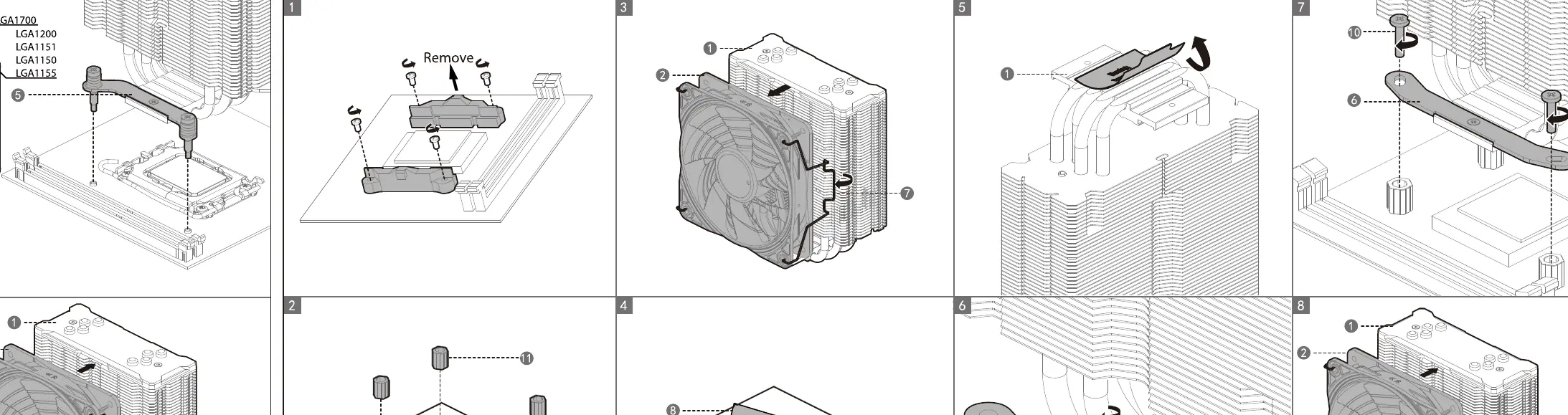
- Prepare the motherboard by installing the Intel backplate (3) on the underside.
- Apply thermal paste (8) to the CPU surface.
- Attach the Intel mounting bracket (5) to the heatsink using the provided screws (9).
- Secure the heatsink assembly onto the motherboard using the standoffs (10) and screws.
- Attach the fan (2) to the heatsink using the fan clips (7).
- Connect the fan cable to the CPU_FAN header on the motherboard.
AMD installation
For AMD AM5 and AM4 sockets:
- Remove the original plastic retention brackets from the motherboard, keeping the original backplate.
- Install the standoffs (11) onto the motherboard.
- Attach the AMD mounting bracket (6) to the heatsink using the provided screws (9).
- Apply thermal paste (8) to the CPU surface.
- Secure the heatsink assembly onto the motherboard using the screws (10).
- Attach the fan (2) to the heatsink using the fan clips (7).
- Connect the fan cable to the CPU_FAN header on the motherboard.
Manufacturer information
DeepCool
Practical help
Common problems
Fan not spinning
Ensure the 4-pin fan connector is securely plugged into the CPU_FAN, CPU_OPT, or CHA_FAN header on the motherboard.
High CPU temperatures
Verify that the protective film on the base of the heatsink was removed and that thermal paste was applied correctly.
Before use
- Verify all parts from the inventory are present.
- Remove the protective film from the bottom of the heatsink base.
- Ensure the motherboard is compatible with the included backplates.
- Clean the CPU surface of any old thermal compound.
Specs in practice
- 4-Pin Connector
- Standard PWM fan connector for speed control via the motherboard.
Images and diagrams
- The diagrams illustrate the specific orientation of the backplates for Intel vs AMD sockets.
- The fan clips are shown attaching to the side grooves of the heatsink fins.
Model compatibility
- Intel: LGA 1700, 1200, 1151, 1150, 1155.

Manual page author
Emily Carter
User documentation editor
Prepares concise manual descriptions and highlights the most useful setup, operation, and maintenance information for readers.