General / Other Manuals
Installation Guide for DeepCool CASTLE 120R Liquid CPU Cooler
Quick installation guide for the DeepCool CASTLE 120R liquid CPU cooler, covering mounting procedures for Intel LGA1200/115X/1700/2066/2011 and AMD AM4 sockets, fan assembly, and power connections.
Table of contents
Manual images
Jump to the sectionQuick guide from the manual
This document provides the necessary steps to install the DeepCool CASTLE 120R liquid CPU cooler. It covers the preparation of the backplate, mounting the pump block onto various Intel and AMD sockets, attaching the fan to the radiator, and completing the electrical connections.
Installation for Intel LGA1200, LGA1151, LGA1150, LGA1155
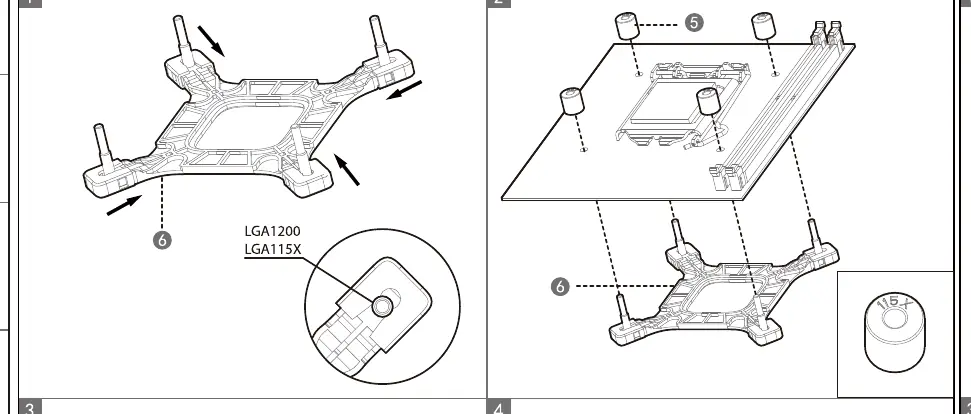
- Prepare the backplate (6) and align it with the motherboard holes.
- Install the standoffs (5) onto the backplate pins.
- Place the pump block (11) onto the CPU, ensuring it aligns with the standoffs.
- Secure the pump block using the thumb nuts (7).
Installation for Intel LGA1700
- Adjust the backplate (6) to the LGA1700 position.
- Install the standoffs (8) onto the backplate pins.
- Place the pump block (11) onto the CPU.
- Secure the pump block using the thumb nuts (7).
Installation for Intel LGA2066, LGA2011-v3, LGA2011
- Install the LGA2011 standoffs (12) directly into the motherboard socket mounting holes.
- Attach the Intel mounting bracket (11) to the pump block.
- Place the pump block onto the CPU and secure it using the thumb nuts (9).
Installation for AMD AM4
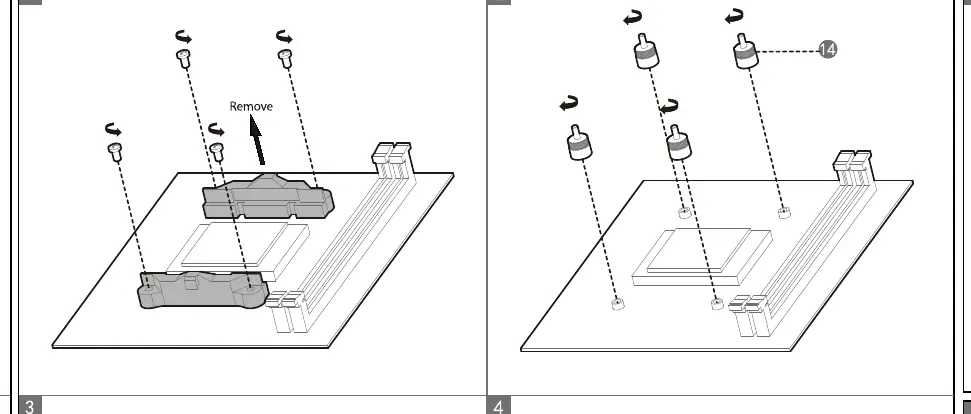
- Remove the original plastic AMD mounting brackets from the motherboard.
- Install the AM4 standoffs (14) into the motherboard backplate.
- Attach the AMD mounting bracket (13) to the pump block.
- Place the pump block onto the CPU and secure it using the thumb nuts (7).
Fan and Radiator Assembly
- Attach the fan (2) to the radiator (1) using the long fan screws (4).
- Mount the radiator assembly into the PC case using the short radiator screws (3).
Connection
Connect the fan cable to the CPU_FAN header on the motherboard. Connect the pump power cable (10) to the AIO_PUMP or CPU_FAN header to ensure the pump receives constant power.
Manufacturer information
DeepCool
Practical help
Common problems
Pump not running or overheating
Ensure the pump power cable is connected to the AIO_PUMP or CPU_FAN header and that the header is set to full speed in BIOS.
Incompatible mounting
Verify your CPU socket type. The kit includes specific standoffs and brackets for Intel (LGA1200/115X/1700/2066/2011) and AMD (AM4).
Before use
- Verify all parts (screws, brackets, standoffs) are present as listed in the parts diagram.
- Identify your specific CPU socket type (Intel vs AMD).
- Ensure the motherboard backplate is correctly positioned for your socket.
- Check that the pump block is firmly secured with thumb nuts.
Specs in practice
- LGA1700 Standoffs
- Specific standoffs (8) required for Intel 12th Gen and newer sockets.
- AIO_PUMP Header
- Recommended motherboard header for the pump to ensure constant voltage.
Images and diagrams
- Page 1 shows the parts list and mounting steps for Intel LGA1200/115X and LGA1700.
- Page 2 shows mounting for Intel LGA2011/2066, AMD AM4, fan/radiator assembly, and cable routing.
Model compatibility
- Supports Intel LGA2066/2011-v3/2011/1700/1200/1151/1150/1155.
- Supports AMD AM4.

Manual page author
Emily Carter
User documentation editor
Prepares concise manual descriptions and highlights the most useful setup, operation, and maintenance information for readers.