Hvac / Air Conditioners
Della 048-APACI-10 Portable Air Conditioner Instruction Manual
Quick guide for the Della 048-APACI-10 portable air conditioner, covering installation, operation, Wi-Fi setup, maintenance, and troubleshooting.
Table of contents
Quick guide from the manual
This document provides essential instructions for the safe installation and operation of the Della 048-APACI-10 portable air conditioner. Key requirements include placing the unit on flat ground with at least 50 cm (19.7 inches) of clearance from obstacles, ensuring a direct wall power connection, and proper window venting. The unit uses R32 refrigerant; handle with care and contact a professional if leakage is suspected.
Installation Guide
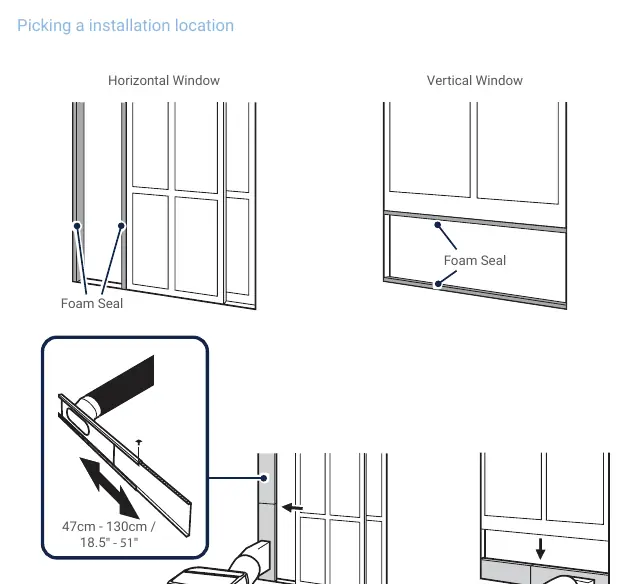
The unit must be installed indoors on a flat surface. To install the exhaust hose: 1. Firmly click the exhaust duct into the rear opening. 2. Attach the other end to the window slider kit. 3. Secure the slider kit in the window frame using the provided screws and foam seal. Keep the exhaust duct as short and straight as possible to maintain cooling efficiency.
Operation Instructions
The unit can be controlled via the top panel or the included remote. Modes include Auto, Cool, Dry, and Fan. Temperature can be adjusted between 60°F - 90°F (16°C - 32°C). The unit features an ECO mode (accessible via control panel in Cool mode) and a Sleep mode (remote only). Timer functions allow for scheduled power on/off.
Wi-Fi and App Connection
Download the DELLA+ app from the App Store or Google Play. Register an account, then select Add Device. Ensure your phone is connected to a 2.4 GHz Wi-Fi network. Follow the in-app prompts to pair the air conditioner.
Water Drainage
When the internal tank is full, the display shows FL. Move the unit to a drain location, remove the bottom drain plug, and empty the water. For continuous drainage during Dry mode, remove the upper drain plug and attach a drain hose leading to a suitable drainage area.
Care and Maintenance
Always shut down and unplug the unit before cleaning. Clean the exterior with a soft, damp cloth. Remove air filters regularly and clean them with a vacuum or warm water with mild detergent. Ensure filters are completely dry before re-installation.
Manufacturer information
Della
Practical help
Common problems
Appliance is nonoperational
Check for power failure, ensure the plug is connected, or check if the power breaker has tripped.
Appliance does not start
Wait 4 minutes for the internal reset cycle or adjust the temperature setting to be lower than the current room temperature.
Poor cooling effect
Clear obstructions from the vent, clean the air filter, close open doors/windows, or check if the room size is too large for the unit.
Noise or vibration
Ensure the unit is placed on a flat, even surface.
Before use
- Ensure the unit is on flat ground.
- Maintain 50 cm (19.7 inches) clearance from walls/obstacles.
- Plug directly into a grounded wall outlet (no extension cords).
- Verify the voltage matches product specifications.
- Ensure the exhaust hose is properly installed and straight.
- Check that the air filter is clean and installed.
Specs in practice
- Cooling Capacity
- 10000 BTU/h, indicating the cooling power of the unit.
- Rated Voltage
- 115V, standard US household power requirement.
- Operation Temperature
- 60°F - 90°F, the ambient temperature range the unit is designed to operate within.
Images and diagrams
- The parts diagram identifies the air outlet, control panel, carrying handle, air exhaust, and drain outlets.
- The installation diagrams show how to seal horizontal and vertical windows using the slider kit and foam seal.
- The drainage diagrams illustrate the location of the bottom drain plug for manual emptying and the upper drain outlet for continuous drainage.
Model compatibility
- Wi-Fi setup requires a 2.4 GHz network; 5 GHz networks are not supported.
- The unit is for indoor use only.
- Do not use rechargeable batteries in the remote control.

Manual page author
David Miller
Documentation analyst
Organizes user manual content into clear summaries, with attention to model details, product context, and everyday usability.